






Lenovo vs Microsoft: Overview & Brand Philosophy
The tablet market has evolved beyond simple media consumption slates into sophisticated computing devices capable of handling professional workloads, creative tasks, and mobile entertainment. Within this landscape, Lenovo and Microsoft represent two fundamentally different product philosophies. Microsoft approaches the category almost exclusively as a pioneer of the "2-in-1" hybrid concept, striving to eliminate the boundary between desktop operating systems and mobile hardware. Lenovo, by contrast, operates as a hyper-versatile hardware powerhouse, offering an expansive catalog that spans entry-level Android entertainment tablets, mid-range productivity slates, and enterprise-grade Windows detachables under its ThinkPad and Yoga banners.
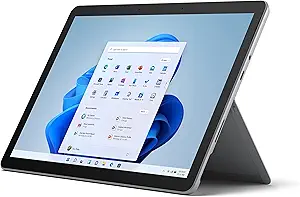
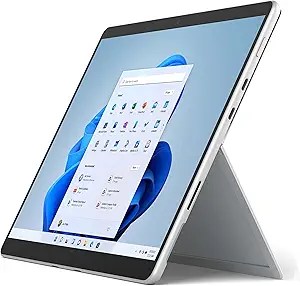
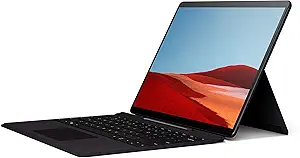
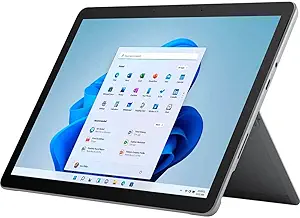
Microsoft’s brand philosophy revolves around the Surface ecosystem, positioning its hardware as the gold standard for native Windows computing in a touch-first form factor. By designing both the operating system and the hardware chassis, Microsoft aims to deliver cohesive productivity experiences characterized by signature integrated kickstands, magnetic type covers, and high-precision active styluses. The target demographic is clearly professionals, enterprise fleets, and students requiring full-fledged desktop software—such as the complete Microsoft 365 suite, Adobe Creative Cloud, and legacy desktop binaries—on an ultra-portable device.
Lenovo approaches the tablet sector through a lens of market segmentation and value engineering. Rather than forcing a single operating system to serve all users, Lenovo delivers lightweight Android devices (such as the Tab P and M series) optimized for media consumption, battery longevity, and low-cost digital note-taking, alongside powerful Windows alternatives (such as the ThinkPad X12 Detachable or IdeaPad Duet). This multi-OS strategy allows Lenovo to capture a much wider demographic spectrum, from budget-conscious students seeking a Netflix machine to corporate IT departments outfitting traveling executives with ruggedized, manageable computing platforms.
Key Differences & Technological Comparison
The core architectural difference between the two brands lies in operating system prioritization and processor architectures. Microsoft Surface tablets—principally the Surface Pro line—run desktop-grade Windows 11 on full x86 Intel processors or, increasingly, advanced ARM-based silicon (like the Qualcomm Snapdragon X Elite). This architecture ensures desktop-class multitasking, window management, and native application support. Lenovo splits its portfolio: its volume-selling tablets utilize Android operating systems on ARM-based MediaTek or Qualcomm chipsets, offering superior mobile app stores, aggressive thermal efficiency, and lightweight touch interfaces. When Lenovo does build Windows tablets, it adheres strictly to enterprise standards, often prioritizing IT deployability and ports over bespoke minimalist aesthetics.
Display technology and form factor mechanics also showcase distinct engineering priorities. Microsoft is renowned for its signature 3:2 aspect ratio PixelSense displays, which maximize vertical screen real estate for documents, coding environments, and web browsing. The hinge mechanism on the Surface Pro remains an industry benchmark, utilizing dynamic friction hinges that allow continuous positioning down to a flat drafting angle ("Studio Mode"). Lenovo utilizes a mix of 16:10 and 16:9 aspect ratios across its consumer Android tablets, making them far better suited for cinematic video playback without severe letterboxing, often pairing these screens with premium multi-speaker arrays tuned by JBL and Dolby Atmos. Lenovo's Windows devices generally feature sturdier, bulkier kickstands built to survive rough field usage.
Accessory integration and connectivity represent another major divide. Microsoft treats essential accessories—specifically the Surface Pro Signature Keyboard and Slim Pen—as high-margin optional add-ons, significantly driving up the total cost of ownership. However, the haptic feedback and charging integration of the Slim Pen 2 are best-in-class for digital ink. Lenovo frequently bundles keyboards and styluses directly into the retail box, particularly within its mid-range Android and Chromebook detachable lines, vastly improving out-of-the-box value. In terms of physical ports, Lenovo tends to be more generous with standard connectivity, while Microsoft relies heavily on Thunderbolt/USB-C and its proprietary magnetic Surface Connect port.
Pros & Cons Comparison
Lenovo Tablets
- Pro: Diverse Portfolio: Offers options ranging from sub-$150 budget Android media slates to enterprise-ready Windows 2-in-1s.
- Pro: Higher Out-of-the-Box Value: Frequently bundles keyboards, folio covers, and digital pens directly in the retail package.
- Pro: Media Optimization: Android models excel at casual entertainment, featuring rich OLED panels, high refresh rates, and superior multi-speaker acoustics.
- Pro: Battery Efficiency: Mobile chipsets in Lenovo Android tablets provide class-leading standby time and multi-day battery endurance for media tasks.
- Con: Software Update Longevity: Android models typically receive fewer years of major OS updates and security patches compared to Microsoft’s unified Windows update schedule.
- Con: Inconsistent Ecosystem Experience: Quality, software skinning (ZUI), and build materials vary wildly between entry-level and flagship tiers.
Microsoft Tablets
- Pro: True Desktop Capability: Native Windows 11 allows full execution of desktop applications, specialized enterprise tools, and complex file systems.
- Pro: Superb Industrial Design: Unibody anodized aluminum chassis, class-leading variable kickstand, and premium 3:2 PixelSense displays.
- Pro: Long-Term Support: Direct firmware and OS updates handled seamlessly by Microsoft for extended multi-year lifecycles.
- Pro: Class-Leading Stylus Experience: The Surface Slim Pen ecosystem offers tactile haptic motor integration that mimics physical friction on paper.
- Con: High Cost of Entry: Premium base pricing coupled with the requirement to buy costly proprietary keyboards and pens separately.
- Con: Subpar Pure Tablet Experience: Windows 11 still lags behind Android and iPadOS in terms of pure finger-touch navigation and dedicated mobile touch apps.
Performance, Durability & Value Analysis
From a raw compute perspective, Microsoft Surface tablets inherently outperform the majority of Lenovo's tablet catalog because they are engineered to displace full-sized laptops. Surface Pro units with modern Intel Core Ultra or Snapdragon X processors manage heavyweight productivity tasks, multi-layered digital illustration, and extensive data crunching effortlessly. However, this level of performance generates significant heat and requires active cooling fans on Intel variants, leading to potential thermal throttling under sustained load. Lenovo’s Android models, while computationally weaker in raw desktop benchmarks, deliver ultra-smooth day-to-day UI responsiveness, instantaneous wake times, and completely silent, passive cooling that makes them more comfortable for casual handheld operation.
Durability and long-term value paint a bifurcated picture. Microsoft builds exceptionally rigid hardware with tight tolerances, but its consumer Surface devices have historically suffered from poor internal repairability scores, featuring heavily glued assemblies (though modern iterations have improved with replaceable SSDs). Lenovo's durability mirrors its tiering: its budget consumer tablets use structural plastics that age moderately over time, but its commercial-grade ThinkPad tablets undergo rigorous MIL-STD-810H testing, boasting superior drop resistance and easier internal component servicing for IT administrators. In terms of pure monetary value, Lenovo easily claims victory for casual users and media consumers, delivering comprehensive hardware kits at lower price points. Microsoft delivers superior professional value, functioning as a legitimate primary PC replacement that justifies its high capital cost through workplace productivity.
Final Verdict: Which Brand Should You Choose?
Your choice between Lenovo and Microsoft hinges entirely on whether you need a mobile-first digital slate or a primary computing workstation that happens to detach from its keyboard. If your workflow requires legacy desktop software, advanced multitasking, deep Microsoft Office integration, coding environments, or digital sketching with industry-standard productivity suites, Microsoft is the clear winner. The Surface Pro line remains the pinnacle of Windows 2-in-1 computing, offering an uncompromised PC experience in a masterfully constructed chassis, provided you have the budget to purchase the hardware alongside its essential type cover and pen.
Conversely, choose Lenovo if you prioritize flexibility, entertainment, and value for money. If your tablet usage consists primarily of streaming video, reading, web browsing, mobile gaming, and light document editing, Lenovo’s Android lineup (such as the Tab P11 or P12 series) provides significantly better ergonomics, display technology, and battery life at a fraction of Microsoft's cost. Furthermore, if you are a corporate buyer or need a rugged, repairable Windows tablet on a realistic budget, Lenovo’s enterprise-oriented detachables provide practical alternatives to Microsoft's premium ecosystem without the steep accessory tax.
Affordability
When evaluating affordability, Lenovo and Microsoft represent two fundamentally different philosophies in tablet hardware engineering, pricing tiers, and operating system ecosystems. Lenovo dominates the budget and mid-range markets by prioritizing pure cost-to-performance efficiency, predominantly utilizing Android and ChromeOS. By integrating cost-effective MediaTek or Qualcomm Snapdragon processors alongside vibrant yet economical IPS LCD panels, Lenovo delivers capable media consumption and productivity devices—such as the Tab M and Tab P series—at a fraction of the cost of premium competitors. In contrast, Microsoft designs its Surface lineup as premium x86 Windows 11 computing platforms. While Microsoft has attempted budget-friendly entries with the Surface Go series, these tablets often carry a significantly higher entry price relative to their processing power, saddling lower-tier models with slower Intel Pentium or Core i3 processors and meager base storage configurations that struggle under modern Windows overhead.
The true divergence in affordability extends beyond the initial tablet purchase to accessory pricing and the total cost of ownership. Lenovo frequently adopts an all-inclusive bundle strategy, packaging essential peripherals such as pressure-sensitive styluses and detachable folio keyboards directly in the box, as seen with value-focused models like the Lenovo IdeaPad Duet. Microsoft, by contrast, operates on an à la carte hardware model; purchasing a Surface device invariably necessitates supplementary outlays for the proprietary Surface Type Cover and Surface Slim Pen, which can inflate the final price by hundreds of dollars. Furthermore, while Microsoft's magnesium alloy builds and precision kickstands showcase superior industrial design, the repairability scores across older Surface models have historically driven up long-term maintenance costs, whereas Lenovo's modular component sourcing often makes post-warranty repairs more economically feasible.
Ultimately, the practical trade-offs regarding affordability hinge on the user's workflow requirements. Consumers seeking exceptional value for multimedia streaming, digital note-taking, and lightweight web navigation will find Lenovo nearly impossible to beat, as it delivers high-refresh-rate displays and quad-speaker arrays at entry-level price brackets. However, if full desktop software compatibility, enterprise-grade legacy Windows support, and premium hardware longevity are non-negotiable, Microsoft’s higher pricing can be justified as an all-in-one primary PC replacement rather than a secondary mobile device. For pure hardware value per dollar spent, Lenovo decisively wins the affordability metric, whereas Microsoft offers higher functional utility that commands an inescapable premium.
Battery Life
When evaluating battery life between Lenovo and Microsoft tablets, the competition hinges on fundamentally different hardware architectures and operating system overheads. Microsoft’s Surface Pro line, serving as the benchmark for Windows 2-in-1s, has historically traded endurance for raw computational power. Flagship Intel-powered models, such as the Surface Pro 9, frequently struggle to meet their ambitious lab-tested ratings in real-world environments, typically yielding between six to eight hours of productivity-level multitasking due to the aggressive thermal envelopes and power draw of the x86 architecture. While Microsoft made massive efficiency strides with the ARM-based Surface Pro (11th Edition) powered by Qualcomm’s Snapdragon X Elite platform—finally pushing active mixed-use battery life into a dependable 12-to-14-hour bracket—the overall portfolio remains fragmented between high-end legacy x86 configurations that drain quickly under thermal load and modern ARM-based solutions that achieve parity with industry leaders.
Lenovo approaches the battery paradigm with broader architectural versatility across its diversified tablet portfolio, which spans both Windows enterprise convertibles and Android-based media tablets. In the Windows space, devices like the ThinkPad X12 Detachable prioritize conservative thermal throttling and intelligent, granular power-management firmware, often outlasting comparable Intel-based Surface devices under standardized office workloads. Where Lenovo distinctly shines, however, is in its Android ecosystem (such as the Tab P12 Pro and Tab Extreme), which integrates high-capacity power cells—often exceeding 10,000 mAh—paired with power-sipping mobile ARM chipsets. This yields phenomenal real-world standby times and video playback figures stretching to 14 hours effortlessly, an endurance baseline that Microsoft cannot match in its mid-tier Windows offerings. Additionally, Lenovo incorporates rapid-charging proprietary protocols, with some models offering up to 68W fast-charging capabilities that vastly outstrip Microsoft's more conservative Surface Connect or standard USB-C Power Delivery recharge curves.
Ultimately, the practical trade-off centers on operating ecosystem efficiency versus unified hardware integration. Microsoft benefits from tightly wound operating system-level integration, leveraging Windows 11 dynamic refresh rates and smart charging features designed to extend the physical cell's multi-year lifespan, though users of non-ARM Surface tablets must continually manage battery anxiety under heavy workloads. Lenovo offers superior raw longevity for media consumption and light productivity through its Android roster, combined with faster turnaround times at the wall outlet. For consumers demanding true all-day stamina straight out of the box, Lenovo’s media tablets deliver consistent reliability, whereas Microsoft’s battery honors are locked almost exclusively behind its newest, premium ARM-powered Surface iterations.
Display
When comparing the display engineering between Lenovo and Microsoft in the tablet arena, the two manufacturers prioritize fundamentally different user paradigms. Microsoft’s Surface lineup is renowned for its proprietary PixelSense technology, which centers around a productivity-driven 3:2 aspect ratio. This squarer format provides noticeably more vertical screen real estate, ideal for viewing documents, coding, and multitasking with split windows. Microsoft meticulously calibrates these panels for high-resolution clarity—often exceeding 260 PPI—paired with exceptional color accuracy (sRGB and DCI-P3) and adaptive 120Hz refresh rates with Dynamic Refresh Rate (DRR) support in Windows 11. Conversely, Lenovo takes a multimedia-first approach across its consumer Tab and professional ThinkPad lineups. Lenovo frequently leverages vibrant OLED and AMOLED panels even in upper mid-range devices like the Tab P-series and Yoga tablets, offering infinite contrast ratios, deep inky blacks, and superior HDR playback (Dolby Vision and HDR10+) that edge out Microsoft's traditional IPS LCDs in pure entertainment value.
From an interactive and technical standpoint, both brands offer sophisticated digitizer implementations, though they cater to distinct tactile preferences. Microsoft relies on its custom G6 and G8 silicon paired with the Surface Slim Pen 2, which utilizes built-in haptic feedback to simulate the friction of pen on paper directly against the glass. This, combined with Microsoft's optical bonding, creates an industry-leading stylus latency experience that is exceptionally natural for note-takers and technical draftsmen. Lenovo combats this with ultra-high refresh rate displays—frequently hitting 144Hz on high-performance models—and compatibility with the Lenovo Precision Pen series. While Lenovo's pen integration is snappy and functionally rich for digital illustrators, it lacks the nuanced mechanical haptic simulation of the Surface. However, Lenovo outpaces Microsoft in outdoor visibility on select models by offering higher peak nits and superior anti-reflective coatings, alongside TÜV Rheinland certifications for full-spectrum hardware-level low blue light mitigation, which significantly reduces eye fatigue during prolonged use.
Ultimately, the choice between Lenovo and Microsoft displays hinges on your daily workflow and content consumption habits. Microsoft’s PixelSense displays represent the pinnacle of desktop-class productivity; the 3:2 aspect ratio, zero-parallax handwriting feel, and color consistency make it the gold standard for professionals navigating spreadsheets, PDFs, and creative digital suites. On the other hand, the wide 16:10 or 15:9 aspect ratios typical of Lenovo tablets minimize letterboxing during cinematic video playback, and their deployment of punchy, power-efficient OLED technology delivers a visually richer, more immersive recreational experience. If your tablet doubles as a primary workstation, Microsoft’s panel ergonomics are superior, but for users prioritizing media consumption, streaming, and casual sketching, Lenovo delivers superior panel contrast and display versatility at a often more aggressive price point.
Performance
When evaluating performance in the tablet category, Lenovo and Microsoft target fundamentally different user paradigms through their divergent silicon architectures and thermal engineering. Microsoft approaches the tablet form factor with a heavy emphasis on desktop-grade, enterprise performance, outfitting its flagship Surface Pro lineup with full-fledged Intel Core Ultra processors and advanced ARM-based Qualcomm Snapdragon X Plus/Elite chips running Windows 11. This hardware allows Microsoft tablets to excel in demanding productivity workflows, including full-software compilation, deep multitasking across legacy x86-64 desktop applications, and sustained content creation. Lenovo, while also offering Windows-based convertibles and enterprise detachables like the ThinkPad X12, primarily dominates the consumer tablet space through Android-based media slates powered by MediaTek, Qualcomm Snapdragon, or Intel chips. Lenovo’s thermal solutions, particularly in thin-and-light Android devices like the Tab P-series, are optimized for burst processing and sustained media consumption rather than the relentless computational workloads for which the Surface is engineered.
In practical application, the trade-offs between the two ecosystems are defined by operating system overhead and graphical throughput. Microsoft’s Surface devices deliver immense compute power and superior multi-core performance, making them genuine laptop replacements, especially with integrated Neural Processing Units (NPUs) that accelerate on-device AI tasks in Copilot+ models. However, this high performance ceiling comes at the cost of aggressive thermal management—often requiring active cooling fans that produce noise under heavy loads—and variable power draw that can rapidly drain the battery during intensive tasks. Conversely, Lenovo’s performance profile shines in thermal efficiency, instantaneous app-launch latency, and mobile-optimized graphics rendering via mobile GPUs. While a Lenovo Android tablet cannot execute complex CAD software or advanced desktop IDEs, it provides an exceptionally fluid, thermal-throttle-free experience for mobile gaming, 4K streaming, and day-to-day multitasking, largely free of the system resource overhead that native Windows environments require.
Ultimately, the performance verdict between the two brands depends on whether a user requires raw computational utility or efficient multimedia agility. Microsoft reigns supreme in pure processing capability, rendering power, and professional-grade multitasking, making it the definitive choice for power users, business professionals, and creatives who need desktop-caliber performance wrapped in a slate form factor. Lenovo, on the other hand, engineers tablets that maximize performance efficiency per dollar and watt. For consumers who prioritize instant-on readiness, cool-to-the-touch chassis dynamics, and seamless execution of mobile-first applications, Lenovo delivers a highly optimized, capable, and responsive experience without the thermal and battery compromises inherent in Microsoft’s PC-first approach.