







Lenovo vs Samsung: Overview & Brand Philosophy
The Android tablet market has matured significantly over the past decade, evolving from oversized smartphones into sophisticated productivity engines, creative studios, and versatile multimedia hubs. At the forefront of this space are Lenovo and Samsung, two manufacturing titans with distinctly different philosophies regarding design, software integration, and consumer positioning. While Samsung has long fought as the premier Android competitor to Apple’s iPad supremacy, Lenovo has carved out a commanding presence by democratizing premium features and pioneering experimental form factors.
Samsung approaches the tablet category through the lens of a unified ecosystem, deeply integrated software, and uncompromising specifications. Guided by its flagship Galaxy Tab S series and budget-conscious Galaxy Tab A lineup, Samsung treats the tablet as an essential node within its broader Galaxy network of phones, smartwatches, and laptops. Its philosophy centers on cutting-edge display technology, industry-standard stylus integration, and desktop-replacement capabilities via Samsung DeX. The company positions its high-end devices toward power users, digital artists, and enterprise professionals willing to pay a premium for tier-one performance and long-term software support.
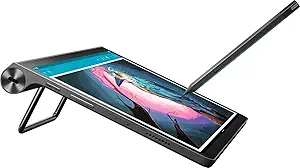
Lenovo, conversely, leverages its computing DNA to deliver exceptional price-to-performance ratios and hardware versatility. Rather than maintaining a rigid design language across tiers, Lenovo experiments with smart-docking features, dual-purpose displays, and built-in kickstands found in the Yoga series. Lenovo's strategy prioritizes consumer utility, offering well-built tablets tailored specifically for casual media consumption, student note-taking, and secondary monitor functionality. While Lenovo also manufactures powerful slates like the Tab Extreme, its core philosophy remains focused on practical innovation, accessible entry points, and straightforward, clean Android implementations.
Key Differences & Technological Comparison
When evaluating hardware between these two industry leaders, display technology represents a major battleground. Samsung is an undisputed pioneer in visual hardware, outfitting its premium Tab S series with state-of-the-art Dynamic AMOLED 2X panels featuring adaptive 120Hz refresh rates, deep blacks, and remarkable HDR10+ calibration. Even its mid-range devices generally feature high-quality TFT or LCD panels with superior color tuning. Lenovo counters aggressively in the mid-to-upper segments with expansive 2.5K and 3K OLED screens on devices like the Tab P11 Pro and Tab Extreme, offering wide color gamuts and Dolby Vision certification that rival Samsung at slightly lower price points.
Software and user interface design form another fundamental divergence. Samsung utilizes its proprietary One UI custom interface, which is arguably the most capable tablet-optimized skin on Android. One UI is purpose-built for large screens, offering multi-window tiling for up to three active applications, a dynamic persistent taskbar, and Samsung DeX—an interface that converts the tablet environment into a fully functional desktop experience. Lenovo generally sticks to a cleaner, near-stock Android implementation augmented by its "Productivity Mode." While Lenovo's interface is snappy and lightweight, it lacks the architectural polish, fluid window management, and comprehensive peripheral optimization that make Samsung’s software suite so productive.
Stylus technology and accessories further illustrate each brand's operational priorities. Samsung includes its battery-free, electromagnetic resonance (EMR) S Pen directly in the box with its Galaxy Tab S lineup, providing ultra-low latency, pressure sensitivity, and seamless software integration like Air Commands and Samsung Notes out of the box. Lenovo requires users to navigate multiple generations of its active-capacitive pens (such as the Precision Pen 2 and 3), which are powered by internal batteries and typically sold separately or bundled in select regional SKUs. Although Lenovo's styluses perform admirably for sketching and annotation, they do not match the universal software integration and latency consistency of the S Pen.
Ecosystem continuity remains a defining advantage for Samsung. Users embedded in the Samsung ecosystem enjoy features like Quick Share, Auto Switch for Galaxy Buds, Second Screen support with Windows laptops, and shared clipboards with Galaxy smartphones. Lenovo addresses interoperability through its Lenovo Freestyle software, which enables file sharing and screen extension to Windows PCs, but the integration feels more like a peripheral utility rather than an intuitive, deeply integrated ecosystem.
Pros & Cons Comparison
Lenovo Tablets
- Pros:
- Exceptional price-to-performance ratio across budget and mid-range tiers.
- Innovative physical form factors, such as integrated kickstands (Yoga series) and multi-port designs.
- Clean, near-stock Android user experience with minimal pre-installed bloatware.
- Excellent multimedia speaker configurations tuned in partnership with JBL and Dolby Atmos.
- Display quality on mid-tier OLED models often surpasses similarly priced competitors.
- Cons:
- Inconsistent software update schedules and shorter overall OS support lifespans.
- Desktop interface (Productivity Mode) is less refined than Samsung DeX.
- Stylus compatibility is often confusing across different model generations.
Samsung Tablets
- Pros:
- Industry-leading Dynamic AMOLED displays with unmatched brightness, contrast, and color accuracy.
- Superior multi-window multitasking and true desktop replacement via Samsung DeX.
- High-precision S Pen is included in the box with flagship models and requires no battery charging for writing.
- Industry-best Android software commitment (up to four years of OS updates and five years of security patches on flagship lines).
- Durable build quality featuring Armor Aluminum frames and IP68 water/dust resistance on high-end models.
- Cons:
- Premium flagship models command significantly higher prices.
- Entry-level (Galaxy Tab A) devices often feature underpowered processors and slower charging speeds.
- One UI can feel resource-heavy on hardware configurations with less than 6GB of RAM.
Performance, Durability & Value Analysis
From an architectural and longevity perspective, Samsung holds a decided edge in raw computing power and environmental durability. Samsung routinely equips its flagship slates with the latest top-tier Qualcomm Snapdragon platforms (such as the customized Snapdragon 8 Gen series), ensuring high graphical overhead for 3D gaming, high-bitrate video editing, and demanding multitasking environments. Furthermore, Samsung introduced IP68 water and dust resistance ratings to its Tab S9 and S10 lines—a milestone feature absent from most competing Android tablets. This structural protection, coupled with premium aluminum enclosures, ensures that flagship Galaxy tablets can survive the rigors of travel, field work, and accidental spills far better than most alternatives.
Lenovo, however, captures the objective value metric for the vast majority of mainstream consumers. In the sub-$400 price bracket, Lenovo consistently out-specifies Samsung. Where a budget Samsung Galaxy Tab A-series may feature an entry-level TFT display, modest processing power, and modest speaker output, a comparably priced Lenovo Tab P-series slate frequently delivers a high-resolution 2K display, quad-speaker array, and superior aluminum chassis construction. For media streaming, cloud gaming, digital reading, and web productivity, Lenovo delivers a high-end sensory experience without the flagship price tag. The trade-off lies in long-term platform support: Samsung's commitment to multi-year OS updates guarantees greater security and software relevance over a four-to-five-year timeline, somewhat mitigating Lenovo's upfront hardware value.
Final Verdict: Which Brand Should You Choose?
The decision between Lenovo and Samsung ultimately hinges on how deeply you intend to integrate the tablet into your daily productivity workflow, as well as your operational budget.
Choose Samsung if:
- You require a true productivity workhorse capable of replacing a traditional laptop via Samsung DeX and comprehensive keyboard accessories.
- You are a digital artist, designer, or avid note-taker who demands the unmatched latency, pressure sensitivity, and out-of-the-box convenience of the S Pen.
- You already own a Galaxy smartphone, Galaxy Watch, or Windows PC and wish to capitalize on seamless cross-device synchronization and file sharing.
- You value long-term software longevity, dependable security updates, and top-tier environmental protection like IP68 water resistance.
Choose Lenovo if:
- Your primary use cases are media consumption, video streaming, casual gaming, web browsing, and e-reading.
- You want the absolute best display, audio, and physical build quality possible at a strictly controlled budget (particularly under $400).
- You prefer an unencumbered, near-stock Android user interface without heavy vendor ecosystems running in the background.
- You appreciate functional hardware designs, like integrated kickstands or smart display docks, that adapt naturally to living room or kitchen environments.
Affordability
When evaluating affordability in the tablet market, Lenovo consistently positions itself as the champion of upfront value and budget-conscious engineering, whereas Samsung structures its affordability around a tiered product ecosystem. Lenovo excels at capturing the sub-$200 to $400 market with lines like the Tab M and Tab P series, engineering devices that prioritize display quality and fundamental multimedia capabilities over raw processing overhead. By utilizing cost-effective MediaTek and mid-range Qualcomm Snapdragon processors housed in surprisingly rigid, dual-tone aluminum chassis, Lenovo democratizes premium aesthetic touches at accessible price points. Crucially, Lenovo frequently bundles essential accessories—such as active styluses and folio keyboard covers—directly in the box with their mid-range offerings, dramatically lowering the total cost of ownership. The trade-off, however, lies in software longevity; Lenovo’s lower operating margins often translate to brief software update cycles and slower security patch cadence, which shortens the functional lifespan of their hardware.
Samsung addresses affordability through a bifurcated strategy, leveraging its supply-chain dominance to offer budget options via the Galaxy Tab A-series while providing upper-mid-range alternatives through its "Fan Edition" (FE) iterations. While base-level Tab A devices carry a price premium over functionally equivalent Lenovo tablets and historically cut corners with inferior TFT panels and sluggish eMMC storage, Samsung outclasses the competition in ecosystem value and software lifecycle. A moderately priced Samsung tablet benefits from several years of guaranteed Android OS upgrades, robust security updates, and a remarkably mature desktop interface in Samsung DeX. Furthermore, Samsung's FE series delivers flagship-level engineering, such as IP68 water resistance and low-latency S-Pen hardware (included at no extra charge), providing an enterprise-grade experience at a fraction of true flagship pricing. Consequently, while Samsung requires a higher initial capital outlay than Lenovo, its superior resale value and multi-year software viability offer a lower annualized cost over a three-to-five-year period.
Ultimately, the affordability paradigm between these two manufacturers rests on whether a consumer prioritizes immediate price-to-performance or long-term return on investment. Lenovo is the undisputed victor for buyers with strict immediate budget caps who demand high-resolution streaming, casual productivity, and bundled physical accessories straight off the shelf. Samsung, by contrast, represents a calculated, value-retention approach: the upfront investment is higher, but the return in engineering refinement, persistent software support, and multi-device interoperability ensures that the hardware remains performant and secure long after an entry-level Lenovo device has reached its operational end-of-life.
Battery Life
When evaluating battery life in the tablet market, Samsung and Lenovo utilize distinct engineering philosophies, resulting in varied performance profiles across different price tiers. Samsung typically dominates the flagship segment with its Galaxy Tab S series, integrating massive battery capacities—often exceeding 11,000 mAh in its Ultra models—paired with dynamically adapting AMOLED displays and heavily optimized Qualcomm or Exynos silicon. Samsung’s One UI features robust software-level power management, including nuanced background app restrictions and deep sleeping states that preserve battery over extended idle periods. However, Samsung’s high-performance hardware, coupled with resource-intensive features like Samsung DeX, 120Hz refresh rates, and brighter peak luminescence, can deplete the battery rapidly under sustained heavy workloads, often netting between 9 to 11 hours of typical real-world screen-on time.
Lenovo, conversely, leverages efficient, pragmatic hardware combinations that frequently give it an endurance edge in the budget and mid-range tiers through lines like the Tab P and M series. Lenovo often equips its tablets with power-frugal MediaTek or mid-tier Snapdragon chipsets and tuned IPS LCD panels, which consume substantially less baseline power than Samsung’s high-drive displays. Because Lenovo's Android interface runs closer to stock with far fewer heavy background processes and proprietary ecosystem syncs, its devices exhibit exceptional idle-drain control and impressive media playback loops, frequently achieving 12 to 14 hours of continuous light-to-moderate use. The trade-off lies in peak performance and fast-charging capabilities; while Samsung provides consistent, standardized 45W fast charging across its premium models, Lenovo’s charging speeds vary wildly, often capping at a modest 20W to 30W even on large-battery units, leading to significantly longer downtime at the outlet.
Ultimately, the practical choice regarding battery life depends on usage patterns and hardware expectations. Samsung delivers superior high-demand power engineering, providing reliable endurance under complex multitasking and faster recharge cycles, making it the preferred choice for productivity-focused power users who have frequent access to high-wattage chargers. In contrast, Lenovo offers superior passive longevity and uninterrupted screen time for media consumption, e-reading, and casual browsing, catering to consumers who prioritize long spans between charges over lightning-fast top-up speeds.
Display
When evaluating display technology in the tablet market, Samsung stands as the undisputed industry benchmark, primarily due to its vertically integrated display manufacturing and cutting-edge panel technology. Samsung’s flagship Galaxy Tab S-series sets the standard with its proprietary Dynamic AMOLED 2X panels, which boast remarkable contrast ratios, deep inky blacks, and exceptional peak brightness levels exceeding 900 nits in HDR environments. Engineered with adaptive 120Hz refresh rates and broad DCI-P3 color gamut coverage, Samsung displays deliver unmatched visual fluidity, color accuracy, and HDR10+ fidelity. Even in its mid-to-entry tiers, such as the Galaxy Tab A-series, Samsung implements calibrated TFT and LCD panels that maintain superior anti-reflective coatings and consistent viewing angles, ensuring superior outdoor legibility and minimal glare across the entire lineup.
Lenovo approaches tablet displays with a strategy focused on aggressive value-to-spec ratios, targeting entertainment and productivity without the premium price tag. Upper-tier models, such as the Lenovo Tab Extreme and the P-series, utilize gorgeous OLED and 3K resolution panels that support Dolby Vision and HDR10, offering cinematic color reproduction and 120Hz refresh rates that rival Samsung's high-end hardware. Furthermore, Lenovo frequently experiments with productivity-friendly aspect ratios, such as 16:10 and 3:2, along with matte-finish, paper-like screen innovations that minimize eye strain during extended reading or note-taking. However, Lenovo’s engineering falls slightly short in panel uniformity, software-driven color calibration, and peak outdoor brightness, where its sub-flagship LCD models often hover around 400 nits—noticeably dimmer than comparable Samsung hardware.
Ultimately, the practical trade-off between the two brands centers on visual perfection versus budget-conscious utility. Samsung delivers the most refined display engineering available on Android, complete with superior stylus tracking latency, higher peak brightness, and industry-leading HDR rendering, making it the definitive choice for digital artists, media connoisseurs, and users needing outdoor versatility. Conversely, Lenovo provides exceptional visual real estate and modern OLED perks at significantly more accessible price points, making its tablets an immensely attractive proposition for casual streaming, document editing, and everyday multimedia consumption where absolute color accuracy and extreme outdoor visibility are secondary concerns.
Performance
When evaluating raw processing power and engineering execution, Samsung commands a definitive lead over Lenovo, particularly within the mid-range to premium tiers. Samsung’s flagship Galaxy Tab S series leverages customized, top-tier silicon—most notably Qualcomm’s high-binned Snapdragon processors or flagship-grade MediaTek Dimensity chips—paired with deeply optimized LPDDR5X RAM and UFS 4.0 storage. This high-bandwidth architecture delivers sustained, thermal-throttled performance capable of handling extreme demands, such as 4K video rendering, high-framerate mobile gaming, and complex multi-window workflows via Samsung DeX. Lenovo, conversely, adopts a more fragmented silicon strategy. While their flagship offerings like the Tab Extreme demonstrate competent peak performance with upper-tier Dimensity chipsets, the vast majority of Lenovo’s portfolio relies on budget-to-midrange Qualcomm Snapdragon or lower-end MediaTek Helio processors. These components excel at standard daily tasks, such as content consumption and web browsing, but they quickly encounter thermal throttling and memory bottlenecks under sustained computational stress.
The practical trade-offs become most apparent when assessing operating system overhead and long-term performance stability. Samsung’s One UI interface is highly optimized to extract every ounce of hardware efficiency, offering enterprise-level background process management that prevents aggressive app-killing while sustaining multi-app split-screen sessions with zero UI latency. Samsung also holds a technical advantage in storage longevity, deploying advanced file management protocols and offering up to seven years of firmware support that keeps performance snappy over multiple Android iterations. Lenovo takes a different engineering approach by utilizing a much lighter, near-stock Android skin—or their specialized ZUI in select regions. While this lightweight software footprint yields surprisingly fluid navigation even on modest hardware with limited RAM, it lacks the aggressive underlying optimization required for heavy-duty multitasking. Lenovo’s PC Mode offers decent productivity, but sustained multi-tasking often results in micro-stutters and deferred background rendering due to conservative memory management algorithms.
Ultimately, the performance gap delineates distinct consumer targets for each brand. Lenovo engineered its tablet lineup for cost-to-performance efficiency, maximizing value for media-centric users, students, and light productivity workers who do not require sustained graphical throughput or desktop-level multi-threading. Samsung, by contrast, targets power users, digital creatives, and mobile professionals, engineering its tablets with desktop-grade silicon, superior thermal dissipation structures, and robust hardware acceleration. While Lenovo offers an exceptional computational baseline at competitive price points, Samsung provides an uncompromised, future-proof performance ceiling capable of substituting for a traditional laptop in high-demand computing environments.