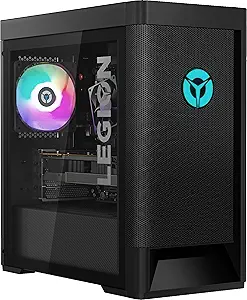







Lenovo vs HP: Overview
Comparing Lenovo and HP helps you determine which brand is best suited for your needs in Prebuilt PC. Both brands offer strong choices depending on your budget and key feature requirements.
Key Features & Comparison
Evaluate factors such as build quality, warranty, customer satisfaction, and total value before making your final purchase choice between Lenovo and HP.
Features
From an ecosystem and utility standpoint, both brands offer robust software suites and diverse hardware configurations, though their execution targets different user needs. HP prebuilts stand out through the Omen Gaming Hub and HP Support Assistant, providing clean, highly functional interfaces for system monitoring, network boosting, and integrated RGB lighting sync across peripherals. Higher-end HP Omen configurations often offer advanced thermal features such as patented 'Cryo Chamber' external radiator brackets and high-wattage 80-Plus Gold power supplies. However, HP’s lower-tier lines, particularly Pavilion and Envy systems, frequently cut corners on front I/O connectivity and storage expansion, sometimes limiting users to single M.2 slots and restricted PCIe lanes due to cost-optimized proprietary motherboards.
Lenovo takes a more technically open approach, particularly within its Legion desktop lineup. Features like the Lenovo Vantage software provide granular control over fan curves, automated network priority, and one-click GPU overclocking profiles without burying options behind unintuitive sub-menus. More importantly, Lenovo distinguishes itself in physical features: their chassis designs routinely feature unhindered top and front fan mounts, dual M.2 NVMe slots with pre-installed heavy-duty heatsinks, and tool-less drive sleds. Lenovo also exhibits superior rear I/O port density across equivalent price tiers, offering more USB 3.2 Gen 2 ports and standard display connectivity, making it considerably easier to attach extensive arrays of external peripherals and multi-monitor setups without requiring specialized hubs.
Performance
In real-world performance benchmarks, sustained thermal dissipation is the primary differentiator between these two manufacturers. Lenovo consistently demonstrates superior thermal management across both Intel Core and AMD Ryzen configurations. By prioritizing high-airflow mesh front panels, standardized 120mm tower air coolers, and traditional front-to-back chassis wind tunnels, Lenovo Legion desktops avoid the aggressive thermal throttling that plagues many prebuilts. This robust thermal headroom allows both the CPU and GPU to sustain their maximum boost clocks for extended periods during demanding computational workloads, intensive rendering, and competitive high-refresh-rate gaming sessions.
HP delivers fierce competition at the top end of the market with its high-tier Omen liquid-cooled systems, which utilize premium Asetek-based all-in-one liquid coolers capable of matching or occasionally exceeding Lenovo’s thermal output under short-burst synthetic loads. However, performance consistency drops significantly as you move down HP’s product ladder. Mainstream Victus and Pavilion desktops are notorious for prioritizing acoustic suppression over cooling efficiency, often relying on restricted intake vents and diminutive downdraft CPU coolers. As a result, sustained gaming or multi-threaded CPU workloads in mid-tier HP machines can lead to elevated internal temperatures and noticeable clock-speed downthrottling, giving Lenovo a decisive edge in sustained, heavy-duty performance across the entire pricing spectrum.
Design
The aesthetic philosophies of Lenovo and HP represent a stark contrast between minimalist aggression and contemporary lifestyle design. Lenovo’s Legion line utilizes an angular, industrial motif characterized by stark black or white chassis finishes, deeply recessed mesh grilles, and illuminated, minimalist brand badges. Inside, Lenovo adheres closely to industry-standard internal layouts: cable management runs through dedicated channels behind the motherboard tray, and the lack of structural crossbars allows for effortless component visibility through tinted tempered glass side panels. While functional and clean, Lenovo’s design language can occasionally feel somewhat repetitive and overtly utilitarian, lacking the high-fashion sophistication seen in custom boutique rigs.
HP, conversely, excels at creating visually arresting hardware that blends seamlessly into modern office spaces and gaming environments. The Omen and Envy lineups feature sculpted, brushed aluminum accents, seamless monolithic front panels, and refined addressable RGB lighting zones that avoid the garishness typical of entry-level gaming PCs. Even HP’s budget-oriented Victus systems adopt an understated, modern architectural look that conceals their plastic-heavy construction well. The trade-off for HP’s sleek exterior styling is often interior spatial compromise; many HP enclosures are spatially compact with tight interior clearances that make future upgrades cumbersome and restrict total air volume, sacrificing thermodynamic optimization for clean living-room or desktop aesthetics.