






Lenovo vs Alienware: Overview & Brand Philosophy
The prebuilt desktop market has evolved significantly over the past decade, shifting away from generic off-the-shelf towers toward specialized, high-performance machines engineered for both professional workflows and high-framerate gaming. Within this competitive landscape, Lenovo and Alienware (Dell’s dedicated high-performance gaming division) represent two fundamentally distinct philosophies in systems engineering, consumer targeting, and aesthetic design. While both boast global supply chains and vast warranty support infrastructures, their approach to the internal and external architecture of desktop computing caters to distinctly different customer profiles.
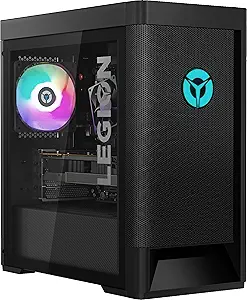
Lenovo approaches the prebuilt PC space through the lens of engineering pragmatism, scalability, and broad-market utility. Through its Legion gaming brand and ThinkStation workstation lines, Lenovo emphasizes minimalist industrial designs, standardized component form factors, and superior acoustic-thermal balances. Lenovo focuses heavily on standard ATX and Micro-ATX specifications, ensuring that users retain an upgrade path long after purchase. Rather than leaning into hyper-stylized gamer iconography, Lenovo prioritizes clean lines, high-airflow mesh panels, and straightforward internal layouts that appeal equally to competitive gamers, software developers, and digital artists.
Alienware, conversely, is built on a foundation of high-concept futurism, brand prestige, and proprietary systems integration. As Dell’s halo performance badge, Alienware desktop systems—most notably the Aurora lineup—are engineered as bold, statement-making centerpieces. The brand leans into sculptural, space-age chassis designs, bespoke liquid-cooling configurations, and deep integration with its proprietary Alienware Command Center ecosystem. Alienware targets enthusiasts and casual gamers who seek out-of-the-box performance, concierge-level technical support options, and iconic aesthetic flair without the desire to manually tinker, swap motherboards, or troubleshoot hardware configurations themselves.
Key Differences & Technological Comparison
The technical divergence between Lenovo and Alienware lies primarily in chassis architecture, thermal management strategies, component standardization, and software ecosystems. Understanding these nuances is critical for any buyer deciding between these two computing titans.
Chassis Architecture and Thermal Engineering
Historically, thermal dissipation has been a primary battleground in prebuilt computing. Lenovo’s Legion towers utilize a conventional box-style chassis with expansive front, top, and rear mesh configurations. This design maximizes natural airflow through high-volume, low-RPM chassis fans and standard 240mm or 360mm AIO (All-in-One) liquid coolers. Because Lenovo avoids radical, form-over-function plastic shrouding, ambient cool air intake remains unobstructed, leading to lower fan noise under sustained workloads.
Alienware’s Aurora series features an unmistakable, molded exoskeleton. While visually striking, earlier iterations faced criticism for restricted airflow due to compact, tightly packed internal layouts. Dell addressed this with recent redesigns (such as the Aurora R16), shifting to an open-air architecture with streamlined side-intake venting. While thermal performance on newer Alienware models has improved dramatically—lowering internal temperatures and noise profiles relative to previous generations—internal clearance remains tighter than Lenovo's more traditional cubic layouts.
Proprietary vs. Standardized Components
A major differentiating factor is long-term serviceability. Lenovo heavily favors industry-standard hardware. The power supplies, cooling brackets, and motherboards in most Legion desktops use standard ATX or Micro-ATX mounting holes and standard 24-pin power connectors. This allows users to easily replace individual components, install aftermarket graphics cards, or upgrade motherboards years down the line without compatibility hurdles.
Alienware utilizes a substantial amount of proprietary engineering. Dell custom-engineers many Aurora motherboards with bespoke I/O placement, non-standard front-panel headers, and specialized power supply configurations. While these tailored components allow Alienware to pack immense power into sculpted, non-traditional shapes, they severely limit aftermarket modularity. Swapping out an Alienware motherboard or power supply often requires buying Dell-specific replacements rather than standard retail components.
Software Ecosystems and Bloatware
Lenovo desktops ship with Lenovo Vantage, a lightweight system utility that lets users monitor thermals, adjust GPU overclocks, configure RGB lighting, and update drivers with minimal resource overhead. It stays largely out of the user's way during daily operation.
Alienware relies on the Alienware Command Center (AWCC). AWCC is deeply featured, offering per-game thermal and lighting profiles, sound tuning, and granular power-stage controls. However, it is a resource-intensive software suite that historically has required frequent updates and occasionally suffers from configuration bugs, requiring a steeper learning curve to master fully.
Pros & Cons Comparison
Lenovo
- Pro: Standardized Internal Layouts: Uses standard form factors (ATX/mATX, standard PSU connections), allowing seamless consumer-led repairs and part upgrades.
- Pro: Exceptional Thermal Efficiency: High-airflow chassis designs paired with traditional cooling configurations yield low acoustic profiles under load.
- Pro: Understated Aesthetic: Sophisticated, professional chassis styling that fits naturally into both modern gaming rooms and executive office environments.
- Pro: Minimal Bloatware: Lenovo Vantage provides essential hardware controls without overburdening the operating system with background processes.
- Con: Conservative Styling: May look too generic or plain for buyers seeking striking, futuristic showpiece hardware.
- Con: Less Frequent Halo Configurations: Lenovo is often slower to deploy ultra-high-end liquid loops or extreme factory overclocks compared to specialized boutique setups.
Alienware
- Pro: Iconic, Futuristic Aesthetics: Instantly recognizable industrial design that serves as a visual centerpiece in any setup.
- Pro: Robust Factory Configuration Options: Offers an extensive range of customization options directly through Dell's order portal, including high-tier CPU/GPU pairings.
- Pro: Premium Support Infrastructure: Access to Dell’s top-tier support networks, including rapid on-site service warranties and comprehensive accidental damage coverage.
- Pro: Deep Ecosystem Integration: Seamlessly synchronizes RGB profiles, audio presets, and monitor settings across Alienware-branded peripherals.
- Con: Proprietary Parts Restrict Upgradability: Custom motherboards, non-standard power distribution, and tailored chassis cutouts make deep aftermarket modifications difficult.
- Con: Brand Premium: Alienware machines often carry a higher price tag relative to raw hardware specifications, charging a premium for design and branding.
Performance, Durability & Value Analysis
When measuring pure, synthetic out-of-the-box performance, both Lenovo and Alienware extract maximum utility from identical silicon tiers (Intel Core / AMD Ryzen CPUs paired with NVIDIA GeForce RTX graphics). Frame rates, rendering output, and encoding benchmarks run neck-and-neck between matching configurations. However, performance divergence surfaces during sustained, long-duration computing sessions. Lenovo’s less restrictive intake layouts and standard dual- or triple-fan liquid cooling setups maintain baseline clock speeds with minimal thermal throttling. Alienware delivers blisteringly fast peak performance, but depending on the specific chassis model and cooling configuration selected, fan acoustics may ramp up more aggressively to maintain those thermals within its compact structural bounds.
From a durability and lifecycle perspective, Lenovo captures a clear value advantage. Because Lenovo avoids proprietary mounting brackets and motherboard designs, users can systematically extend the computer’s lifespan: adding new power supplies to accommodate next-generation graphics cards or replacing standard fans requires zero proprietary parts. Alienware's build quality is structurally sound—the plastics are dense, chassis frames are rigid, and internal cabling is meticulously anchored—but the system often functions as a fixed appliance. Once an Alienware motherboard reaches technological obsolescence, upgrading typically entails replacing the entire machine. Consequently, Lenovo presents higher value retention per dollar over a multi-year horizon, while Alienware justifies its initial premium through support convenience and industrial design prestige.
Final Verdict: Which Brand Should You Choose?
Choosing between Lenovo and Alienware comes down to your personal priorities regarding aesthetic identity, long-term upgrade ambitions, and software simplicity.
Choose Lenovo if: You value functional design, whisper-quiet thermal performance, and long-term hardware modularity. The Lenovo Legion lineup is ideal for gamers, creators, and engineers who want standard desktop components that are easy to repair, upgrade, and optimize down the road. It provides exceptional thermal engineering, sleek professional aesthetics, and competitive performance per dollar without locking you into a proprietary ecosystem.
Choose Alienware if: You prioritize head-turning industrial design, fully integrated brand ecosystems, and a hands-off ownership experience backed by Dell’s extensive support network. If you prefer to unbox a visually stunning, meticulously branded gaming machine and have no interest in building, rewiring, or swapping internal motherboards over time, Alienware delivers a premium, out-of-the-box powerhouse that commands attention.
Features
When evaluating feature sets in the prebuilt PC landscape, Lenovo (principally through its Legion desktop lineup) and Alienware (Dell’s enthusiast gaming arm, defined by the Aurora series) approach system engineering from fundamentally opposing philosophies: standard-form utility versus proprietary showmanship. Lenovo prioritizes functional, enthusiast-friendly features that closely mirror custom PC building. Its Legion towers prominently feature standardized components—including ATX motherboards, standard-mounting CPU coolers, and standard ATX power supplies—which maximize post-purchase modularity. In contrast, Alienware engineers heavily around an integrated, proprietary ecosystem. Alienware Aurora chassis rely heavily on bespoke motherboards, custom thermal airflow layouts, and integrated lighting diffusers designed for aggressive, sci-fi-inspired aesthetics. While Alienware brings high-end feature innovations like tool-less swing-arm power supply brackets, transparent side panels with integrated electromagnetic shielding, and robust, enterprise-grade liquid cooling loops, this architecture comes at the cost of standardized feature expandability, severely limiting third-party component swaps down the line.
On a software and technical utility level, the feature discrepancy shifts toward user control and peripheral synchronization. Alienware leans into deep hardware telemetry via the Alienware Command Center (AWCC). AWCC acts as an all-in-one suite for custom acoustic profiles, automated CPU and memory overclocking offsets, thermal sensor mapping, and intricate AlienFX RGB synchronization with a massive ecosystem of native Alienware peripherals. Lenovo counters with Lenovo Vantage, a lighter-weight utility optimized for low resource overhead rather than sprawling customization. Vantage offers clean, straightforward toggle switches for GPU overclocking, hybrid network prioritization, and rapid BIOS-level fan curve switching (Performance, Balance, and Quiet profiles). While Alienware delivers significantly more granularity for users who want to tune clock speeds, voltages, and ambient light shows down to individual RGB zones, its proprietary software suite is historically notorious for high idle resource consumption and occasional driver bloat. Lenovo delivers a leaner, cleaner out-of-the-box feature set with far less ambient bloatware, though it offers comparatively fewer hyper-specific tweaking options for advanced tuners.
From an input/output (I/O) and connectivity perspective, Alienware frequently edges out Lenovo on front-panel versatility, while Lenovo excels in logical chassis usability. Alienware Aurora desktops typically feature an expansive front I/O cluster that includes high-speed USB 3.2 Gen 2 Type-C ports with PowerShare alongside multiple Type-A ports, making them ideal for heavy VR setups and rapid peripheral swapping. Lenovo Legion towers, while adequately equipped with modern Wi-Fi 6E/7 and standard USB connectivity, lean into functional chassis features such as integrated top-mounted carry handles, dedicated internal headphone hangers, and magnetic, washable mesh dust filters that simplify long-term maintenance. Ultimately, the feature-based trade-off is clear: choose Alienware if your priority is deep out-of-the-box system lighting integration, advanced monitoring telemetry, and hyper-modern aesthetics; choose Lenovo if your primary feature requirement is standard-component upgradeability, clean software management, and low-maintenance longevity.
Performance
When evaluating sustained performance in prebuilt gaming PCs, Lenovo’s Legion line and Dell’s Alienware series diverge sharply in engineering philosophy and thermal architecture. Lenovo primarily achieves its technical prowess through industry-standard component integration and superior airflow-centric case design. The Legion Tower models feature open, mesh-heavy chassis layouts equipped with standard 120mm fans and robust dual-tower air or 240mm/360mm AIO liquid coolers. This adherence to unencumbered airflow dynamics allows Lenovo systems to extract consistent boost clocks from high-TDP Intel Core and AMD Ryzen CPUs, as well as flagship NVIDIA GeForce RTX GPUs, without aggressively thermal-throttling during prolonged compute workloads or extended gaming sessions.
Conversely, Alienware—exemplified by its flagship Aurora series—relies heavily on proprietary motherboard form factors, bespoke power distribution, and aggressive firmware tuning to squeeze out peak performance metrics. While modern Alienware redesigns like the Aurora R16 have significantly improved acoustic and thermal performance over older, cramped chassis geometries, their compact and somewhat convoluted internal layouts still demand high-RPM fan curves and mandatory liquid cooling to avoid heat saturation. Alienware leverages aggressive out-of-the-box overclocking profiles via the Alienware Command Center (AWCC), often yielding marginally higher initial synthetic benchmark bursts; however, this comes at the expense of higher operational temperatures and sustained acoustic output compared to Lenovo's more thermally stable chassis design.
Ultimately, the practical trade-off between the two brands rests on the longevity and consistency of their performance profiles. Alienware delivers specialized, fine-tuned performance capabilities with advanced software suites that appeal to users who favor high-strung, out-of-the-box speed and distinct engineering aesthetics. However, Lenovo offers a more technically sound and reliable platform for sustained thermal headroom. By prioritizing spacious airflow, standard component spacing, and lower core temperatures over aggressive proprietary tuning, Lenovo ensures that its prebuilts deliver uncompromised frame rates, stable rendering performance, and far simpler long-term component upgradability.
Design
Lenovo and Alienware represent diametrically opposed engineering philosophies in the prebuilt gaming desktop space, particularly through their flagship Legion Tower and Aurora lines. Lenovo prioritizes functional, standardized engineering with a subtle aesthetic that bridges the gap between stealth workstation and gaming rig. Utilizing clean, boxy chassis dimensions with tasteful RGB accents and high-airflow mesh front panels, the Legion design emphasizes thermal practicality and component accessibility. Alienware, an enthusiast brand under Dell, leans heavily into an avant-garde, futuristic design language characterized by bold, sculptural silhouettes, the iconic Legend design framework, and extensive, synchronized AlienFX lighting zones. While Alienware’s molded exterior shells provide an unmistakable, premium presence that stands out in any setup, this radical exterior styling often demands a significantly larger footprint on the desk compared to Lenovo’s more space-efficient mid-tower footprints.
Under the hood, the divergence in technical layout and thermal design becomes even more pronounced. Lenovo champions a traditional DIY-style internal layout, utilizing standard ATX power supplies, accessible motherboard headers, and standard chassis fan mounts. This results in direct, unobstructed front-to-back airflow channels that facilitate straightforward cooling and unhindered future hardware upgrades. Conversely, modern Alienware Aurora models—while vastly improved over older swing-arm chassis iterations with their redesigned open-air Legend 3 architectures—still rely on more proprietary structural elements and custom internal ducting to manage airflow through sculpted vents. Alienware excels at integrating advanced liquid cooling configurations and distinct, acoustically tuned heat management systems out of the box, but the internal complexity can make user maintenance, dust filter cleaning, and component expansion significantly more labor-intensive than the intuitive, tool-less bays commonly found in Lenovo Legion enclosures.
Ultimately, the choice between Lenovo and Alienware comes down to a trade-off between practical modularity and showpiece industrial design. Lenovo is the superior choice for pragmatic users and upgrade-minded gamers who value industry-standard engineering, exceptional out-of-the-box airflow, and an understated chassis that blends into professional or gaming environments alike. Alienware remains the premier destination for consumers seeking a distinctive, conversation-starting centerpiece that delivers an integrated, spaceship-like aesthetic with robust software ecosystem control, provided they are comfortable with a bulkier chassis footprint and a degree of internal chassis customization that limits conventional PC part swapping down the line.