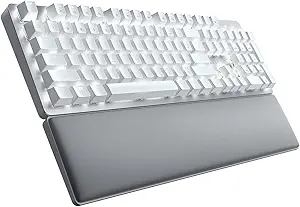





Razer vs Corsair: Overview & Brand Philosophy
In the high-stakes arena of gaming peripherals, few rivalries are as fiercely contested as that between Razer and Corsair. Both companies have shaped the modern mechanical keyboard market, transitioning from specialized hardware makers into global lifestyle gaming giants. Razer, founded in 2005 with its iconic triple-headed snake emblem, positions itself firmly around esports excellence and bleeding-edge responsiveness. Its design ethos centers on aggressive gaming aesthetics, proprietary switch innovations, and rapid actuation, marketing directly to competitive gamers who demand lightning-fast peripheral response times.
Corsair, originating in 1994 as a high-performance computer memory manufacturer, approaches peripheral design with an engineering-first mentality rooted in PC enthusiast culture. When Corsair entered the mechanical keyboard market, it revolutionized the industry through an exclusive partnership with German switch maker Cherry MX, pioneering aircraft-grade brushed aluminum frames and integrated media controls. Corsair's keyboard philosophy emphasizes structural rigidity, modular customization, and an ecosystem that bridges the gap between clean desktop productivity and high-tier competitive gaming.
While both brands command premium price tags and offer extensive product portfolios spanning compact 60% keyboards to full-sized command centers, their design and engineering diverge significantly. Razer champions bespoke internal switch engineering (such as optical and analog switches) paired with refined, gamer-centric industrial design. Corsair, by contrast, focuses on robust build quality, versatile connectivity, and hyper-polling processing power, making this matchup a battle between pure esports agility and uncompromising desktop utility.
Key Differences & Technological Comparison
When evaluating keyboard technology, the primary differentiators between Razer and Corsair lie in switch mechanisms, processing architecture, build materials, and companion software.
Switch Innovations and Feel: Razer has largely moved away from off-the-shelf components, investing heavily in proprietary switches. Their Gen-2 Optical Switches and Analog Optical Switches (found in flagships like the Huntsman V2 and Huntsman V3 Pro) utilize infrared light beams to register keypresses, virtually eliminating debounce delay and allowing for adjustable actuation points and rapid trigger functionality. Corsair has traditionally relied on the gold-standard Cherry MX mechanical switches, though they have recently developed their own OPX optical-mechanical switches. While Corsair's OPX switches are blisteringly fast, Razer offers a broader variety of specialized switches, including clicky, linear, and dual-step analog options with deeper software-based actuation adjustments.
Processing Power and Latency: Corsair pioneered ultra-polling with its AXON Hyper-Processing Technology, capable of native 8,000Hz (0.125ms) polling rates. This allows Corsair keyboards to transmit inputs up to eight times faster than standard gaming keyboards. Razer countered with its own 8,000Hz HyperPolling technology in the Huntsman line. In empirical testing, input latency between the two brands is imperceptible to human senses, yet Corsair's AXON processor manages complex onboard lighting configurations alongside high-frequency polling with slightly less CPU overhead than Razer's software-reliant implementation.
Materials, Chassis, and Keycaps: Corsair has long maintained an edge in chassis rigidity thanks to its signature brushed anodized aluminum top plates, which give keyboards like the K70 and K100 series a weighty, premium presence with zero deck flex. Razer historically relied on hardened plastic top shells, though modern iterations such as the BlackWidow V4 Pro and Huntsman lines now integrate matte aluminum alloy plates. Both brands have largely standardized on doubleshot PBT keycaps for their premium tiers, resisting finger oils and shine, though Razer's standard typography is generally crisper and less aggressive than Corsair’s wide-font legends.
Software Ecosystem: Razer Synapse vs. Corsair iCUE: Razer Synapse 3 provides an intuitive, modular interface for key remapping, secondary function layers (Razer Hypershift), and per-key Chroma RGB lighting. However, Synapse can consume substantial system resources and occasionally suffers from cloud-sync hiccups. Corsair iCUE is arguably the most powerful lighting and macro engine on the market, capable of orchestrating complex macros and syncing across internal PC components (fans, coolers, RAM). The trade-off is that iCUE carries a steep learning curve and has a notably heavy system footprint.
Pros & Cons Comparison
Razer Keyboards
- Pros:
- Industry-leading optical and analog switches with customizable actuation and rapid trigger.
- Exceptional acoustic dampening and pre-lubricated stabilizers on newer models (e.g., BlackWidow V4, Huntsman V2).
- Razer Chroma RGB offers superior game integration with third-party software and titles.
- Intuitive software configuration via Razer Hypershift for expansive secondary keybindings.
- Cons:
- Razer Synapse software has high system memory utilization and requires continuous background execution for some features.
- Lower-tier models still incorporate plastic-heavy housings prone to creaking.
- Entry-to-mid-tier models occasionally use ABS keycaps instead of durable doubleshot PBT.
Corsair Keyboards
- Pros:
- Superior chassis durability featuring iconic brushed aircraft-grade aluminum top frames.
- Dedicated physical controls, including tactile volume rollers, media keys, and multi-function control wheels.
- Corsair AXON processing provides true 8,000Hz hyper-polling across multiple premium models.
- Expansive onboard memory profiles that run independently of desktop software.
- Cons:
- Corsair iCUE software is complex, unintuitive for beginners, and resource-heavy.
- Acoustics on non-modded boards can sound hollow with noticeable metallic ping on larger keys.
- Non-standard bottom row key spacing on older models complicates third-party custom keycap installation.
Performance, Durability & Value Analysis
From an endurance perspective, both brands engineer keyboards built to survive millions of actuations, but they achieve durability through different avenues. Corsair’s reliance on structural aluminum and heavy-duty braided cabling gives its units an unmistakable physical longevity; it is not uncommon for a Corsair K70 to remain fully functional through six to eight years of intense daily use. Razer's optical switches theoretically offer superior electrical durability because they lack physical contact points, eliminating mechanical wear and tear, contact degradation, and oxidation. However, Razer’s wrist rests and cable connection points have historically shown wear faster than Corsair's equivalent hardware.
In terms of acoustic performance and typing feel—a crucial aspect of modern keyboard evaluation—Razer has taken significant strides ahead of Corsair out of the box. Recent Razer keyboards feature integrated sound-dampening foam, factory-lubricated stabilizers, and improved switch dampeners that minimize high-pitched pinging and clatter. Corsair keyboards, while structurally unyielding, often retain a hollow acoustic signature unless opting for their heavily padded, custom-adjacent models like the K70 MAX. In terms of price-to-performance value, Corsair typically provides more physical inputs (USB passthrough, dedicated media arrays) per dollar, whereas Razer offers more sophisticated switch technology and typing comfort at identical price brackets.
Final Verdict: Which Brand Should You Choose?
Your choice between Razer and Corsair ultimately hinges on whether your priorities lie in esports-grade competitive switch mechanics or industrial hardware craftsmanship with broad PC component integration.
Choose Razer if: You are primarily a competitive gamer focused on FPS, battle royale, or fast-paced titles where microsecond inputs matter. Razer’s optical switches, rapid trigger capability, and refined acoustic dampening make models like the Huntsman V3 Pro and BlackWidow V4 unmatched for pure gaming responsiveness and pleasant out-of-the-box typing acoustics. Furthermore, if you value clean keycap fonts and intuitive software customization via Razer Chroma, Razer is the superior pick.
Choose Corsair if: You view your keyboard as a comprehensive desktop control station and prioritize build materials, physical utility, and holistic ecosystem synchronicity. Corsair is the clear winner for users who want tactile aluminum decks, dedicated media rollers, USB passthrough, and an interface that seamlessly coordinates peripheral RGB lighting with internal PC components like coolers and RAM. If you want a keyboard built like a tank that excels at both office productivity and high-performance gaming, Corsair remains the gold standard.
Features
When evaluating keyboard feature sets, Razer and Corsair represent the pinnacle of gaming-centric peripheral engineering, yet they target slightly different functional priorities. Razer heavily focuses on pure competitive performance and cutting-edge actuation hardware. Its flagship keyboards feature second-generation Analog Optical and Rapid Trigger Hall-Effect magnetic switches (featured prominently in the Huntsman line), allowing users to adjust per-key actuation points dynamically from 0.1mm to 4.0mm and map dual-step inputs to a single keypress. Complementing this is Razer's Synapse software, which supports Snap Tap (SOCD priority resolution) and HyperPolling up to an industry-leading 8000Hz. While Razer excels in pure mechanical and optical innovation alongside highly plush, magnetic wrist rests, its feature compromises typically lie in media integration—often relying on minimalist multi-function digital dials rather than extensive dedicated banks of macro or streaming keys.
Corsair takes an expansive, productivity-and-broadcast-hybrid approach to its keyboard architecture, turning its flagship decks like the K100 RGB into all-encompassing command centers. Corsair's technical strength lies in its Corsair AXON hyper-processing technology, which natively delivers 8000Hz hyper-polling and 4000Hz key scanning while orchestrating complex, layered lighting effects without system latency. Unlike Razer's reliance on integrated multi-function rollers, Corsair leans into dedicated hardware features, offering independent aluminum volume rollers, comprehensive media clusters, tactile programmable control wheels (iCUE Control Wheel), and dedicated macro rows directly compatible with Elgato Stream Deck software. Corsair also retains USB passthrough on more of its standard full-size frames, providing a practical utility that Razer frequently omits on its modern, streamlined chassis.
The trade-offs between the two ecosystems ultimately depend on whether a user prioritizes instantaneous in-game actuation mechanics or comprehensive desktop control. Razer's feature suite is tightly optimized for esports responsiveness, where hyper-granular switch customization and lower physical key travel offer tangible competitive advantages. However, navigating Razer Synapse 4 can feel resource-heavy for basic customizations. Conversely, Corsair offers unmatched utility for content creators, multi-taskers, and enthusiasts who demand complex macros, hardware-level onboard profile storage (up to 8MB holding 200 profiles on select models), and extensive physical controls. While Corsair’s proprietary OPX optical-mechanical switches offer blistering speed, they lack the true analog variable-actuation nuances found in Razer’s latest magnetic switch arrays, making Corsair the champion of physical versatility and Razer the leader in raw input technology.
Performance
When evaluating keyboard performance, Razer and Corsair represent the pinnacle of mainstream gaming engineering, yet they achieve high-tier responsiveness through distinctly different philosophies. Razer has heavily invested in proprietary optical and analog switch technologies, exemplified by their Analog Optical Switches found in the Huntsman line. These switches eliminate the traditional mechanical debounce delay by utilizing light-actuation, enabling lightning-fast inputs and cutting-edge features like Rapid Trigger and adjustable per-key actuation points (ranging from 0.1mm to 4.0mm). Razer backs this hardware with its HyperPolling technology, delivering true 8000Hz polling rates to reduce input latency to a virtually imperceptible 0.125 milliseconds. Corsair counters this with their proprietary AXON Hyper-Processing Technology, also offering native 8000Hz hyper-polling across models like the K70 and K100 series, but primarily leverages a long-standing partnership with Cherry to deploy classic mechanical switches (such as Cherry MX Speed Silvers) alongside their own OPX optical-mechanical variants. While Corsair's OPX switches match Razer's optical speed, Razer holds a slight edge in technical versatility due to its superior execution of dynamic rapid-trigger software tuning, which gives competitive esports players unmatched fluidity in movement-heavy titles.
In terms of practical stability, acoustics, and typing performance, Corsair often balances gaming speed with a more traditional typing feel, whereas Razer leans aggressively toward raw esports mechanics. Corsair boards generally feature robust aluminum top plates and rigorous internal stabilization, resulting in firm keystrokes and dependable tactile consistency, though legacy models can suffer from metallic "ping" and switch chatter over extended lifespans. Razer has made immense strides in recent iterations by integrating internal sound-dampening foam, factory-lubricated stabilizers, and dual-layer PBT keycaps out of the box, offering a substantially more refined auditory profile and smoother key travel that rivals custom enthusiast boards. However, both brands make trade-offs on the software front: Corsair’s iCUE engine provides deeper macro stacking, extensive hardware profile storage, and robust system-wide hardware monitoring, but it demands significant system resources. Razer’s Synapse software is lighter on background processes during gameplay, but occasionally struggles with cloud-sync reliability, meaning on-the-fly performance profile switching can sometimes hitch.
Ultimately, both manufacturers deliver elite performance, but the optimal choice hinges on your specific technical priorities. Razer wins the high-performance competitive edge, particularly for first-person shooter enthusiasts who require instantaneous resets via Rapid Trigger and minute actuation adjustments tailored to competitive gaming. Corsair remains the stronger contender for power users, content creators, and multi-genre gamers who value structural resilience, physical dedicated media and macro keys, and deep integration with broader hardware ecosystems. While Corsair delivers brute-force mechanical reliability driven by the AXON chip, Razer’s refined optical ecosystem currently offers the lowest practical input latency and the most sophisticated competitive feature set in the consumer keyboard market.
Design
When evaluating keyboard design, Razer prioritizes sleek minimalism and unified aesthetics, whereas Corsair leans heavily into an aggressive, industrial, and utilitarian approach. Razer’s hardware philosophy, epitomized by its flagship Huntsman and BlackWidow lines, centers on clean top-plates crafted from matte aluminum, tightly aligned bezels, and some of the industry’s brightest per-key RGB backlighting. The integration of high-grade doubleshot PBT keycaps has become a standard across most of Razer’s lineup, addressing historical criticisms of premature shine and wear. Furthermore, Razer emphasizes desk ergonomics through magnetic, plush leatherette wrist rests and refined low-profile options, such as the DeathStalker series. In contrast, Corsair—championed by the K70 and K100 series—embraces a more overt "gamer" aesthetic defined by brushed aircraft-grade aluminum top frames with visible textures, pronounced top bezels housing dedicated hardware controls, and customizable multi-function iCUE control wheels. Corsair's industrial engineering feels unapologetically robust, though it demands significantly more desk real estate than Razer's comparatively streamlined footprints.
Functionally, the mechanical architecture and feature deployment highlight distinct engineering priorities between the two brands. Corsair excels in physical utility; their inclusion of dedicated media clusters, knurled aluminum volume rollers, and auxiliary macro keys provides immediate tactile control without requiring secondary function layers. Corsair keyboards also frequently incorporate hardware-level conveniences like USB passthrough and detachable, reversible wrist rests, though their included wrist supports often utilize rigid, patterned plastics or thinner padding that lags behind the luxury feel of Razer’s magnetic cushions. Razer, however, pushes the envelope in acoustic dampening and physical switch chassis design. Recent Razer models systematically integrate sound-dampening foam and factory-lubricated stabilizers out of the box, addressing the hollow pinging sounds that often plague aluminum chassis keyboards—an area where unmodded Corsair keyboards have historically struggled. While Corsair’s internal construction relies on hyper-polling processing (AXON technology) built into heavily shielded chassis, Razer’s internal layout feels more modernly tuned to the enthusiast typing experience.
Ultimately, the practical trade-offs come down to an operational dichotomy: Corsair offers maximum hardware-driven control at the cost of elegance and desk space, while Razer delivers superior out-of-the-box acoustic refinement and cohesive styling with fewer physical hardware switches. Users who desire dedicated macro layouts, heavy-duty industrial framing, and tactile media rollers will find Corsair’s design language unmatched for productivity-heavy gaming setups. Conversely, consumers who prioritize refined typing acoustics, premium wrist comfort, cleaner desktop cable management, and vibrant optical illumination will find Razer’s modern design trajectory substantially more cohesive and polished.
Compare current retail pricing, active promotions, and verified stock availability directly from authorized stores: