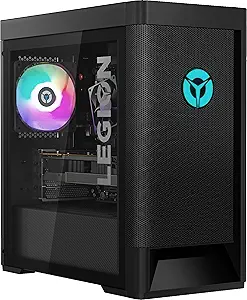







Lenovo vs Acer: Overview & Brand Philosophy
In the prebuilt PC landscape, few names carry as much institutional weight as Lenovo and Acer. Lenovo, tracing its heritage through the acquisition of IBM’s Personal Computing Division, approaches desktop manufacturing through an engineering-first lens. The company focuses heavily on functional refinement, thermal management, and platform stability across its consumer, gaming (Legion), and enterprise (ThinkCentre) divisions. Lenovo's overarching brand philosophy revolves around dependable utility and quiet performance, resulting in systems engineered to run smoothly out of the box with minimal user intervention.
Acer, by contrast, operates with an agile, price-to-performance mindset that prioritizes democratizing modern computing power. Originating from Taiwan, Acer built its global footprint by consistently undercutting competitors on silicon specifications per dollar spent. Whether through its everyday Aspire desktops, creative ConceptD stations, or high-octane Predator and Nitro gaming rigs, Acer's philosophy is rooted in aggressive value and striking aesthetic designs. Where Lenovo aims for understated professional polish, Acer focuses on delivering the highest possible raw frame rates and compute power within constrained consumer budgets.
When evaluating both manufacturers in the prebuilt desktop sector, buyers are essentially deciding between two distinct purchasing paradigms. Lenovo leans toward standardized hardware compliance, proprietary but high-efficiency cooling layouts, and enterprise-grade durability. Acer leans into accessible price entry points, eye-catching chassis designs, and mainstream hardware configurations that lower the barrier to entry for everyday consumers and competitive gamers alike.
Key Differences & Technological Comparison
The architectural differences between Lenovo and Acer prebuilt PCs become most apparent in chassis engineering, motherboard designs, and cooling integration. Lenovo has made massive strides in recent years, particularly within its Legion desktop lineups, by adopting standard mATX motherboards and widely compatible components. Lenovo systems often feature robust, clean internal layouts with thoughtful cable management and integrated shroud systems that direct airflow precisely across VRMs and storage drives. Their proprietary Lenovo Vantage software suite also stands out as one of the least intrusive and most stable companion applications in the prebuilt sector, offering clean performance toggles without excessive bloatware.
Acer takes a noticeably different technological approach, especially in its entry-level and mid-range Nitro and Aspire desktops. Acer frequently relies on customized, proprietary motherboard shapes and front-panel I/O configurations, which can restrict traditional ATX upgrade paths. However, in their upper-tier Predator Orion series, Acer exhibits remarkable technological prowess with features like the FrostBlade fan design and patented IceTunnel airflow architecture, which effectively isolates thermal zones for the GPU, CPU, and power supply. Acer’s PredatorSense utility offers deep RGB customization and direct overclocking profiles, though the software footprint is heavier compared to Lenovo’s lightweight implementation.
Component selection also marks a critical point of divergence. Lenovo consistently partners with reliable Tier-1 OEM suppliers for their internal power supplies (frequently rated 80-Plus Gold or Platinum) and solid-state drives, minimizing system bottlenecking. Acer, while packing high-tier GPUs and CPUs into entry-priced towers, occasionally balances production costs by using generic green-PCB RAM modules without heat spreaders, or single-channel memory configurations on base models. Savvy consumers must pay closer attention to specific spec sheets with Acer to ensure optimal dual-channel memory configurations are present out of the factory.
Pros & Cons Comparison
Lenovo Prebuilt PCs
- Pros:
- Superior acoustic management; towers run noticeably cooler and quieter under heavy loads.
- Higher build consistency with standardized layouts (especially in Legion 5i/7i models), allowing easier component upgrades.
- Lenovo Vantage software provides an exceptional, bloat-free control center for performance tuning.
- Excellent power supply quality, frequently incorporating high-efficiency 80-Plus Gold rated units.
- Cons:
- Typically demands a higher price premium for equivalent CPU/GPU configurations compared to Acer.
- Aesthetic designs can be overly conservative or utilitarian for buyers seeking aggressive desktop styling.
- BIOS options can be restrictive for enthusiasts wanting manual RAM timing or voltage adjustments.
Acer Prebuilt PCs
- Pros:
- Unmatched spec-for-dollar pricing, frequently discounting modern silicon tiers below market average.
- High-end Predator Orion models feature distinct, striking chassis aesthetics with dynamic RGB implementation.
- Wide breadth of budget-friendly configurations, making modern PC gaming accessible to entry-level users.
- PredatorSense software allows rapid, intuitive one-touch GPU overclocking for beginners.
- Cons:
- Mid-tier and budget models (such as the Nitro line) often run loud and experience higher thermal ceilings.
- Frequent use of proprietary motherboards and front-panel connections hinders long-term chassis reusability.
- Higher incidence of pre-installed trial software and bloatware that requires manual uninstallation upon initial setup.
Performance, Durability & Value Analysis
From a raw performance perspective, both manufacturers extract commendable speed from Intel, AMD, and NVIDIA silicon, but thermal execution dictates the long-term sustainability of those clock speeds. Lenovo’s thermal solutions generally outpace Acer’s mainstream offerings. Because Lenovo utilizes deeper heatsinks, more expansive mesh front panels, and optimized static-pressure fans, their machines sustain boost clocks for extended periods with minimal thermal throttling. Acer systems match these speeds out of the gate, but compact chassis designs in models like the Nitro 50 can run into thermal ceilings during prolonged rendering or heavy gaming sessions, resulting in fan noise that ramps up aggressively to compensate.
When assessing long-term durability and retained value, Lenovo holds a structural advantage. The operational lifespan of a prebuilt PC is largely governed by thermal stress on the motherboard and power supply stability. Lenovo's adoption of higher-grade capacitors, certified OEM power units, and standardized parts makes long-term servicing and repair straightforward, ensuring the system remains viable for 4 to 6 years with simple drop-in upgrades. Acer delivers monumental upfront value—making it possible to purchase high-demand GPUs at near-MSRP equivalent system costs—yet its lower-tier models may require aftermarket cooler replacements or component transplants down the line, slightly mitigating that initial financial savings.
Final Verdict: Which Brand Should You Choose?
Choosing between Lenovo and Acer ultimately depends on your technical priorities, budget sensitivity, and how much you value long-term chassis serviceability over immediate hardware power.
Choose Lenovo if: You value quiet operation, refined industrial design, and an upgrade-friendly interior. Buyers searching for a dependable workstation or a gaming rig (via the Legion line) that requires zero post-purchase tinkering will find Lenovo’s higher engineering standards well worth the slight price premium. It is the premier choice for consumers who plan to keep their machine for several years and potentially swap parts as technology progresses.
Choose Acer if: Maximizing your initial component hardware per dollar is your primary objective. If you have a firm budget and want the fastest possible graphics card and processor combination without paying for premium chassis materials, Acer’s Nitro and Aspire lines deliver unrivaled price efficiency. Enthusiasts who appreciate aggressive, showpiece aesthetics will also find a lot to love in Acer's high-end Predator series, provided they are comfortable managing fan profiles to keep thermals in check.
Features
When evaluating the feature ecosystems of Acer and Lenovo prebuilt PCs, the two manufacturers cater to notably different priorities in hardware configuration and chassis functionality. Acer, particularly through its Nitro and Predator lines, leans heavily into gamer-centric utilities and aggressive thermal management features. Premium Predator systems frequently incorporate proprietary cooling innovations, such as the FrostBlade fans and liquid-cooled setups, paired with specialized chassis features like hot-swappable drive bays and physical headset cradles. Conversely, Lenovo’s Legion and IdeaCentre desktops prioritize minimalist design, high acoustic dampening, and exceptionally practical internal layouts. Lenovo excels in delivering standardized, standardized motherboards with non-proprietary layouts, making their feature sets significantly more attractive to users concerned with post-purchase component expansion and tool-less maintenance.
From a software and firmware perspective, Lenovo typically offers a more cohesive and refined suite than Acer. The Lenovo Vantage software provides an intuitive dashboard that seamlessly balances fan profiles, network prioritization, GPU overclocking, and hybrid power management without introducing excessive system bloat. In contrast, Acer’s PredatorSense and NitroSense interfaces deliver extensive hardware monitoring, individual fan-speed tuning, and granular RGB control, but the software overhead can occasionally feel heavier and less integrated into the native operating system environment. Additionally, Lenovo demonstrates a technical edge in wireless engineering by consistently integrating top-tier Wi-Fi 6E/7 and Bluetooth modules across broader price brackets, whereas Acer occasionally cuts corners on peripheral connectivity by relying on lower-bandwidth wireless cards and asymmetrical front I/O panel selections in their entry-tier models.
Ultimately, the trade-offs regarding features center on flash and raw customization versus long-term utility and clean engineering. Acer offers an overtly feature-dense experience out of the box, with built-in aesthetics, lighting zones, and niche performance features tailored to gaming purists who want deep aesthetic and thermal control. Lenovo takes a more mature, modular approach, offering standardized power supply connections, superior cable-routing features, and dual-chamber thermal layouts that make routine cleaning and hardware swaps straightforward. For users who value integrated software elegance and standard component modularity, Lenovo holds a distinct feature advantage, while Acer remains appealing for those seeking distinct, hardware-level flair and targeted thermal monitoring features.
Performance
When evaluating prebuilt PC performance, Lenovo consistently demonstrates superior engineering refinement, thermal management, and power delivery compared to Acer. Lenovo’s gaming-focused Legion lineup and enterprise-grade ThinkCentre towers benefit from well-designed airflow pathways, dual- or triple-fan intake layouts, and robust motherboards that adhere to standard ATX or microATX specifications. This infrastructure allows Intel Core and AMD Ryzen processors to sustain higher boost clocks for extended periods without encountering aggressive thermal throttling. In contrast, Acer's desktop offerings—specifically the Predator Orion and budget Nitro series—frequently integrate high-end silicon like the Intel Core i7 or i9 paired with Nvidia RTX graphics, but their chassis engineering often limits that potential. Acer frequently utilizes restricted front-panel intakes, compact proprietary motherboards, and undersized stock air coolers or 92mm/120mm AIO liquid setups that struggle under sustained compute loads, resulting in performance dips during long rendering sessions or intense gaming marathons.
From a hardware utilization and software perspective, Lenovo provides a more balanced and user-optimized ecosystem for out-of-the-box performance. Lenovo's Vantage software suite includes transparent power-mode profiles, reliable fan curve modulation, and easy-to-use memory overclocking profiles (XMP) that ensure RAM runs at its advertised speeds, which is critical for maximizing Ryzen gaming throughput. Acer, conversely, equips its systems with PredatorSense, which features aggressive aggressive factory overclocks on paper, but in practice, these overclocks are often constrained by inadequate power supplies (PSUs) that leave minimal overhead for component transients. Additionally, Acer prebuilt machines tend to ship with a heavier footprint of pre-installed background bloatware, which can measurably degrade background CPU usage, introduce latency spikes, and negatively impact system responsiveness compared to Lenovo’s relatively clean factory images.
Ultimately, the practical trade-off between the two brands comes down to raw on-paper component value versus actual sustained sustained throughput. Acer often undercuts Lenovo in price-to-spec ratios, allowing budget-conscious users to acquire high-tier components like an RTX 4070 or 4080 at lower initial price points. However, Lenovo provides the better pure performance experience; their machines maintain quieter acoustics, lower peak core temperatures, and sustained power limits, enabling the installed silicon to perform to its full factory potential over years of heavy usage without requiring immediate aftermarket cooling modifications.
Design
When evaluating the design philosophy of prebuilt PCs, Lenovo consistently demonstrates superior engineering precision, standardized component architecture, and thermal intelligence compared to Acer. Lenovo’s flagship gaming line, the Legion series, is widely acclaimed for its sleek, understated aesthetic that bridges the gap between aggressive gaming rigs and professional workstations. Lenovo utilizes spacious, airflow-optimized chassis engineered with fine-mesh front fascias, dedicated dual-chamber layouts, and strategic fan placement that minimizes thermal throttling without generating excessive acoustic noise. More critically, Lenovo relies heavily on standard micro-ATX and ATX motherboard form factors, non-proprietary power supply units (PSUs), and standard pinouts across its Legion and higher-end IdeaCentre tiers. This standardized design approach affords consumers tremendous upgradeability, making it effortless to swap motherboards, replace cooling blocks, or upgrade to modern graphics cards down the line.
Conversely, Acer takes a more polarizing, performance-per-dollar approach to chassis design that frequently prioritizes ostentatious exterior styling over functional internal architecture. Gaming lines like the Acer Predator Orion and Nitro series feature aggressive angles, heavy plastic shrouds, and bold RGB accentuation that clearly appeal to a traditional gamer demographic, yet their thermal execution often lags behind. Acer frequently encloses these systems in tighter, airflow-restrictive cases that rely heavily on proprietary cooling solutions and idiosyncratic intake pathways, resulting in higher operating temperatures and elevated fan acoustics under sustained loads. Furthermore, Acer often employs proprietary motherboard designs and bespoke 12V-only power delivery connections, notably in its mid-range Nitro and budget Aspire models. While this integrated design strategy reduces production costs and allows Acer to deliver exceptional price-to-performance metrics out of the box, it drastically limits consumer-friendly serviceability and forward hardware modularity.
Ultimately, the practical trade-offs between Acer and Lenovo regarding prebuilt PC design center on the tension between initial cost-efficiency and long-term chassis utility. Acer's design language succeeds in delivering bold visuals and compact footprints at accessible price points, making them compelling plug-and-play machines for users who intend to run the system stock throughout its lifespan. However, Lenovo commands a clear victory in pure design sophistication. By investing in cleaner internal cable management, intuitive tool-less drive sleds, significantly better thermal dynamics, and standardized interior components, Lenovo offers a refined, durable, and future-proof physical platform that respects the maintenance and upgrade needs of discerning PC users.