





Epson vs Xerox : Overview
Comparing Epson and Xerox helps you determine which brand is best suited for your needs in Printers. Both brands offer strong choices depending on your budget and key feature requirements.
Key Features & Comparison
Evaluate factors such as build quality, warranty, customer satisfaction, and total value before making your final purchase choice between Epson and Xerox .
Features
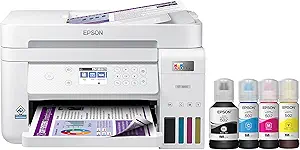
Epson’s feature ecosystem emphasizes user autonomy, diverse connectivity options, and exceptional media versatility. The centerpiece of Epson’s consumer and small-business lineup is the EcoTank platform, which replaces conventional cartridges with high-capacity ink reservoirs, dramatically reducing cost-per-page overhead. Across their workforce and photo lines, Epson units feature advanced mobile integration via the Epson Smart Panel application, direct Wi-Fi, Apple AirPrint, and cloud scanning utilities. Furthermore, Epson often outperforms Xerox in handling specialized media, offering rear-feed trays designed to accommodate thick fine-art paper, canvas, and roll media, supported by sophisticated droplet control engines that precisely optimize ink density for creative professionals.
Xerox counters with an enterprise-grade software and utility suite designed for centralized document management and high-volume corporate productivity. Powered by the proprietary Xerox ConnectKey ecosystem, Xerox devices function essentially as smart workplace assistants, boasting an app gallery that bridges physical paper workflows with major cloud platforms like Microsoft 365, Google Drive, and Dropbox. Xerox excels in document capture and physical output handling, providing options for high-capacity multi-position stapling, booklet making, automated duplex document feeders with dual-sensor rapid scanning, and institutional authentication solutions like RFID badge readers. While Epson focuses on the ink delivery mechanism and media flexibility, Xerox prioritizes document automation, data management, and enterprise-level fleet customization.
Performance
Performance benchmarks between these two manufacturers illustrate the stark technical differences between liquid inkjet and toner-based laser printing. Epson achieves remarkable print quality through its PrecisionCore MicroTFP print chips, which fire microscopic ink droplets without thermal degradation. This yields breathtaking photo reproduction, nuanced gradient transitions, and wide color gamuts that laser devices simply cannot match. However, while Epson’s business-tier inkjets have made tremendous strides in print speed—often matching entry-level lasers—they can still be susceptible to longer drying times on non-porous media and potential printhead clogs if left inactive for extended periods, despite automated maintenance cycles.
Xerox, in stark contrast, is built for raw, uncompromising speed, precision vector rendering, and rapid throughput under heavy multi-page loads. Xerox laser and LED printers deliver exceptionally crisp, laser-sharp monochrome and color text with razor-fine line delineation that resists smudging, moisture, and highlighters instantly upon exiting the fuser unit. Their first-page-out times from deep-sleep states are notably rapid, and their sustained page-per-minute (PPM) metrics consistently outperform standard inkjets in high-yield corporate settings. While Xerox cannot replicate the continuous-tone, gallery-standard color depth of an Epson photo printer, its mechanical components are engineered to process tens of thousands of pages per month with minimal maintenance intervention.
Design
In terms of physical design and spatial integration, Epson prioritizes lightweight construction, compact desk footprints, and intuitive physical user interfaces. Modern EcoTank models feature seamlessly integrated front-facing ink reservoirs with translucent view windows, allowing operators to monitor supply levels at a glance without navigating digital menus. Epson’s industrial design favors curved lines, matte plastics, and space-saving mechanisms such as multi-stage telescoping output trays and combined cassette systems. Although this construction keeps units manageable and affordable, it relies more heavily on lighter composite plastics, which may feel less sturdy than industrial-grade equipment under abusive, high-traffic conditions.
Xerox approaches hardware design with an emphasis on rugged industrial durability, modular scalability, and ergonomic workplace integration. Xerox machines are built atop rigid metal sub-frames designed to handle the thermal demands of high-heat fusers and the continuous mechanical stress of complex paper paths. Their user interfaces typically center around large, adjustable, tablet-style color touchscreens that mimic smartphone operating environments for quick navigation of enterprise menus. While this results in physically heavier, bulkier hardware that demands dedicated office real estate and reinforced surfaces, the trade-off is a high-duty, professional-grade appliance designed to facilitate modular upgrades like additional high-capacity paper decks, finishers, and robust card-reader brackets.