






Apple vs Redragon: Overview
Comparing Apple and Redragon helps you determine which brand is best suited for your needs in Mouse. Both brands offer strong choices depending on your budget and key feature requirements.
Key Features & Comparison
Evaluate factors such as build quality, warranty, customer satisfaction, and total value before making your final purchase choice between Apple and Redragon.
Features
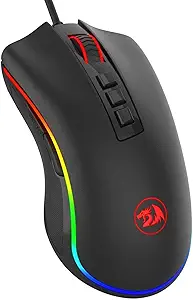
In terms of functional feature sets, Redragon mice offer an abundance of tactile controls and customization capabilities tailored to high-density input scenarios. Typical Redragon models feature anywhere from five to eighteen programmable physical buttons, customizable on-the-fly DPI cycling switches, onboard memory profiles, and adjustable weight tuning systems. Furthermore, Redragon leverages user-configurable RGB lighting frameworks and comprehensive desktop software that allows for granular macro programming, debounce adjustments, and key reassignment, providing an immense degree of operational agency across varied computing and gaming tasks.
Apple fundamentally rejects this traditional button-heavy methodology, opting instead for a singular, continuous multi-touch capacitive surface atop the Magic Mouse. This design eschews physical scroll wheels and discrete buttons entirely in favor of intuitive gesture recognition, enabling users to perform smooth momentum scrolling, horizontal panning, two-finger desktop swiping, and Mission Control navigation. While Apple’s feature set is peerless for creative tasks like video editing timeline navigation and general macOS multitasking, it severely limits users who require discrete right-click-and-drag mechanics or extensive programmable shortcuts, presenting a streamlined yet rigid feature environment compared to Redragon's expansive utility.
Performance
Evaluating performance reveals divergent engineering priorities, with Redragon emphasizing low-latency responsiveness and sensor precision. Redragon equips its mice with modern optical gaming sensors capable of reaching high DPI ceilings (frequently up to 12,000 or 16,000 DPI), high IPS tracking speeds, and 1,000Hz (1ms) USB polling rates over wired, 2.4GHz wireless, or Bluetooth connections. This technical infrastructure minimizes input lag, prevents sensor spin-out, and ensures pixel-perfect accuracy under rapid, erratic hand movements, making their mice inherently well-suited for high-cadence gaming, esports, and precise cursor manipulation.
Apple’s Magic Mouse delivers adequate performance tailored strictly to general desktop productivity and digital navigation rather than high-performance tracking. Utilizing an optical sensor with a conservative tracking resolution and a fixed 90Hz polling rate over standard Bluetooth, the Magic Mouse lacks the precision and rapid input registration demanded by competitive gaming or rapid cursor maneuvering. While the tracking is consistent on smooth desktop surfaces, it lacks the multi-surface tracking capability of high-grade gaming sensors and introduces subtle latency that, while imperceptible in everyday browsing or design tasks, fails to match the snappy responsiveness engineered into Redragon's hardware.
Design
The industrial design of Redragon mice heavily reflects gamer ergonomics, utilizing contoured chassis, aggressive geometry, textured side grips, and distinct thumb rests to optimize comfort during extended computing sessions. Redragon predominantly employs matte-finished ABS plastics engineered to resist sweat and wear, incorporating mechanical microswitches with pronounced, clicky actuation feedback. The form factors are intentionally sculpted to accommodate various grip styles—such as palm, claw, or fingertip—mitigating hand strain through sculpted physical support, although their bulky, angular aesthetic can look distinctly out of place in a modern professional office setting.
Apple, by contrast, pursues an ultra-minimalist, symmetrical silhouette constructed from premium materials including an aluminum unibody chassis and an acrylic top surface. The result is a visually stunning peripheral that seamlessly complements Apple’s broader hardware ecosystem. However, this aesthetic perfection comes at a notable ergonomic expense; the Magic Mouse’s remarkably flat profile offers almost no palm support, forcing users into a claw-like grip that can induce fatigue over long workdays. Additionally, Apple's infamous placement of the Lightning or USB-C charging port on the underside of the mouse renders the device completely unusable while tethered, representing a controversial design compromise where visual purity superseded utilitarian convenience.