






Lenovo vs Corsair: Overview & Brand Philosophy
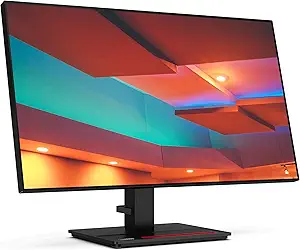
In the expansive world of display technology, Lenovo and Corsair represent two fundamentally different product philosophies, each tailored to specific market demands. Lenovo, an established titan in enterprise computing, approaches the monitor industry with an emphasis on broad accessibility, ergonomics, and productivity. Their extensive catalog spans everything from budget-friendly home-office displays to color-accurate professional monitors within the ThinkVision ecosystem, alongside dedicated gaming displays under the Legion banner. Lenovo's driving philosophy is built on utilitarian reliability, broad compatibility, and mass-market scalability, catering to corporations, creators, and everyday users alike.
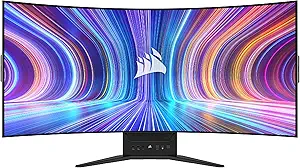
Conversely, Corsair entered the display market from an enthusiast-first perspective. Best known for high-performance PC components and gaming peripherals, Corsair’s monitor lineup—spearheaded by the Xeneon series—targets hardcore gamers, high-end content creators, and hardware purists who demand bleeding-edge performance. Instead of attempting to capture the budget commercial market, Corsair prioritizes premium materials, high refresh rates, and breakthrough form factors. Their philosophy is anchored in technological ambition and deep integration within the broader Corsair ecosystem, treating the monitor as the centerpiece of a dedicated gaming battle-station.
Ultimately, this divergence creates a compelling dynamic for consumers. Lenovo’s strength lies in its sheer breadth, competitive pricing tiers, and decades of display engineering tuned for daily office workflows and balanced gaming. Corsair, by contrast, operates as a boutique performance powerhouse in this segment, utilizing premium panels (including bendable OLED technology) to push the boundaries of what high-end gaming hardware can achieve.
Key Differences & Technological Comparison
When analyzing the technological architectures of both brands, several distinct hardware and feature differences emerge across panel choices, ergonomics, and ecosystem integration.
Panel Technology and Innovation: Lenovo emphasizes volume and visual reliability across widespread panel types, heavily relying on In-Plane Switching (IPS) and Vertical Alignment (VA) panels. While Lenovo has begun rolling out mini-LED and OLED options in select ThinkVision and Legion models, their focus remains on predictable color reproduction, anti-glare coatings, and Eyesafe certifications designed to reduce eye strain during 8-to-10-hour workdays. Corsair, on the other hand, embraces experimental, high-end display panels. Corsair famously made waves with the Xeneon Flex, featuring a bendable LG OLED panel that allows users to manually adjust the display curvature from flat to 800R. Corsair almost exclusively utilizes fast-IPS and OLED technologies, ensuring near-instantaneous response times (down to 0.03ms GtG on OLEDs) and deep black levels tailored for immersive gaming.
Connectivity and Productivity Features: Lenovo dominates the productivity space through robust docking solutions. Many ThinkVision monitors function as complete USB-C and Thunderbolt hubs, delivering high wattage power delivery (up to 100W), daisy-chaining capabilities via DisplayPort-out, integrated RJ45 Ethernet ports, and built-in KVM switches. Corsair monitors also offer KVM functionality and USB-C connectivity, but their ports are configured primarily for high-bandwidth gaming peripherals and seamless switching between a streaming rig and a gaming PC, rather than corporate enterprise infrastructure.
Aesthetics, Stand Design, and Software: Lenovo’s industrial design is sober, minimalist, and functional. ThinkVision models feature compact square bases with integrated smartphone holders, while Legion monitors sport subdued gaming accents that can fit into an office without drawing unwanted attention. Corsair stands out with aggressive, die-cast aluminum stands that take up substantial desk depth, featuring premium integrated cable-management channels. On the software front, Corsair integrates monitors into its iCUE ecosystem, allowing users to tweak monitor settings directly through the OS or synchronize ambient lighting with Corsair peripherals. Lenovo utilizes simpler OSD software (Lenovo Artery) focused on quick layout adjustments and basic color profiles.
Pros & Cons Comparison
Lenovo Monitors
- Pro: Comprehensive Product Range: Offers displays at every price point, from under $100 home-office panels to high-end creator screens.
- Pro: Enterprise-Grade Ergonomics: Highly adjustable stands with exceptional tilt, swivel, and height mechanics alongside blue-light mitigation.
- Pro: Excellent Docking Capabilities: ThinkVision displays offer premier single-cable USB-C and Thunderbolt hub functionality with Ethernet and daisy-chaining.
- Con: Conservative Gaming Lineup: Legion monitors are capable, but rarely match Corsair's technological extremes in refresh rates or exotic panel features.
- Con: Slower Response Times on Budget Panels: Entry-level and mid-tier IPS/VA panels from Lenovo can exhibit noticeable ghosting or motion blur in fast-paced titles.
Corsair Monitors
- Pro: Cutting-Edge Display Panels: Access to ultra-fast OLEDs, 240Hz+ refresh rates, and boundary-pushing designs like the bendable Xeneon Flex.
- Pro: Premium Build Materials: Heavy-duty aluminum stands, immaculate cable-routing systems, and durable, enthusiast-grade packaging.
- Pro: Zero Dead Pixel Warranty: Corsair backs its monitors with an aggressive 3-year warranty that includes zero bright/dead pixel guarantees and burn-in protection for OLEDs.
- Con: Prohibitive Pricing: With virtually no budget or mainstream office options, Corsair screens demand a hefty initial investment.
- Con: Large Stand Footprint: Corsair's signature desk mounts are massive and can consume significant desk depth, often requiring monitor arms for smaller setups.
Performance, Durability & Value Analysis
From a longevity and build-quality standpoint, Lenovo relies on its established track record in the enterprise market. ThinkVision displays are notoriously durable, engineered to withstand constant operation in corporate environments without failure. Their power supply circuits, cooling designs, and structural plastics are designed to survive corporate refresh cycles of 5 years or more. Value-wise, Lenovo is hard to beat for mainstream consumers; whether spending $150 or $500, buyers consistently receive high color fidelity, low energy consumption, and solid mechanical stability relative to the price point.
Corsair takes an enthusiast-grade approach to durability. By leveraging heavy-gauge metals, high-grade polymers, and robust external power bricks, their hardware feels unequivocally premium. However, the high-performance nature of Corsair monitors—especially their OLED models—means long-term panel health requires more vigilance regarding heat dissipation and burn-in management. Corsair addresses this risk by offering one of the most generous 3-year burn-in and dead-pixel policies in the industry, significantly elevating their perceived value for gamers willing to spend $800 to $1,500 on an elite display solution.
Final Verdict: Which Brand Should You Choose?
Your choice between Lenovo and Corsair should be guided entirely by your primary use case, desk space, and financial ceiling.
Choose Lenovo if: You are seeking a high-utility monitor for professional work, coding, general productivity, or budget-to-midrange gaming. If your workflow requires clean single-cable laptop docking, exceptional ergonomics, or you simply need an affordable, dependable display backed by an enterprise computing giant, Lenovo is the smarter, more economical choice.
Choose Corsair if: You are an enthusiast gamer, hardware collector, or creative professional with the budget to invest in premier display technologies. If your priorities include ultra-fast response times, top-tier HDR performance, deep OLED contrast, seamless multi-PC switching, and striking industrial design, Corsair delivers an uncompromised enthusiast experience that outclasses Lenovo's mainstream offerings.
Affordability
When evaluating affordability in the monitor space, Lenovo and Corsair represent fundamentally divergent market philosophies. Lenovo prioritizes volume-driven accessibility and tiered segmentation, offering an extensive catalog that ranges from sub-$100 entry-level productivity displays to competitive mid-tier gaming units under its Legion banner. By leveraging massive supply chain efficiencies and in-house manufacturing synergies, Lenovo consistently delivers functional panel engineering at highly aggressive price points. In contrast, Corsair operates strictly in the premium and enthusiast categories, with its Xeneon monitor lineup purposefully avoiding budget-oriented tiers entirely. Corsair positions its displays around bleeding-edge technologies—such as bendable OLEDs, ultra-high refresh rates, and specialized content-creator color profiles—meaning their absolute barrier to entry is exponentially higher than Lenovo's, often requiring investments exceeding hundreds, if not thousands, of dollars.
The technical trade-offs associated with these distinct pricing strategies dictate entirely different value propositions for the consumer. Lenovo’s budget and mid-range monitors maximize utility per dollar by incorporating standardized IPS and VA panels with modest color gamuts and basic stands, saving premium build materials and high-bandwidth interfaces (like HDMI 2.1) exclusively for their higher-end SKUs. This allows budget-conscious shoppers to acquire functional features like basic FreeSync support or USB-C hub connectivity without paying for enthusiast-grade chassis designs. Corsair, on the other hand, engineers its displays with premium aluminum die-cast stands, advanced thermal cooling solutions to prevent OLED burn-in, integrated Elgato ecosystem compatibility, and exceptional factory color calibration. While Corsair's high cost of entry makes it virtually inaccessible to users seeking cheap utility, it provides a feature-dense package where the cost is justified by niche, high-performance hardware that Lenovo rarely packages together in the lower pricing tiers.
Ultimately, Lenovo is the undisputed leader in sheer, ubiquitous affordability, providing dependable options that fit virtually any consumer budget without demanding significant functional compromises for day-to-day office work or casual gaming. Corsair cannot be considered affordable in the traditional sense, as it entirely lacks an entry-level portfolio; however, it delivers calculated premium value for enthusiasts willing to invest heavily in state-of-the-art display innovations. For buyers seeking the lowest upfront capital expenditure and optimal feature-to-price ratios across the general market, Lenovo is the definitive choice, whereas Corsair remains an investment solely for those looking for elite performance where price is secondary.
Customer Support & Warranty
When evaluating monitor customer support and warranty coverage, Lenovo relies on its robust, enterprise-grade global infrastructure, whereas Corsair positions itself with aggressive, enthusiast-tailored policies. Lenovo offers standard 3-year limited warranties across the majority of its ThinkVision professional lineup and higher-tier Legion gaming displays, featuring dedicated sub-policies such as their zero-bright-dot guarantee for specific commercial panels. Lenovo’s primary strength lies in its sprawling corporate-level support ecosystem, which facilitates straightforward local service, cross-border dispatching, and rapid part swaps via authorized technicians. However, navigating Lenovo’s legacy ticketing queues and tier-one customer service can be frustratingly bureaucratic for individual consumers. In contrast, Corsair—though a newer entrant in the monitor sector—has established a benchmark with an inclusive, enthusiast-friendly 3-year warranty that expressly covers zero dead pixels and, crucially, up to three years of burn-in protection on its flagship OLED models, such as the Xeneon Flex and 27QHD240.
The technical and practical trade-offs become glaringly apparent in policy execution and technical troubleshooting. Corsair bypasses traditional OEM red tape by embedding customer service directly into its community-centric ecosystem, supported by accessible web ticketing, active forum staff, and comprehensive RMA (Return Merchandise Authorization) express replacement pathways. This approach is highly advantageous for gamers who require definitive, written protection against organic panel degradation. Conversely, Lenovo's warranty framework, while technically stable, often leaves OLED burn-in policies vaguely categorized under "normal wear and tear" unless an upgraded Premier Support tier is explicitly purchased. For enterprise deployments and everyday productivity, Lenovo provides the assurance of global scalability, comprehensive documentation, and commercial stability. However, for specialized, high-investment gaming hardware where rapid direct-to-vendor communication and explicit panel protection are paramount, Corsair delivers a superior, consumer-protective ownership experience.
Picture Quality
When evaluating picture quality, Lenovo and Corsair approach display engineering from fundamentally different market philosophies, resulting in distinct visual profiles. Lenovo casts a wide net, offering everything from business-grade sRGB-accurate panels in their ThinkVision line to mid-and-high-tier IPS gaming displays under the Legion banner. Lenovo excels in out-of-the-box color fidelity, factory calibration, and image stability. Their professional and productivity monitors frequently boast Delta E < 2 color accuracy, uniform backlighting, and wide color gamut coverage across DCI-P3 and Adobe RGB spectrums. This engineering focus prioritizes text clarity, natural color reproduction, and low-glare matte finishes that minimize eye strain during long hours. However, Lenovo’s mainstream lineup can struggle with contrast ratios, particularly in their IPS configurations, where typical IPS glow and lifted black levels limit true high dynamic range (HDR) performance unless stepping up to their scarce, premium Mini-LED models.
Conversely, Corsair’s monitor engineering is almost exclusively gaming-centric and heavily tilted toward bleeding-edge display technology, specifically OLED and advanced Fast-IPS implementations through their Xeneon series. Corsair delivers a masterclass in dynamic range and peak contrast, particularly with flagships like the Xeneon Flex and Xeneon 27QHD240, which leverage LG Display’s WOLED panels to achieve infinite contrast, per-pixel local dimming, and absolute true blacks. Where Lenovo optimizes for chromatic precision in illuminated office environments, Corsair targets cinematic immersion, vivid HDR highlights, and instantaneous pixel response times with near-zero motion blur. Corsair panels feature exceptionally wide color gamuts that produce intense, saturated visuals, though they occasionally lean toward an over-saturated profile out of the box that requires user-end calibration for color-critical creative workflows. Furthermore, subpixel layouts on their OLED models can introduce subtle text fringing, putting them at a disadvantage against Lenovo for standard desktop productivity.
The practical trade-offs between the two brands ultimately hinge on ambient viewing conditions and content type. Lenovo offers the more reliable, cost-effective picture quality for professional creators, coders, and general office users who require pristine static-image rendering, uniform edge-to-edge brightness, and zero risk of burn-in. Corsair represents the superior choice for high-end consumers demanding unrivaled contrast, deep shadow detail, and punchy HDR for gaming and media consumption. While Lenovo provides a stable, highly calibrated, but conservative visual experience, Corsair delivers an aggressive, high-contrast, visually arresting picture that sacrifices some fine text legibility and sustained full-screen brightness to achieve unmatched depth and vibrancy.
Build Quality & Durability
When evaluating build quality and engineering resilience, Lenovo and Corsair represent two distinct design philosophies: corporate-grade industrial utility versus high-end enthusiast performance. Lenovo leverages decades of enterprise hardware expertise across its ThinkVision business displays and Legion gaming monitors. ThinkVision units are virtually unmatched in pragmatic durability, characterized by thick, matte-textured plastics that resist scuffs, robust internal metal chassis, and legendary stands that offer smooth, tension-balanced articulation without wobbling. The gaming-focused Legion lineup adopts a similarly rugged approach, utilizing reinforced, heavyweight tripod bases and rigorous thermal venting designs. Lenovo’s strict adherence to commercial TCO (Total Cost of Ownership) standards means their monitors undergo extensive drop, vibration, and environmental testing, resulting in products engineered to endure years of relentless, continuous daily operation with negligible cosmetic or structural degradation.
Conversely, Corsair approaches monitor engineering through a boutique, gamer-centric lens, prioritizing premium materials, innovative form factors, and striking aesthetic polish. Best exemplified by their Xeneon and Xeneon Flex lines, Corsair monitors boast cast-aluminum desktop stands that offer exceptional structural rigidity and an instantly recognizable, modern industrial feel. The engineering complexity is significantly higher on Corsair’s flagship units—particularly the Flex, which incorporates an intricate mechanical linkage that allows users to manually bend the panel from flat to an 800R curve. However, this higher mechanical complexity inherently introduces more potential points of wear compared to Lenovo’s monolithic structures. While Corsair excels in using premium-touch materials and high-spec passive thermal cooling solutions that preserve panel life, the tight tolerances of their bespoke, movable designs demand gentler handling than Lenovo’s workhorse alternatives.
Ultimately, the trade-off in build quality and longevity comes down to utilitarian resilience versus high-performance refinement. Lenovo is the clear winner for users seeking no-nonsense durability, structural reliability, and low mechanical failure rates over prolonged operational lifespans, backed by reliable standardized internal power components. Corsair, on the other hand, delivers a markedly more luxurious desktop presence with heavier, all-metal structural support and cutting-edge ergonomic innovation, but at the cost of delicate, complex moving parts that may require more cautious consumer ownership. For pure physical abuse tolerance and dependable enterprise-level structural integrity, Lenovo takes the lead, while Corsair captures the market for premium-feeling materials and advanced mechanical execution.