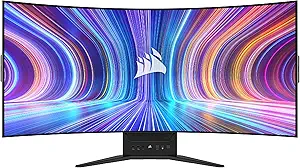








GigaByte vs Corsair: Overview & Brand Philosophy
When shopping for a modern display, consumers frequently encounter GigaByte and Corsair—two hardware giants that approached the monitor sector from vastly different operational philosophies. GigaByte, traditionally an engineering-driven Taiwanese manufacturer famous for motherboards and graphics cards, expanded into monitors with an aggressive, feature-first approach. Their monitor division focuses on democratizing premium performance, bringing high refresh rates, quantum dot enhancements, and built-in KVM switches to everyday gamers and productivity users at extremely competitive price points.
Corsair, an American heavyweight renowned for premium peripherals, high-end PC cases, and memory components, entered the monitor market through a more boutique, innovation-centric lens. Rather than flooding the market with dozens of SKUs covering every budget segment, Corsair prioritizes flagship experiences, bespoke industrial design, and integration with its expansive iCUE software ecosystem. Their philosophy revolves around premium build quality, novel form factors (such as flexible OLEDs), and catering directly to enthusiasts willing to pay a premium for seamless desktop aesthetics and top-tier panel performance.
Key Differences & Technological Comparison
The primary differentiation between GigaByte and Corsair lies in their product segmentation, panel variety, and hardware utility. GigaByte operates across both budget and upper-midrange tiers, primarily utilizing rapid IPS and VA panels from mainstream panel manufacturers, as well as high-end QD-OLED panels through its premium AORUS sub-brand. One of GigaByte's signature technical achievements is the universal integration of hardware KVM (Keyboard, Video, Mouse) switches across standard gaming models, allowing multi-device professionals to switch seamlessly between a work laptop and a gaming desktop without auxiliary hardware.
In contrast, Corsair focuses heavily on high-end niche displays, notably leading the market with boundary-pushing designs like the Xeneon Flex—a bendable 45-inch OLED display developed in partnership with LG Display. Corsair monitors routinely feature superior ergonomic engineering, utilizing low-profile aluminum stands, integrated cable routing channels, and standard mounting threads on top of the stands for Elgato streaming gear (microphones, cameras, or key lights). Furthermore, Corsair typically pushes for longer factory burn-in warranties on its OLED units and integrates zero-dead-pixel guarantees that exceed the standard coverage provided by budget-focused rivals.
Pros & Cons Comparison
GigaByte: Pros
- Exceptional price-to-performance ratio across budget and mid-tier brackets.
- Widespread inclusion of built-in hardware KVM switches for multi-device workflows.
- Broad product portfolio spanning ultra-affordable 1080p esports screens to 4K QD-OLEDs.
- Comprehensive OSD (On-Screen Display) features with deep software-level customization via OSD Sidekick.
GigaByte: Cons
- Inconsistent stand quality and basic chassis materials on lower-tier models.
- Occasional quality control variance, including backlight bleed on entry-level IPS panels.
- Customer support and RMA turnaround times can be slower compared to premium American brands.
Corsair: Pros
- Industry-leading industrial design, ultra-slim profiles, and robust aluminum desk stands.
- Native integration with streaming hardware (built-in 1/4-inch Elgato Multi-Mount threads).
- Pioneering display technology, including bendable OLED panels and high-refresh ultrawides.
- Superior warranty terms, including comprehensive 3-year burn-in and zero-dead-pixel policies on flagship models.
Corsair: Cons
- Significantly higher cost of entry; few to no budget-friendly choices.
- Limited catalog size compared to traditional panel manufacturers.
- OSD features heavily encourage reliance on the proprietary Corsair iCUE desktop software.
Performance, Durability & Value Analysis
From a raw performance standpoint, both brands extract the maximum potential from their respective panels, but their target audiences yield different results. GigaByte panels excel in motion clarity per dollar spent, providing solid overdrive tuning, low input latency, and strong color accuracy right out of the box. However, long-term durability on GigaByte's standard lineup is reflective of its price: high usage of plastics, lightweight stands that transmit desk wobble, and varying panel uniformity. In contrast, Corsair monitors demonstrate exceptional physical durability, utilizing aircraft-grade aluminum, rigid articulation hinges, and premium thermal dissipation solutions that promote panel longevity—particularly crucial for mitigating heat buildup on high-refresh OLED surfaces.
When assessing overall consumer value, GigaByte remains the undisputed champion for the majority of mainstream buyers. A user can secure a feature-packed 1440p or 4K IPS display from GigaByte for hundreds less than a Corsair equivalent without sacrificing core gaming benchmarks like response time or refresh rate. Corsair, however, justifies its steeper valuation not on raw panel metrics alone, but on the refined ecosystem experience: premium aesthetics, studio-friendly streaming modularity, and superior long-term warranty peace of mind.
Final Verdict: Which Brand Should You Choose?
Choose GigaByte if: You want the absolute highest performance, fastest refresh rate, and highest resolution your money can buy without paying for aesthetic premiums. GigaByte is the ideal brand for pragmatic PC gamers, hybrid remote workers who can leverage built-in KVM switches, and budget-conscious enthusiasts looking for high-end features like QD-OLED without the flagship price tag.
Choose Corsair if: You are an enthusiast, content creator, or streamer building a cohesive, high-end desk setup. Corsair is the correct choice if you demand exceptional industrial design, want plug-and-play mounting compatibility with cameras and lights, or wish to invest in avant-garde form factors like flexible ultrawides backed by comprehensive dead-pixel and burn-in warranties.
Affordability
When evaluating affordability in the monitor space, Gigabyte firmly positions itself as a market leader in price-to-performance engineering, whereas Corsair operates as a premium lifestyle brand where budget considerations are secondary. Gigabyte has masterfully captured the entry-level and mid-range enthusiast segments by offering high-refresh-rate IPS and VA panels with aggressive specifications—such as 144Hz to 240Hz refresh rates, QHD resolutions, and wide color gamuts—at price points that undercut legacy competitors. By utilizing standardized, cost-effective chassis designs, outsourced panel sourcing (often from AU Optronics or Innolux), and streamlined internal scalers, Gigabyte passes substantial savings directly to consumers without gutting essential gaming metrics like low input lag and FreeSync compatibility.
Conversely, Corsair largely bypasses the budget monitor category entirely, focusing its engineering and product catalog on high-end, halo-tier displays. Monitors in Corsair’s Xeneon lineup command premium prices that reflect bespoke industrial design, specialized aluminum die-cast stands, integrated iCUE ecosystem controls, and cutting-edge panel implementations, such as bendable OLEDs (Xeneon Flex) and ultra-fast Quantum Dot IPS displays. Corsair’s elevated cost of entry is justified by enterprise-level build quality, comprehensive three-year zero-dead-pixel warranties, and robust I/O hubs that feature USB-C power delivery and integrated cable management channels—luxuries that Gigabyte routinely omits on its value-oriented models to keep retail prices accessible.
Ultimately, the trade-off regarding affordability between these two brands comes down to pragmatic utility versus luxury finishing. Gigabyte is the clear winner for cost-conscious consumers, esports players, and general gamers who demand competitive visual specifications per dollar, accepting modest compromises in plastic-heavy construction, basic ergonomics, and barebones on-screen displays. Corsair caters to a distinct demographic willing to pay a premium markup for elevated aesthetic integration, superior materials, and bleeding-edge panel technology, making it an aspirational choice rather than a practical recommendation for buyers strictly prioritizing financial economy.
Customer Support & Warranty
When evaluating the post-purchase experience and long-term ownership security in the monitor space, Corsair demonstrates a distinct engineering-first ethos, particularly regarding specialized panel technologies. Corsair’s standard monitor lineup is backed by a robust three-year comprehensive warranty, which notably includes a market-leading "Zero Dead Pixel" policy across its high-end portfolio. Furthermore, for their premium OLED and bendable displays (such as the Xeneon series), Corsair directly addresses the primary structural limitation of organic light-emitting panels by integrating a dedicated three-year burn-in and image retention warranty. This coverage is complemented by responsive domestic support tiers, intuitive online ticket tracking, and often the provision of advanced RMA (Return Merchandise Authorization) services, where a replacement unit is dispatched before the defective one is returned. From a technical and investment-protection perspective, Corsair’s policies mirror the high price point and experimental nature of their premium panel engineering.
Gigabyte similarly offers a competitive three-year standard warranty that encompasses most of its Ultra-Durable and AORUS gaming displays, covering the internal mainboard, power delivery systems, and the display panel itself against electrical and manufacturing defects. However, Gigabyte’s dead pixel policy features technical nuances that introduce practical trade-offs for consumers; their coverage frequently adheres to strict ISO fault-class standards requiring a minimum cluster of bright or dark sub-pixels before qualifying for replacement, unless purchasing specific flagship AORUS models with localized "Zero Bright Dot" guarantees. While Gigabyte’s feature sets—such as integrated KVM switches and tactical OSD firmware—are class-leading in the budget to mid-range tier, their customer support infrastructure has historically faced criticism regarding RMA turnaround times, decentralized communication channels, and regional inconsistencies in handling repairs versus direct replacements.
Ultimately, the choice between the two brands reflects the consumer's tolerance for logistical friction versus upfront product cost. Corsair’s technical support ecosystem offers a superior, low-risk safety net, making it the preferred choice for enthusiasts investing heavily in cutting-edge OLED or high-refresh-rate ultrawide monitors where panel degradation or minor pixel failures are high-consequence issues. Conversely, Gigabyte delivers exceptional value for money in hardware specifications, but buyers must accept a more rigid, bureaucratically demanding warranty claims process. For users prioritizing guaranteed panel perfection, swift resolution cycles, and explicit protection against modern display failure modes like burn-in, Corsair establishes a decisive competitive advantage over Gigabyte.
Picture Quality
When evaluating picture quality between Gigabyte and Corsair, the fundamental distinction lies in their targeting of display panel technologies and factory calibration philosophies. Gigabyte primarily built its reputation in the value-to-midrange market, leveraging standard IPS and VA panels with high refresh rates. While their higher-tier AORUS sub-brand features Quantum Dot layers (such as in the FI32Q-X) for wide DCI-P3 color gamuts, their mainstream lineup often relies on cost-effective panels that exhibit average contrast ratios (around 1000:1 for IPS) and susceptible IPS glow. In contrast, Corsair entered the monitor market targeting the enthusiast and premium tier, heavily investing in state-of-the-art OLED panels, developed in partnership with LG Display. Models like the Corsair Xeneon Flex and Xeneon 27QHD240 deliver self-lit pixel precision, rendering true infinite contrast ratios, pitch-black deep levels, and imperceptible haloing that fundamentally surpass Gigabyte’s predominantly edge-lit or conventional backlighting implementations.
Color performance, brightness, and HDR capabilities further delineate the two manufacturers' engineering strengths and compromises. Corsair's IPS panels (such as the standard Xeneon 32QHD165) and their newer OLEDs consistently exhibit meticulous factory color profiling, broad Adobe RGB coverage, and superior gray-scale tracking out of the box, making them reliable for mixed-use visual workloads and gaming without extensive user calibration. However, Corsair's OLED displays struggle with peak full-field white brightness due to aggressive Automatic Brightness Limiting (ABL), an intrinsic drawback in bright room environments. Conversely, Gigabyte’s conventional high-end LED-backlit monitors often achieve significantly higher sustained fullscreen nit levels, granting them an edge in well-lit productivity environments. Where Gigabyte falters is in its entry-level tuning, which can suffer from oversaturated reds and greens in "FPS" profiles and limited local dimming zones that yield a subpar, blown-out HDR experience compared to Corsair's native per-pixel HDR execution.
Ultimately, practical trade-offs come down to clarity, panel longevity, and the intended use case. Gigabyte delivers reliable, high-density text clarity via standard RGB subpixel layouts, making their displays versatile for mixed productivity and gaming without risk of permanent image retention. Corsair’s OLED flagships feature RWGB subpixel layouts, which can introduce subtle text fringing in desktop applications, but they compensate by providing unrivaled motion clarity with 0.03ms response times, eliminating the pixel overshoot and inverse ghosting sometimes present in Gigabyte’s overdrive-tuned IPS and VA panels. For absolute color accuracy, deep contrast, and cutting-edge HDR visual fidelity, Corsair holds the engineering advantage; for uniform brightness, robust productivity sharpness, and superior visual-fidelity-per-dollar across the mainstream spectrum, Gigabyte remains the more utilitarian and cost-effective choice.
Build Quality & Durability
When assessing build quality and engineering integrity, Corsair and Gigabyte approach the monitor market from starkly different manufacturing philosophies. Corsair positions its displays, particularly within the premium Xeneon lineup, as high-end lifestyle investments, employing robust industrial design that leans heavily on die-cast aluminum alloys and rigid, weighted desktop footprints. The chassis tolerances on Corsair monitors are exceptionally tight, with minimal panel flex, zero creak along the seams, and an ultra-sturdy, low-profile stand system that effectively eliminates micro-wobble during aggressive keystrokes. In contrast, Gigabyte targets the price-to-performance sweet spot, utilizing cost-effective high-impact ABS plastics across the majority of its G-Series and mid-tier AORUS frames. While their higher-tier AORUS displays introduce more aggressive metal accents and reinforced internal backings, Gigabyte displays generally feature lighter, more utilitarian shells that exhibit more flex along the outer bezel bezels and rely on thicker plastic housings that can produce thermal expansion creaks during the display's warm-up cycles.
From an internal durability and thermal perspective, Corsair often holds a distinct edge, directly impacting panel longevity. Corsair integrates sophisticated passive heat dissipation designs—such as custom-engineered, fanless copper heat sinks and graphene layers—which are critical for mitigating image retention and pixel degradation on high-heat components like fast IPS panels and QD-OLED modules. This thermal efficiency underpins Corsair’s aggressive burn-in warranties and higher MTBF (Mean Time Between Failures) ratings. Gigabyte counters by integrating functional internal hardware components like built-in power bricks and integrated KVM microcontrollers, which streamline cable management but inevitably introduce concentrated thermal zones inside the plastic chassis. Furthermore, while Gigabyte’s joystick-driven OSDs and hardware controls are functionally responsive, their physical stand articulation mechanisms (tilt, swivel, and height adjustments) employ lighter-duty spring assemblies compared to Corsair's silky, counterbalanced industrial hinges, leading to potential premature sag or looser tolerances over multi-year operational cycles.
The consumer trade-offs between the two brands ultimately balance cost against longevity and structural resilience. Corsair’s reliance on metal-dominant construction, enterprise-grade thermal management, and durable I/O ports—which feature reinforced internal solder joints to prevent port sag over frequent cable swaps—makes it the superior long-term choice for power users, albeit at an aggressively premium price point. Conversely, Gigabyte offers acceptable, workaday durability that easily survives standard static desk setups without issue. While Gigabyte may compromise on tactile luxury, utilizing more consumer-grade plastics and basic mechanical articulation, its engineering choices are smartly tailored to prioritize internal panel performance over exterior armor, making it a highly practical alternative for budget-conscious buyers willing to sacrifice structural prestige for sheer frame rates.