






Microsoft vs Contour Design: Overview
Comparing Microsoft and Contour Design helps you determine which brand is best suited for your needs in Mouse. Both brands offer strong choices depending on your budget and key feature requirements.
Key Features & Comparison
Evaluate factors such as build quality, warranty, customer satisfaction, and total value before making your final purchase choice between Microsoft and Contour Design.
Features
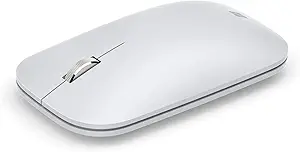
Microsoft mice emphasize streamlined functionality, seamless operating system integration, and intuitive utility. Depending on the model, Microsoft peripherals feature dedicated Windows shortcut buttons, tactile metal scroll wheels, and multi-device Bluetooth pairing through Swift Pair technology. Devices like the Microsoft Surface Precision Mouse incorporate customizable side buttons and smart magnetic detents in the scroll mechanism, allowing users to toggle between smooth and ratcheted scrolling on the fly. Software customization is handled cleanly via the Microsoft Mouse and Keyboard Center, delivering reliable macro creation and sensitivity adjustments tailored precisely for enterprise productivity suites.
Contour Design prioritizes biomechanical adaptability and physical interaction over digital convenience features. The flagship RollerMouse lineup, for example, integrates a long cylindrical bar that slides and rolls simultaneously, providing dual-axis tracking, alongside physical quick-access buttons for one-touch copy, paste, left click, and double click without requiring keyboard shortcuts. Furthermore, Contour Design hardware frequently incorporates adjustable keyboard risers, modular palm supports made from antibacterial leatherette, and hardware-level DPI toggle switches directly on the device, eliminating the need to install third-party drivers in strict enterprise IT environments where software installations are locked down.
Performance
From a tracking performance and sensor perspective, Microsoft leans heavily on its proprietary BlueTrack technology, which offers consistent, forgiving tracking across challenging surfaces such as granite, wood, and rough textiles where traditional optical and laser sensors struggle. Polling rates and latency in Microsoft mice are optimized for standard 60Hz to 120Hz office displays, offering smooth cursor glide, minimal jitter, and outstanding battery longevity that frequently stretches from several months to two years depending on the model. While not engineered for low-latency competitive gaming, Microsoft mice demonstrate exceptional, predictable sensor consistency in multi-monitor spreadsheet and creative workflows.
Contour Design approaches performance through the lens of movement efficiency and kinetic precision rather than raw sensor speed. Because devices like the RollerMouse and Unimouse keep the hand centered or in an unpronated vertical plane, the tracking efficiency is measured by how little the user must move their shoulder and wrist to cross a multi-screen workspace. Contour uses high-grade optical sensors capable of up to 4,000 DPI, which allows slight finger gestures to span ultra-wide displays effortlessly. While there is an initial learning curve that can temporarily slow down fine cursor targeting, the long-term stamina gains and reduction in physical fatigue significantly outperform standard mouse designs during extended 10-hour working shifts.
Design
Microsoft adheres to a sleek, modern, and minimalist design aesthetic that mirrors the hardware language of its Surface computer line. Their mice feature clean curves, matte finishes, and neutral colorways that integrate seamlessly into contemporary corporate workstations. When Microsoft does tackle ergonomics—such as with the Sculpt Ergonomic or Surface Precision Mouse—they utilize familiar teardrop contours, elevated thumb rests, and soft-touch rubber grips that subtly correct wrist pronation without alienating the user. The structural engineering is robust, compact, and highly portable, making them ideal companions for hybrid workers alternating between home and office.
Contour Design abandons conventional aesthetics entirely in pursuit of pure biomechanical intervention. The RollerMouse sits directly in front of the keyboard, featuring broad, padded palm rests made from high-density memory foam to eliminate micro-movements of the forearm and shoulder. For their traditional vertical models, such as the Unimouse, Contour engineered an articulated body with fully adjustable vertical tilt angles (from 35 to 70 degrees) and an expanding, multi-directional thumb rest. The build quality feels distinctly industrial, medical-grade, and anchored; they are substantial desktop fixtures meant to stay stationary, offering unmatched anatomical accommodation at the expense of portability.
Compare current retail pricing, active promotions, and verified stock availability directly from authorized stores: