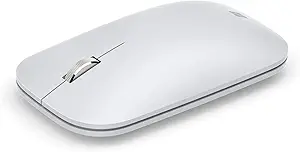







HyperX vs Microsoft: Overview
Comparing HyperX and Microsoft helps you determine which brand is best suited for your needs in Mouse. Both brands offer strong choices depending on your budget and key feature requirements.
Key Features & Comparison
Evaluate factors such as build quality, warranty, customer satisfaction, and total value before making your final purchase choice between HyperX and Microsoft.
Features
HyperX equips its mice with technical features directly aligned with competitive gaming advantages. Their mice typically showcase onboard memory capable of storing customized profiles, intricate RGB lighting arrays controllable through the HyperX NGENUITY software suite, and low-friction 100% PTFE skates that ensure frictionless gliding across cloth and hard surfaces. On the hardware level, features such as TTC Golden micro switches or custom optical micro switches emphasize debounce customization, tactile feedback, and endurance ratings often exceeding 60 to 80 million clicks. While the software can occasionally feel barebones compared to enterprise suites, it focuses squarely on zero-latency mapping, DPI stepping, and sensor calibration.
Microsoft takes an entirely different path with its feature matrix, concentrating on productivity enhancement and multi-system control. Rather than esports-centric software, Microsoft leverages the Mouse and Keyboard Center to deliver deep integration with Windows, offering customizable gesture controls, horizontal scrolling, and dedicated smart switching across multiple PCs via Bluetooth. Premium options like the Microsoft Surface Precision Mouse feature tactile-to-smooth magnetic scroll wheel toggles and rechargeable lithium-ion cells designed for months of work rather than days of gaming. Microsoft avoids the RGB gamer aesthetic, opting instead for productivity-boosting capabilities like cloud-synced shortcuts and frictionless pairing that make everyday workflow navigation intuitive.
Performance
In terms of raw input performance, HyperX is significantly superior, employing high-end optical sensors such as custom PixArt variants (including the PMW3389 and PAW3335) that offer true tracking up to 16,000 DPI and beyond. These sensors feature zero hardware acceleration, minimal lift-off distances, and tracking speeds rated over 400 IPS (inches per second), ensuring that rapid swipes register with pixel-perfect accuracy. Coupled with standard 1,000Hz polling rates (1ms report rates) and optimized 2.4GHz wireless transmission systems, HyperX mice eliminate latency bottlenecks, delivering the instantaneous responsiveness demanded in competitive first-person shooters and fast-paced tracking scenarios.
Microsoft's performance metrics are calibrated for standard desktop environments rather than high-velocity gaming. Utilizing proprietary BlueTrack technology or conventional low-power optical engines, Microsoft mice excel at tracking on unconventional surfaces, including clear glass, granite, and untreated wood, where traditional gaming sensors might struggle. However, their polling rates are conventionally capped at 125Hz to 250Hz to conserve battery life, introducing perceptible latency in fast-motion tracking and gaming. For daily spreadsheets, web navigation, and creative timelines, Microsoft’s motion tracking is remarkably smooth and steady, but it lacks the acceleration-free fidelity and micro-adjustment capability native to HyperX’s hardware.
Design
Design-wise, HyperX concentrates heavily on weight optimization and functional handling under intense physical engagement. Many modern HyperX designs, such as the Pulsefire Haste series, employ ultra-lightweight chassis designs—frequently utilizing perforated honeycomb shells or thin-wall structural engineering—to bring mouse weight down to between 50 and 60 grams. This focus on mass reduction significantly mitigates wrist fatigue during repetitive, rapid arm movements. Their contours generally adopt symmetrical ambidextrous or mild ergonomic profiles paired with tactile side grips, ensuring a versatile hold that accommodates claw, fingertip, and palm grip styles with equal stability.
Microsoft’s design heritage is rooted in industrial minimalism and medical-grade ergonomic support. Icons like the Microsoft Sculpt Ergonomic Mouse and the Surface Precision Mouse showcase sculpted thumb rests, neutral-angle wrist pronation slopes, and premium soft-touch materials engineered to prevent repetitive strain injuries (RSI) during 8-to-10-hour workdays. Weight reduction is not a priority here; Microsoft mice are deliberately weighted to provide substantial, deliberate resistance during linear desktop movements. While Microsoft mice would feel heavy, cumbersome, and restrictive in competitive gaming, their structural contours and finish represent the pinnacle of ergonomic architecture for desk-bound professionals.
Compare current retail pricing, active promotions, and verified stock availability directly from authorized stores: