


HP vs Corsair: Overview & Brand Philosophy
When selecting a desktop monitor, brand philosophy dictates everything from panel tuning to aesthetic integration. HP (Hewlett-Packard) is a titan of the computing world, commanding decades of legacy across enterprise, consumer, and creative spaces. In the display sector, HP positions itself as an all-encompassing solutions provider. Its portfolio spans budget-conscious home office displays, ergonomic enterprise workhorses (such as the E-Series), color-accurate creative monitors (the Z-Series), and enthusiast gaming panels under the OMEN and HyperX banners. HP’s engineering prioritizes universal accessibility, reliability, and functional minimalism designed to integrate seamlessly into corporate deployments or home workstations.
Conversely, Corsair approaches the display market through the focused lens of high-performance gaming and enthusiast hardware. Known primarily for its premium PC components, power supplies, and peripherals, Corsair entered the monitor arena relatively recently with its "Xeneon" family of displays. Rather than attempting to serve every budget tier or enterprise procurement office, Corsair targets power users, esports competitors, and boutique workspace builders. Their brand philosophy revolves around cutting-edge panel technology—such as high-refresh Fast IPS and bendable OLEDs—paired with modular ecosystem integration, aggressive styling, and deep desktop customization options.
The contrast between the two brands highlights a classic divergence in consumer hardware: the expansive, versatile utility of an established hardware conglomerate versus the concentrated, enthusiast-first engineering of a high-end gaming and lifestyle brand. While HP aims to offer a reliable screen for every possible desk and budget, Corsair strives to make every monitor an aspirational centerpiece for the advanced user.
Key Differences & Technological Comparison
The technological architectures of HP and Corsair monitors reflect their diverging target demographics, particularly in panel selection, aesthetic design, connectivity, and ecosystem integration.
Panel Diversity vs. Enthusiast Focus: HP offers an extraordinarily wide range of panel technologies. From standard 60Hz Twisted Nematic (TN) and Vertical Alignment (VA) panels for basic productivity to elite In-Plane Switching (IPS) and mini-LED arrays on their Z-Series and OMEN lines, HP covers the entire spectrum. Corsair, by contrast, restricts its catalog exclusively to the high-performance tier. The Xeneon lineup features ultra-fast IPS panels and cutting-edge OLEDs (including revolutionary flexible displays developed in partnership with LG Display), focusing purely on low response times, wide color gamuts (DCI-P3), and extreme refresh rates up to 240Hz.
Industrial Design and Ergonomics: HP monitors, particularly the enterprise and OMEN lines, feature clean, utilitarian profiles. HP emphasizes space-saving footprints, integrated cable management, and extensive ergonomic adjustments (height, tilt, swivel, and pivot). Corsair displays feature a distinct, industrial aesthetic characterized by robust, die-cast aluminum stands and ultra-wide profiles. Notably, Corsair integrates standard 1/4-inch multi-mount threads directly atop their monitor stands, allowing content creators to mount cameras, microphones, or lighting directly to the display.
Connectivity and Peripheral Integration: HP excels in office productivity connectivity. Many of its business and creator displays double as full USB-C docking stations, delivering up to 100W Power Delivery, integrated gigabit Ethernet (RJ-45), and daisy-chaining capabilities via DisplayPort-out. Corsair focuses heavily on high-bandwidth gaming interfaces, integrating HDMI 2.1, DisplayPort 1.4, and USB-C display connectivity, alongside tight integration with Corsair’s iCUE software ecosystem, allowing users to control display settings directly via desktop software or an Elgato Stream Deck.
Pros & Cons Comparison
HP Monitors
- Pros:
- Comprehensive catalog accommodating budgets from under $100 to high-end professional tiers.
- Exceptional enterprise docking features (high-wattage USB-C, RJ-45 LAN, KVM switches).
- Factory-calibrated color accuracy available on professional Z-Series displays.
- Energy-efficient designs with extensive global enterprise support and warranties.
- Cons:
- Enthusiast gaming options (OMEN) can lack the cutting-edge panel innovation seen in boutique brands.
- Entry-level models often use cheaper plastic chassis and limited tilt-only stands.
- OSD (On-Screen Display) controls can be clunky on lower-tier consumer models.
Corsair Monitors
- Pros:
- Pioneering display technology, including high-refresh OLEDs and innovative bendable panels.
- Exceptional build quality with heavy-duty metal stands and creator-friendly mounting threads.
- Deep integration with Corsair iCUE and Elgato ecosystem for software-based display control.
- Standard inclusion of high-bandwidth inputs like HDMI 2.1 and comprehensive 3-year zero-dead-pixel warranties.
- Cons:
- Prohibitively expensive; zero presence in the budget or entry-level productivity space.
- Large, wide stand designs occupy significant physical desktop depth.
- Limited utility for pure office environments where gaming styling and ultra-high refresh rates are redundant.
Performance, Durability & Value Analysis
From a performance perspective, evaluating these brands requires separating their target applications. In gaming and enthusiast media consumption, Corsair routinely outperforms HP's mid-tier offerings by delivering near-instantaneous pixel response times, lower input lag, and superior HDR implementations, particularly on their OLED models. However, HP's top-tier OMEN monitors compete admirably in raw frame delivery, while their Z-Series displays drastically outperform Corsair in static color consistency, delta-E accuracy, and gray-scale tracking required for professional print and video production. In terms of durability, both brands employ high-grade components, but Corsair's premium pricing reflects an uncompromising build standard using heavy metals over molded plastics, backed by a robust 3-year zero-burn-in and zero-dead-pixel guarantee on its flagship screens.
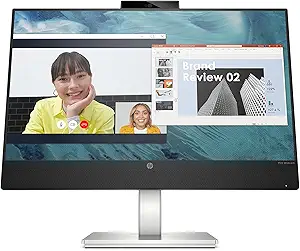
Value assessment heavily favors HP when measured by market utility per dollar. An enterprise or hybrid worker can purchase an HP monitor featuring an integrated webcam, noise-canceling microphone array, and 65W USB-C hub for a fraction of the cost of a Corsair display. HP delivers maximum productivity value at scale. Corsair’s value proposition, meanwhile, is rooted entirely in premium enthusiast satisfaction. While Corsair displays carry steep price tags, the inclusion of multi-mount rigging, bleeding-edge panel technology, and dual-ecosystem software utility offers justifiable value to gamers, streamers, and advanced power users who would otherwise purchase separate monitor arms and docking accessories.
Final Verdict: Which Brand Should You Choose?
Your choice between HP and Corsair depends directly on your primary use case, your desk setup requirements, and your budget parameters.
Choose HP if: You are outfitting a home office, purchasing hardware for enterprise use, or need an affordable, dependable daily driver. HP is the superior choice for professionals who need clean ergonomics, built-in USB-C docking hubs, and factory-calibrated color accuracy for design work. It is also the only choice between the two if your budget is below $400, providing excellent functional value across conventional refresh rates and screen sizes.
Choose Corsair if: You are a hardcore gamer, enthusiast content creator, or streamer building a high-end workstation. Corsair is worth the premium investment if you demand top-tier visual performance, ultra-fast refresh rates (144Hz to 240Hz), OLED black levels, or innovative features like bendable displays. If you already utilize Corsair peripherals or Elgato streaming gear, the seamless iCUE desktop integration makes their monitors a natural, high-performance command center.
Affordability
When evaluating affordability, HP and Corsair represent fundamentally different market philosophies within the monitor landscape. HP casts an expansive net, mastering economies of scale to dominate the budget and mid-tier segments. Through its ubiquitous Pavilion, everyday V-Series, and mainstream OMEN/Victus gaming lineups, HP engineers displays that target distinct, accessible price brackets ranging from sub-$100 productivity panels to aggressively priced 1440p gaming monitors. The trade-off for HP’s entry-level affordability lies primarily in materials and feature compromises—utilizing tilt-only plastic chassis, modest sRGB color coverage, lower peak nits, and standard refresh rates to minimize production costs. However, for everyday office workers, students, and budget-conscious gamers, HP delivers unbeatable cost-per-screen-inch and reliable, baseline engineering without superfluous overhead.
Conversely, Corsair operates almost entirely within the enthusiast and premium tier, meaning their definition of "affordability" is anchored in high-end value retention rather than a low barrier to entry. Corsair's Xeneon portfolio eschews bare-bones budget displays, focusing instead on advanced IPS, Fast IPS, and cutting-edge QD-OLED panels that carry substantial base price tags. While a consumer cannot purchase a sub-$300 Corsair monitor, the brand justifies its elevated costs through superior industrial design, heavy-duty aluminum stands, comprehensive multi-port I/O arrays (often including high-wattage USB-C with Power Delivery), and class-leading multi-year zero-dead-pixel burn-in warranties. Corsair offers high technical yield for the money spent—delivering exceptional color volume, ultra-fast response times, and boutique features like bendable OLEDs—yet it remains completely divorced from true budget-tier accessibility.
Ultimately, the affordability verdict hinges on consumer intent and fiscal constraints. HP is the decisive champion of pure affordability, offering an unmatched breadth of highly functional, cost-effective options that provide excellent utility for the dollar. Corsair cannot compete in terms of accessible upfront pricing; instead, it offers "prosumer value," trading low entry costs for premium build longevity, cutting-edge panel technology, and robust productivity integration. For shoppers looking to spend the least amount of money for a dependable everyday visual experience, HP is the undisputed victor, while Corsair appeals strictly to consumers with deeper pockets seeking premium performance benchmarks per dollar spent.
Customer Support & Warranty
When evaluating monitor post-purchase security, HP and Corsair offer vastly different support frameworks reflecting their distinct market orientations. HP leverages its legacy enterprise infrastructure, providing a standardized, global customer service network characterized by extensive multilingual phone support, automated virtual assistance, and broad authorized service center access. Most mainstream HP displays (such as the Pavilion and OMEN lines) come with a standard one-year to three-year limited warranty depending on the tier. HP’s engineering and validation processes yield high reliability in corporate and office environments, but their RMA (Return Merchandise Authorization) process can feel rigid, bureaucratically segmented, and heavily reliant on scripted troubleshooting. While HP occasionally provides advanced exchange programs for commercial-grade Z-displays, gamers and home users are frequently subjected to strict pixel-defect thresholds that require a high cluster of dead or stuck sub-pixels before qualifying for replacement.
Conversely, Corsair approaches customer support with an enthusiast-first philosophy, engineered to meet the aggressive performance demands of the modern gaming and content creation market. Backed by a standard three-year warranty across its display catalog, Corsair holds a decisive technical edge in specialized screen protection—most notably with its robust 3-year burn-in and zero dead pixel guarantee on premium OLED models like the Xeneon series. Corsair’s technical support channels, integrated closely with community forums and a centralized ticketing system, are staffed by representatives who are inherently more adept at diagnosing enthusiast-level issues like variable refresh rate flickering, firmware deployment via Corsair iCUE, and display pipeline bandwidth limitations. While Corsair lacks the vast global brick-and-mortar footprint of HP, its RMA turnaround times for domestic North American and European gamers often outpace HP due to more permissive advanced replacement options and human-driven ticket escalations.
The practical trade-off hinges on global ubiquity versus enthusiast-specific peace of mind. HP is the safer choice for enterprise deployments, mass-procurement setups, and remote professionals who benefit from an entrenched corporate logistics chain with geographically proximate service centers. However, Corsair delivers vastly superior value in high-stakes display categories where modern risks are elevated. Investing in cutting-edge OLED or high-refresh rate panels through Corsair mitigates catastrophic degradation through their explicit burn-in coverage—an engineering and operational commitment that HP’s generic consumer warranties generally fail to match.
Picture Quality
When evaluating picture quality, HP and Corsair approach monitor engineering from fundamentally different market philosophies, yielding distinct visual strengths. HP casts a wide net, offering everything from budget IPS office panels to specialized creator-grade displays under its Envy and Z-series banners, alongside its OMEN gaming lineup. In contrast, Corsair focuses aggressively on the enthusiast gaming and prosumer segments, heavily investing in high-end display technologies like Fast IPS and cutting-edge QD-OLED (Quantum Dot OLED). Consequently, Corsair consistently delivers class-leading picture quality at the top tier. Their flagship displays—such as the Xeneon 27QHD240 and the bendable Xeneon Flex—boast infinite contrast ratios, absolute black levels, and per-pixel local dimming that eliminate the backlight bleed and IPS glow that frequently plague standard edge-lit panels. Furthermore, Corsair tunes its displays for an exceptionally wide color gamut, easily covering over 98% of the DCI-P3 spectrum, which results in remarkably punchy, vibrant imagery suited for high-fidelity HDR gaming and entertainment.
HP strikes back through sheer engineering versatility and precision color calibration in the professional sector. While HP’s mainstream and mid-range OMEN gaming monitors rely on standard IPS or VA panels that often suffer from mediocre contrast ratios and modest HDR capabilities, its Z-series displays represent the pinnacle of color fidelity and factory calibration. These productivity-focused monitors undergo rigorous factory tuning to achieve sub-2 Delta E tolerances, offering expansive sRGB and Adobe RGB coverage optimized for graphic designers, digital artists, and video editors who prioritize color neutrality and uniform brightness over dynamic contrast. However, outside of their top-tier creative screens, HP’s consumer panels frequently exhibit noticeable trade-offs, such as limited peak HDR brightness (often stalling at HDR 400 with no effective local dimming zones) and slower pixel response times that can introduce mild motion smearing compared to Corsair’s ultra-fast offerings.
Ultimately, the practical trade-off between the two brands comes down to dynamic impact versus color-critical utility. Corsair is the clear victor for users seeking transformative picture quality characterized by jaw-dropping contrast, rich saturation, and superior HDR performance, largely driven by their aggressive adoption of modern OLED panels. However, Corsair's panels require careful ambient light management due to lower average SDR brightness and necessitate precautions against OLED burn-in. HP provides a safer, more utilitarian visual experience that excels in bright-room conditions, offering robust white-point consistency, flicker-free anti-glare coatings, and pinpoint chromatic accuracy for workflow productivity. Gamers and visual enthusiasts should lean toward Corsair’s contrast-rich fidelity, whereas productivity professionals will find HP’s calibrated stability and broad portfolio more dependable for color-accurate labor.
Build Quality & Durability
When assessing build quality and long-term durability, HP approaches monitor manufacturing with a focus on institutional reliability and functional consistency. Benefiting from decades of enterprise hardware design, HP’s monitor chassis—spanning their budget-friendly M-series, ergonomic E-series, and premium OMEN gaming displays—are engineered with rigid, matte-finished post-consumer recycled plastics and robust internal metal subframes. Their commercial and high-end gaming stands offer weighted stability and tight-tolerance pivot hinges that resist wobble and prevent sagging over years of adjustments. Internally, HP prioritizes thermal efficiency through passive venting that shields critical display driver ICs and power delivery components from prolonged heat degradation, resulting in standard-setting mean time between failures (MTBF). The trade-off, however, is a design philosophy that occasionally prioritizes utilitarian durability over premium tactile feel, particularly in their entry-to-mid tiers where plastic seams and bezel trims can exhibit minor flex under torsional stress.
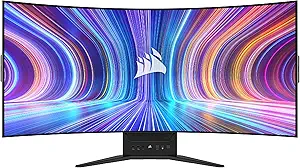
Corsair takes an aggressively premium, enthusiast-driven approach to engineering, utilizing materials and manufacturing techniques that cater directly to high-performance gamers and workstation creators. With its Xeneon display lineup, Corsair distinguishes itself by employing cast-aluminum stands and reinforced alloy backplates that deliver exceptional structural rigidity and an elite physical presence. The hardware engineering is further highlighted by thoughtful physical features, such as integrated quarter-inch camera mounting threads and specialized cable channels, all built to withstand heavy re-configuration. Furthermore, in products like the bendable Xeneon Flex, Corsair demonstrates bold mechanical engineering, utilizing specialized multi-layer panel reinforcements and heavy-duty manual bending mechanisms designed and rigorously tested for thousands of flex cycles. Corsair's panel durability is heavily reinforced by generous three-year zero dead-pixel policies and extensive thermal pad implementations that directly sink heat away from high-refresh scaler chips and OLED matrices to combat burn-in and panel degradation.
From a comparative standpoint, the divergence in build quality between these two brands is defined by industrial mass-production versus boutique enthusiast engineering. HP delivers exceptional structural dependability and uniform quality control across hundreds of thousands of units, making their monitors resilient workhorses in both home offices and demanding corporate environments. Conversely, Corsair outclasses HP in premium material deployment and tactile solidity, relying on heavy-gauge metals and specialized mechanical tolerances that feel distinctly more luxurious. While HP’s cost-effective composite housings and simpler hinge assemblies are built to provide trouble-free longevity without fuss, Corsair’s over-engineered chassis and enthusiast-grade components are built to endure the aggressive physical demands and high thermal loads typical of competitive, long-session desktop setups.