






GigaByte vs Samsung: Overview & Brand Philosophy
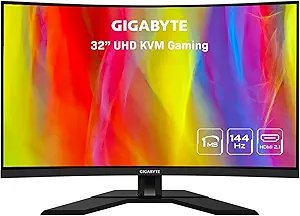
When shopping for a computer monitor, navigating the distinct philosophies of industry titans shapes your entire desktop experience. GigaByte, traditionally celebrated as a premier manufacturer of PC motherboards and graphics cards, entered the display arena with a laser-focused objective: delivering high-utility, feature-rich gaming monitors at aggressively competitive price points. Operating largely through its core brand and its premium AORUS gaming sub-brand, GigaByte targets PC gamers, esports enthusiasts, and home-office multi-taskers who prioritize raw tactical specifications—such as high refresh rates, low response times, and built-in KVM switches—without paying an excessive brand premium.
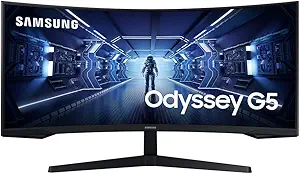
Samsung, by contrast, stands as an undisputed titan of display manufacturing, operating as an integrated panel developer through Samsung Display. Rather than simply sourcing components, Samsung pioneers foundational visual technologies, driving market innovation with its proprietary QD-OLED, Quantum Mini-LED, and ultra-aggressive 1000R curved form factors. The South Korean conglomerate’s Odyssey gaming line and ViewFinity professional series cater to users seeking cutting-edge visual luxury, cinematic immersion, and category-defining engineering, commanding significant market influence from the budget level all the way to ultra-premium super-ultrawide panels.
Ultimately, this matchup highlights a compelling strategic contrast. GigaByte approaches the monitor market with an engineer's sensibility, optimizing third-party panels with smart firmware and pragmatic user-centric features. Samsung operates with the prestige and vertical scale of a global display innovator, willing to push the boundaries of industrial design and panel physics to create halo-tier visual experiences.
Key Differences & Technological Comparison
The technological divide between GigaByte and Samsung manifests across panel architecture, onboard software, ergonomics, and target use cases:
- Panel Technology and Sourcing: Samsung manufactures its own bleeding-edge panels, allowing it to introduce market-leading technologies like Quantum Dot OLED (QD-OLED) and Quantum Matrix Mini-LED with ultra-dense local dimming zones. GigaByte primarily sources high-grade IPS, VA, and OLED panels from established manufacturers like LG Display, AU Optronics, and Samsung itself, fine-tuning them with proprietary control boards and thermal solutions.
- Curvature and Immersive Form Factors: Samsung is the foremost champion of extreme curvature, routinely equipping models like the Odyssey G7 and G9 with steep 1000R curves designed to match the natural human field of view. GigaByte favors traditional flat panels or gentler 1500R/1800R curves, appealing to users who mix gaming with color-critical creative work, CAD design, or general productivity where extreme curvature can cause visual distortion.
- Productivity and Tactical Features: GigaByte frequently integrates hardware-level KVM switches directly into its monitors (notably the M-series), enabling users to control multiple systems (such as a work laptop and a gaming desktop) with a single keyboard and mouse via USB-C. Samsung counters with smart platform integration, embedding its Tizen OS into several modern Odyssey and Smart Monitor lines, allowing standalone 4K video streaming, cloud gaming, and IoT control without a connected PC.
- HDR and Peak Luminance: Samsung dominates peak high dynamic range (HDR) performance. Its flagship Mini-LED and QD-OLED displays achieve true HDR 1000 to HDR 2000 capabilities, characterized by deep blacks and searing specular highlights. GigaByte displays typically top out at DisplayHDR 400 or HDR 600 in their mainstream portfolio, which provides competent color expansion but lacks the zone-level dimming control required for authentic cinematic HDR.
- Aesthetics and Build Integrity: GigaByte retains an understated, utilitarian industrial design with minimal gamified RGB accents (outside of select AORUS halo products). Samsung champions futuristic aesthetics featuring sleek white chassis, aggressive angles, and customizable "CoreSync" ambient lighting hubs.
Pros & Cons Comparison
GigaByte Monitors
- Pros:
- Exceptional price-to-performance ratio across 1440p and entry 4K tiers.
- Built-in hardware KVM switches on many budget and mid-tier models.
- Accurate out-of-the-box color profiles with flat IPS implementations favored by hybrid workers.
- Clear, responsive On-Screen Display (OSD) with companion desktop software (OSD Sidekick).
- Cons:
- Limited real HDR capabilities on mainstream models due to edge-lit backlighting.
- Lower maximum brightness compared to Samsung's high-end Mini-LED solutions.
- Fewer ultra-wide and super-ultrawide (32:9) form factors available.
Samsung Monitors
- Pros:
- Class-leading contrast, black levels, and brightness via QD-OLED and Mini-LED technologies.
- Deeply immersive 1000R curved gaming options that dominate the super-ultrawide segment.
- Integrated Tizen OS offers standalone smart TV streaming and cloud gaming utility.
- Industry-pushing refresh rates reaching 240Hz and beyond at 4K and dual-QHD resolutions.
- Cons:
- Significantly higher retail price tags, particularly in the Odyssey flagship tier.
- Inconsistent quality control history, including reported scanline artifacts and firmware glitches on launch models.
- Tizen OS can make standard monitor input switching feel bloated and sluggish.
Performance, Durability & Value Analysis
From an absolute performance standpoint, Samsung holds the performance ceiling. For gamers and cinephiles chasing maximum contrast, vibrant saturation, and blisteringly fast gray-to-gray pixel response times, Samsung's flagship QD-OLED and Neo QLED (Mini-LED) lines outclass GigaByte's standard offerings. Motion clarity on Samsung’s high-tier 240Hz and 360Hz displays is superb. However, GigaByte reliably dominates the broad middle of the market. Its mainstream IPS and fast-VA displays often match or exceed Samsung's entry-to-mid-tier displays in terms of motion handling, pixel transition consistency, and viewing angles, while completely avoiding the software friction of bloated smart interfaces.
When analyzing long-term durability and structural value, the comparison tightens. Samsung has faced recurring consumer criticism regarding quality control and launch-day firmware stability, particularly surrounding panel delamination risks on tight 1000R curves and micro-stutters in complex adaptive sync scenarios. GigaByte monitors, by virtue of their simpler hardware architecture and robust external power bricks, tend to exhibit predictable longevity, minimal thermal throttling, and dependable firmware. In terms of sheer financial value, GigaByte is arguably the industry benchmark in the $250 to $600 bracket, while Samsung represents premium aspirational value for those willing to spend upwards of $1,000 for halo visual tech.
Final Verdict: Which Brand Should You Choose?
Selecting between GigaByte and Samsung comes down to your budget tier, your primary use cases, and how much you value bleeding-edge panel technology versus practical utility.
Choose GigaByte if: You are seeking the best return on investment in the 1080p, 1440p, or entry 4K gaming market. If your workflow involves alternating between a personal gaming rig and a work laptop, GigaByte's integrated KVM technology and dependable flat IPS panels offer unrivaled convenience and color stability without breaking the bank. It is the smarter, more practical choice for budget-conscious gamers, esports competitors, and hybrid home-office workers.
Choose Samsung if: You demand the absolute pinnacle of visual fidelity, state-of-the-art HDR, and unparalleled immersion. If you have the budget for high-end Mini-LED backlighting, class-leading QD-OLED panels, or panoramic 32:9 super-ultrawide displays (such as the Odyssey Neo G9), Samsung provides an uncompromising, boundary-pushing visual spectacle that GigaByte simply does not match at the enthusiast level.
Affordability
When evaluating affordability in the monitor space, Gigabyte has emerged as a disruptive value champion, particularly within the mid-range gaming sector, by delivering aggressive price-to-performance ratios. Unlike legacy display manufacturers, Gigabyte approaches monitor production through smart component sourcing and feature prioritization, integrating high-demand gaming specifications—such as fast IPS panels, high refresh rates (144Hz to 240Hz), and wide color gamuts—at price points traditionally reserved for baseline displays. Their product strategy forgoes expensive proprietary form factors in favor of utilitarian, cost-effective industrial design, often utilizing standard AU Optronics or Innolux panels. Consequently, monitors in their M-series (such as the M27Q or M32U) frequently undercut comparable competitors by 15% to 30% while introducing productivity-oriented hardware like integrated KVM switches. The trade-offs for Gigabyte’s budget-friendly approach usually manifest in less sophisticated local dimming, plastic-heavy chassis construction, and less uniform backlighting, but the raw cost efficiency for esports and mixed productivity remains exceptionally high.
Samsung presents a drastically different affordability profile, functioning as a vertically integrated tier-one panel manufacturer with an expansive catalog that spans from ultra-budget sub-$100 office displays to ultra-premium $1,500+ Odyssey QD-OLED monitors. Because Samsung controls its own manufacturing pipelines, its entry-level and mainstream displays often feature robust panel quality, superior contrast ratios via proprietary VA technology, and sleek aesthetic engineering. However, Samsung imposes a tangible "brand tax" in the mainstream-to-enthusiast segment; when matching Gigabyte spec-for-spec on features like refresh rates and ergonomic stands, Samsung models typically command a higher retail price. Where Samsung redeems its cost proposition is through aggressive periodic sales, educational discounts, and the sheer technical superiority of its high-end displays—where advanced innovations like 1000R deep curves, Mini-LED arrays, and quantum dot layers deliver a tier of visual fidelity that budget-focused brands simply cannot engineer at any price point.
Ultimately, the practical affordability verdict depends on the consumer's target performance tier. Gigabyte represents the objective victor for shoppers seeking maximum spec density per dollar in the high-volume $200 to $600 bracket, making it the smarter economical choice for budget-conscious gamers and work-from-home professionals who require high refresh rates, 4K resolution, and convenient I/O without premium markups. Samsung, conversely, offers less intrinsic value in the competitive mid-range, with budget variants often sacrificing stand adjustability or port selection to hit low price targets. However, Samsung remains the more viable option at the polar extremes of the market: it offers dependable, highly affordable enterprise monitors at the bottom end and unrivaled display performance at the high end, where high absolute prices are justified by cutting-edge proprietary display technology.
Customer Support & Warranty
When evaluating the post-purchase landscape in the monitor market, GigaByte and Samsung represent fundamentally different paradigms in warranty structure and customer service execution. GigaByte, operating primarily within the enthusiast and PC-DIY hardware sector, leans on traditional component-style warranty policies. Most of their gaming displays come standard with a robust three-year limited warranty covering parts, labor, and the backlight, alongside a competitive Zero Bright Dot (ZBD) guarantee for select high-end AORUS models during the initial months of ownership. In contrast, Samsung offers a more bifurcated warranty ecosystem. While mainstream and standard enterprise monitors typically carry a reliable three-year limited warranty, many of Samsung's flagship consumer gaming displays—including high-profile Odyssey Neo and OLED models—are often restricted to a standard one-year limited warranty in North America. This engineering-to-risk ratio is a critical technical trade-off: despite Samsung’s state-of-the-art Quantum Dot and Mini-LED display innovations, GigaByte provides an objectively superior duration of baseline coverage out of the box, mitigating the financial risks associated with early panel degradation and backlight failure.
The practical trade-offs become even more apparent during technical RMA (Return Merchandise Authorization) processing and post-sales triage. GigaByte’s global RMA footprint is smaller, meaning return logistics often require shipping the unit to central depot repair hubs, occasionally resulting in extended turnaround times and customer friction regarding shipping costs. Furthermore, GigaByte’s support infrastructure lacks the modern, omnichannel responsiveness found with enterprise giants. Conversely, Samsung leverages its massive global consumer electronics footprint to deliver a technologically superior support front-end. Samsung provides 24/7 technical live chat, intuitive web ticketing, comprehensive diagnostic tracking, and in specific premium regions, local authorized service center drop-offs or in-home panel replacement for ultra-large displays (such as the 49-inch and 57-inch Odyssey series). However, Samsung’s scale can be a double-edged sword; navigating first-tier customer service often requires persevering through rigid automated scripts and prolonged escalation channels before reaching specialized display engineers who can address subtle panel defects like micro-stutter, firmware handshake bugs, or precise sub-pixel anomalies.
Ultimately, the consumer's optimal choice depends on whether they prioritize long-term temporal security or logistical support accessibility. GigaByte emerges as the more protective choice for value-conscious consumers who prioritize an extended 36-month mechanical and panel safety net, even if the ticketing system feels like an older component-vendor portal. Samsung delivers superior initial logistical velocity, firmware update rollouts, and multi-channel support reach, but fundamentally compromises its value proposition by tethering some of its most complex, thermally dense, and expensive displays to a truncated one-year standard warranty. Buyers investing in Samsung's cutting-edge displays are often practically compelled to purchase third-party extended warranties, whereas GigaByte integrates enterprise-length peace of mind directly into the retail purchase price.
Picture Quality
When evaluating picture quality, Samsung operates as a vertically integrated panel manufacturer, allowing it to lead the market in raw visual performance through cutting-edge display technologies. Samsung's flagship monitors showcase industry-leading implementations of QD-OLED and Mini-LED (branded as Quantum Matrix), which yield virtually infinite contrast ratios, deep inky blacks, and exceptional peak brightness exceeding 1,000 nits in HDR environments. The integration of Quantum Dot color filters enables Samsung displays to achieve remarkably wide color gamuts, often covering upwards of 99% of DCI-P3 with deep, saturated hues. In contrast, Gigabyte primarily acts as a third-party integrator, sourcing high-grade IPS, VA, and increasingly standard W-OLED or QD-OLED panels from suppliers like LG Display and Samsung Display. While Gigabyte does not pioneer the underlying glass technology, their engineering shines in factory calibration, gamma tracking, and aggressive overdrive tuning, delivering exceptionally clean sRGB clamps, accurate out-of-the-box color reproduction, and minimal inverse ghosting on their mid-range to high-end SuperSpeed (SS) IPS and AORUS panels.
The primary trade-offs between the two brands emerge in contrast execution, text clarity, and consistency across varying price points. Samsung’s ultra-deep contrast on its VA-based Odyssey gaming monitors and OLED panels offers vastly superior local dimming and HDR rendering compared to Gigabyte’s predominantly edge-lit budget and mid-tier IPS catalog, which frequently suffers from characteristic "IPS glow" and lower native contrast (typically 1000:1). However, Samsung's aggressive 1000R screen curvatures on many models can distort geometry and introduce viewing-angle luminance shifts that frustrate creative professionals. Furthermore, subpixel layouts on certain Samsung QD-OLED panels can introduce minor color fringing around fine text in productivity scenarios. Gigabyte counters this by catering strongly to visual purists who require flat or gently curved displays with uniform brightness and high text clarity. Gigabyte's mid-range models offer more predictable visual fidelity in standard dynamic range (SDR) and superior gray-uniformity consistency, avoiding the scanline anomalies and panel lottery inconsistencies that have occasionally plagued Samsung's aggressive display firmware and processing engines.
Ultimately, Samsung holds the technical advantage for users prioritizing jaw-dropping visual dynamism, true HDR gaming, and the absolute pinnacle of panel contrast and luminance. Their high-end Odyssey lineups provide an immersive, cinematic picture quality that traditional backlight implementations cannot match. Gigabyte, however, presents a more pragmatically engineered alternative for consumers seeking reliably accurate, uniform, and cost-effective SDR color performance without the extreme physical curves or the premium price tag associated with Samsung’s proprietary panel innovations. While Samsung dominates the visual ceiling, Gigabyte excels at democratizing high-quality, color-accurate panel integration across the mid-market tier.
Build Quality & Durability
When evaluating build quality and engineering resilience, Samsung and Gigabyte approach monitor construction with fundamentally different design philosophies. Samsung, as an industry titan with vertically integrated manufacturing, generally commands a higher standard of industrial design, particularly in its premium Odyssey and ViewFinity lineups. High-end Samsung displays feature sophisticated chassis engineering, integrated core lighting, and sleek, metal-accented stands that exude structural rigidity. However, Samsung's aggressive push into radical form factors—most notably their deep 1000R curved ultra-wides like the Odyssey Neo G9—introduces distinct physical vulnerabilities. The extreme mechanical tension required to maintain these steep curves has historically led to isolated reports of bezel separation, micro-creaks under thermal expansion, and fragile panel bonding, presenting a trade-off where futuristic design can occasionally compromise long-term structural cohesion.
Conversely, Gigabyte focuses on a utilitarian, function-first approach that prioritizes robust mechanical integrity over boundary-pushing aesthetics. Competing primarily in the mainstream and enthusiast gaming spaces through its standard and AORUS product lines, Gigabyte utilizes heavy-duty, matte-textured plastics that effectively resist fingerprints and minor abrasions. While their bezels and rear casings lack the seamless, hyper-polished look of Samsung's flagships, Gigabyte’s internal structural frames are exceptionally stout. Their stands, often built with thick die-cast aluminum cores, provide broad, wobble-free stability and generous ergonomic articulation that rivals, and sometimes exceeds, Samsung’s mid-tier offerings. The practical trade-off for Gigabyte lies in styling; their designs are visually conservative, and their AORUS line often incorporates bulky, gamer-centric plastic accents that do not necessarily contribute to overall durability, even if the core assembly remains rock-solid.
From a longevity and component-durability perspective, both brands exhibit unique operational risks that buyers must balance. Samsung's reliance on cutting-edge, proprietary technologies—such as intricate Mini-LED backlighting arrays and proprietary Smart TV OS boards embedded inside the monitor—introduces more points of electronic failure and increased heat generation, which can shorten the lifespan of internal capacitors over time. Gigabyte, on the other hand, utilizes simpler, standardized third-party controller hardware and passive cooling schemes that run cooler and present fewer software-driven points of failure. While Samsung maintains an edge in pure material sophistication and premium aesthetics, Gigabyte delivers a more dependable, consistent baseline of mechanical toughness across its entire catalog, making Gigabyte the safer bet for physical sturdiness per dollar and Samsung the choice for cutting-edge, though occasionally temperamental, display architecture.