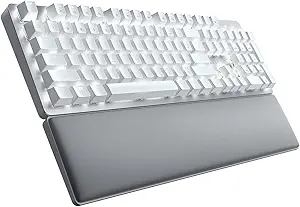





Razer vs Microsoft: Overview
Comparing Razer and Microsoft helps you determine which brand is best suited for your needs in Keyboards. Both brands offer strong choices depending on your budget and key feature requirements.
Key Features & Comparison
Evaluate factors such as build quality, warranty, customer satisfaction, and total value before making your final purchase choice between Razer and Microsoft.
Features
Razer's feature set is among the most sophisticated and technologically advanced in modern peripheral design. Supported by the extensive Razer Synapse software suite, Razer keyboards offer per-key RGB backlighting, complex macro recording, and proprietary secondary functions like Razer Hypershift, which effectively doubles the number of assignable inputs. Many flagship models, such as the Huntsman series, introduce analog optical switches capable of dual-step actuation and rapid trigger technology, enabling users to adjust actuation points down to fractions of a millimeter. Furthermore, detachable braided Type-C cables, multi-device Bluetooth/2.4GHz wireless configurations, and onboard memory profiles are standard fare across Razer's mid-to-high-end lineup.
Microsoft presents a much more restrained, utilitarian philosophy that favors out-of-the-box convenience over complex software manipulation. Feature sets on Microsoft keyboards, such as the Sculpt Ergonomic or Surface Keyboard lines, center on specialized media controls, dedicated Microsoft 365 and Copilot keys, and integrated numeric keypads. While their customizability via the Microsoft Mouse and Keyboard Center is basic compared to Synapse, they excel in zero-latency plug-and-play operation, native Windows hotkey optimization, and exceptional battery endurance, often operating for months or years on standard AA batteries. The trade-off is clear: Razer delivers unmatched programmable depth, while Microsoft provides dependable, frictionless productivity with minimal setup.
Performance
In terms of raw input latency, key travel accuracy, and anti-ghosting capabilities, Razer significantly outperforms Microsoft across the board. Razer keyboards are built around mechanical, optical, and hybrid switches with full N-key rollover (NKRO) and hyper-polling rates reaching up to 8,000Hz. This ensures that every keystroke registers with zero missed inputs and sub-millisecond response times, an essential requirement for esports competitors and fast-paced gaming. The tactile feedback, customizable actuation thresholds, and stable mechanical key stems yield an authoritative typing experience that rewards precise, deliberate inputs.
Microsoft keyboards are tuned for steady, rhythmic typing rather than high-frequency input burst rates. Most of Microsoft's portfolio employs scissor-switch or membrane mechanisms that prioritize quiet operation, low key travel, and reduced finger fatigue during long document drafting sessions. While these switches lack the high polling rates and rapid-trigger capabilities of Razer’s optical switches, they deliver an exceptionally quiet, consistent acoustic profile ideal for communal office spaces and Zoom meetings. Microsoft keyboards deliver reliable, non-fatiguing performance for desk workers, but they are technically ill-equipped to match Razer's high-speed responsiveness under demanding workloads.
Design
Aesthetically and structurally, Razer embraces a bold, modern, and often aggressive design language marked by aircraft-grade aluminum top plates, textured double-shot PBT keycaps, and vibrant Chroma RGB illumination. Razer’s keyboards are constructed to withstand physical punishment, featuring substantial chassis rigidity, magnetic plush leatherette wrist rests, and sleek cable routing channels. While earlier generations leaned heavily into gamer-centric aesthetics, recent models incorporate cleaner, minimalist frames that fit seamlessly into high-end streaming setups or modern developer workstations, without sacrificing structural weight and durability.
Microsoft approaches design through functional minimalism and medical ergonomics, producing some of the most influential physical layouts in keyboard history. The curved, domed split-key architecture of the Microsoft Ergonomic and Natural lines is designed specifically to encourage neutral wrist and forearm alignment, actively combating repetitive strain injuries (RSI) and carpal tunnel syndrome. Meanwhile, the Surface Keyboard lineup embraces an ultra-slim, anodized aluminum chiclet design reminiscent of Apple’s aesthetic, pairing exceptionally well with minimalist modern desks. While Microsoft keyboards use more ABS plastic components and lack the luxury feel of PBT keycaps, their structural geometry is unmatched in prioritizing long-term physical comfort over visual flash.
Compare current retail pricing, active promotions, and verified stock availability directly from authorized stores: