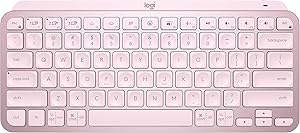







Logitech vs Apple: Overview
Comparing Logitech and Apple helps you determine which brand is best suited for your needs in Keyboards. Both brands offer strong choices depending on your budget and key feature requirements.
Key Features & Comparison
Evaluate factors such as build quality, warranty, customer satisfaction, and total value before making your final purchase choice between Logitech and Apple.
Features
Logitech outclasses Apple in sheer functionality and programmatic adaptability. Flagship offerings such as the MX Keys series and mechanical MX Master variants feature smart backlighting with proximity detection, multi-host Bluetooth pairing switchable across up to three distinct devices via dedicated Easy-Switch keys, and the Logitech Flow feature, which allows seamless cross-computer file transfer and cursor tracking. Supported by the Logi Options+ software suite, users can establish application-specific macros, customize function keys, and deeply personalize their workflow, an asset that heavy productivity users rely upon daily.
Apple takes a markedly different approach, emphasizing simplicity and platform-exclusive hardware features over exhaustive software customization. The Magic Keyboard boasts unmatched integration with macOS, including instantaneous Bluetooth pairing, dedicated function keys for system controls like Spotlight and Dictation, and the standout inclusion of Touch ID on compatible models for secure biometric authentication and Apple Pay. However, the hardware lacks backlighting entirely, offers zero multi-device switching capability, and cannot be remapped natively beyond basic system keyboard settings, forcing multi-platform users into a severely compromised experience.
Performance
In terms of tactile feedback and raw typing performance, Logitech provides a substantially more diverse and satisfying typing experience. The MX Keys lineup utilizes dished, scissor-switch keys that offer balanced resistance, stability, and travel, reducing fatigue during long sessions. Additionally, Logitech's mechanical portfolios, utilizing switches ranging from proprietary low-profile options to traditional tactile and linear mechanical designs, grant users the ability to choose an actuation force and auditory profile that suits their exact biomechanical preferences, bolstered by low-latency connections via the Logi Bolt or Lightspeed wireless receivers.
Apple's Magic Keyboard utilizes a refined scissor-switch mechanism that delivers an extremely stable, crisp, and predictable keystroke, but its physical key travel is notoriously shallow. While this allows for rapid, lightweight typing, many users report finger fatigue during prolonged sessions due to the harsh bottoming-out sensation against the rigid aluminum frame. Wireless performance is near-flawless within the Apple environment due to finely tuned Bluetooth firmware, but the lack of high-polling wireless dongles or high-travel mechanical switches limits its appeal for rapid-fire data entry, transcriptionists, and high-intensity computing.
Design
Logitech approaches industrial design with a functionalist and ergonomic-first philosophy. Devices in the MX line incorporate substantial weight, metal sub-assemblies for chassis rigidity, and contoured keycaps crafted to naturally guide fingertip alignment, while specialized product lines like the Ergo K860 introduce split, wave-like layouts designed to mitigate repetitive strain injuries. Although Logitech products feature clean, modern industrial styling, their visual language is undeniably utilitarian, employing premium plastics alongside aluminum top plates to maintain cost-efficiency and multi-platform visual neutrality.
Apple maintains an uncontested standard for minimalist, sculptural hardware design. The Magic Keyboard is engineered around a clean, ultra-slim, unibody anodized aluminum chassis that mirrors the visual language of the Mac Studio, iMac, and MacBook lineup with immaculate precision. It occupies the smallest possible desk footprint with virtually zero wasted border space, making it effortlessly portable and visually pristine. However, this dedication to a razor-thin profile comes at the cost of ergonomic adjustability; the keyboard sits at a fixed, flat angle with no integrated kickstands, sacrificing long-term ergonomic health for immaculate aesthetic cohesion.