






Epson vs Canon: Overview
Comparing Epson and Canon helps you determine which brand is best suited for your needs in Printers. Both brands offer strong choices depending on your budget and key feature requirements.
Key Features & Comparison
Evaluate factors such as build quality, warranty, customer satisfaction, and total value before making your final purchase choice between Epson and Canon.
Features
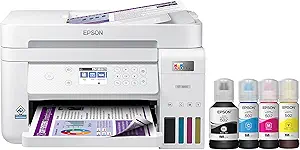
When examining feature sets, Epson leans heavily into enterprise and productivity capabilities even within its consumer hardware. Epson printers frequently incorporate comprehensive connectivity protocols, robust PrecisionCore arrays, and versatile automated document feeders (ADFs) with single-pass duplex scanning. Their accompanying software suite, including Epson Smart Panel and Epson Connect, provides granular administrative control, cloud routing, and detailed diagnostics. Furthermore, Epson's EcoTank line frequently integrates mechanical keying on ink bottles to prevent color cross-contamination and user-replaceable maintenance boxes, ensuring minimal professional servicing downtime.
Canon counterbalances this by curating a feature set oriented toward creative versatility and frictionless user operation. Many consumer and prosumer Canon printers feature dual-paper feeds (rear tray and front cassette), which streamline switching between standard copy paper and heavy fine-art or photo media without reloading. Canon’s creative ecosystem—anchored by the Canon PRINT app, PosterArtist, and Easy-PhotoPrint Editor—surpasses Epson in consumer accessibility and design templates. Moreover, Canon's PIXMA and imagePROGRAF lines often include multi-ink configurations (incorporating photo blue, chroma optimizer, or dual-black pigment and dye systems) that provide creative professionals with broader color gamuts and superior tonal gradations.
Performance
In operational performance, Epson demonstrates exceptional speed in mono-text environments and long continuous print runs. Because Epson's Micro Piezo printheads do not rely on heat to boil ink droplets, they require virtually no warm-up time, yielding significantly faster first-page-out times from sleep states. When handling heavy text documents and basic business graphics, Epson machines deliver sharp, crisp edges that resist highlighter smudging when using DURABrite pigment inks. However, for casual photo printing, standard four-color Epson systems can sometimes render slightly muted color profiles compared to their immediate competitors without meticulous manual profiling.
Canon shines brilliantly in pure image reproduction, tonal smooth-blending, and photo sharpness. Thanks to the microscopic nozzle density of its thermal FINE printheads, Canon manages transitions, skin tones, and deep blacks with industry-leading nuance, minimizing visible droplet grain even on entry-level models. While Canon's first-page-out times may lag slightly behind Epson due to thermal head heating cycles, Canon frequently matches or exceeds Epson in sustained color-print speed. The primary trade-off rests in thermal degradation: Canon printheads endure thermal stress that may necessitate printhead replacements over long lifecycles, whereas Epson’s cold-actuation mechanism maintains steady, wear-resistant output over millions of cycles.
Design
From an industrial design standpoint, Epson emphasizes utilitarian compactness, mechanical ergonomics, and space efficiency. Epson was the first to fully integrate ink reservoirs into the printer chassis rather than attaching external bulbous tanks, a clean architectural philosophy that remains evident across their modern EcoTank and WorkForce fleets. Their chassis construction tends to favor lightweight, textured matte plastics that resist fingerprint accumulation and scratches. Control consoles on Epson printers are functionally laid out, though entry-to-mid-range models sometimes rely on smaller, non-touch LCD screens paired with physical navigation directional pads that feel somewhat dated.
Canon adopts a modern, sleek aesthetic with a pronounced focus on tactile user ergonomics and living-space integration. Canon devices often showcase high-gloss accents, clean geometric silhouettes, and exceptionally well-engineered tilting control panels featuring vibrant, full-color touchscreens with highly legible iconography. The paper paths and access doors in Canon hardware typically operate with a smoother, dampened tactile feedback compared to Epson's more utilitarian friction latches. While Canon's generous inclusion of secondary paper trays and manual bypass slots can slightly increase the printer's overall operational footprint on a desk, the structural execution feels robust, premium, and well-tailored for both modern offices and creative studios.