






Razer vs Alienware: Overview & Brand Philosophy
In the premium gaming laptop arena, Razer and Alienware represent two divergent philosophies on how high-performance mobile computing should look, feel, and function. Razer entered the PC hardware space with a mission to deliver sleek, minimalist, and ultra-dense machinery. Often referred to as the "Apple of PC gaming," Razer prioritizes unibody CNC-machined aluminum chassis, understated aesthetics, and exceptional portability without sacrificing top-tier internal specifications. Its Blade lineup targets creative professionals, software engineers, and gamers who demand desktop-class power in a form factor that fits seamlessly into a boardroom or a coffee shop.
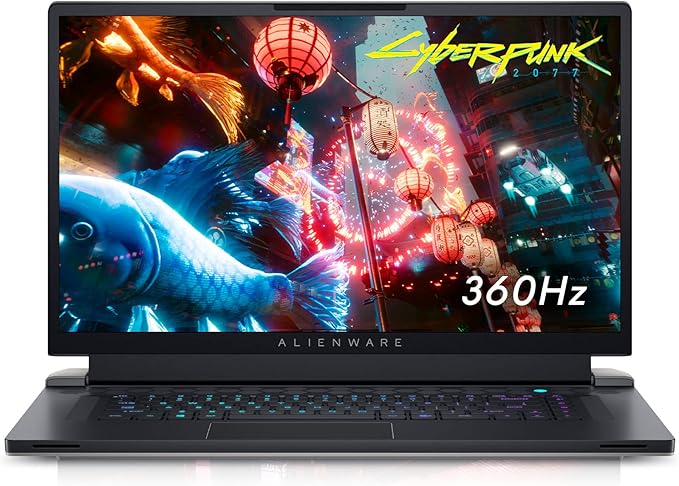
Alienware, operating as Dell’s flagship enthusiast gaming subsidiary, approaches portable performance from an unapologetically gamer-centric perspective. Alienware machines are characterized by their futuristic "Legend" industrial design, prominent customizable AlienFX RGB zones, and aggressive thermal engineering. Rather than chasing thin-and-light chassis, Alienware routinely maximizes internal thermal headroom and raw power delivery, utilizing extended rear exhaust shelves (the "thermal shelf") to push graphics cards and processors to their highest allowable Total Graphics Power (TGP) ratings. Alienware designs its systems primarily for maximum frame rates and desktop replacement duties.
While both brands sit at the upper echelon of laptop pricing, their target demographics reflect their product engineering. Razer positions itself around refinement, premium materials, and compact versatility, whereas Alienware champions maximalist styling, maximum wattage delivery, and deep integration with Dell’s enterprise-grade support and warranty ecosystem.
Key Differences & Technological Comparison
The fundamental distinction between Razer and Alienware lies in chassis architecture and thermal management. Razer constructs its Blade laptops from a single block of T6-grade aluminum, anodized with an electro-chemically sealed finish to resist scratches. To cool these dense, thin machines, Razer relies exclusively on bespoke, ultra-thin vapor chamber cooling systems paired with low-profile fans. Conversely, Alienware utilizes a hybrid approach incorporating magnesium-alloy structural frames, high-density structural plastics, and their proprietary "Element 31" gallium-silicone liquid metal thermal interface material alongside quad-fan cooling setups on flagship models like the m16 and m18.
Display technology is another battleground where both manufacturers push boundaries. Razer has historically led the market in panel color accuracy and dual-mode functionality, frequently outfitting the Blade lineup with factory-calibrated 100% DCI-P3 OLED panels, as well as innovative dual-mode mini-LED panels capable of switching natively between high-resolution 4K at 120Hz and high-refresh-rate FHD+ at 240Hz. Alienware matches this visual fidelity with ultra-high-refresh-rate fast-IPS panels reaching up to 480Hz for competitive esports titles, alongside optional Cherry MX ultra-low-profile mechanical keyboard switches featuring true mechanical switches and 1.8mm key travel—an option Razer’s membrane and low-profile optical switches cannot fully replicate in tactile feel.
Software ecosystems also heavily influence daily usability. Razer Synapse provides comprehensive peripheral integration, per-key RGB control, and power profile adjustments, though it has historically faced criticism for heavy background resource usage. Alienware Command Center (AWCC) handles performance tuning, overclocking, and lighting across the machine. While early iterations of AWCC were criticized for clunkiness, recent revamps have significantly stabilized thermal offset controls and performance profiles.
Pros & Cons Comparison
Razer
- Pro: Industry-leading build quality featuring rigid, unibody CNC-machined aluminum construction.
- Pro: Exceptionally compact footprint with high power density, making it far more portable than typical gaming laptops.
- Pro: Factory-calibrated, high-color-accuracy display options (including dual-mode Mini-LED and OLED) ideal for creative professionals.
- Pro: Expansive, highly responsive glass precision trackpads that rival modern ultrabooks.
- Con: Expensive baseline pricing with an exceptionally high "luxury tax" per specification.
- Con: Lower component wattage targets (TGPs) on smaller chassis to manage heat compared to bulkier competitors.
- Con: Exterior chassis can become uncomfortably warm under prolonged, heavy compute loads.
Alienware
- Pro: Maximum TGP allocation and aggressive thermal headroom that extracts peak frame rates from GPUs.
- Pro: Outstanding tactile typing experience with optional co-developed Cherry MX mechanical keyboards.
- Pro: Backed by Dell’s extensive global service infrastructure, including optional on-site next-business-day repairs.
- Pro: More frequent promotional sales, financing options, and aggressive discounting throughout the retail cycle.
- Con: Substantially heavier and bulkier footprints, exacerbated by oversized proprietary power bricks.
- Con: Prominent aesthetic styling and heavy RGB implementation that cannot easily blend into conservative professional environments.
- Con: Increased utilization of external plastics compared to Razer's all-metal unibody construction.
Performance, Durability & Value Analysis
When measuring pure, sustained gaming performance, Alienware generally claims the advantage over equivalent-spec Razer machines. By accepting larger chassis profiles and heavier thermal heatsinks, Alienware allows NVIDIA GeForce RTX graphics cards to run at their maximum 175W TGP curves without thermal throttling as rapidly. Razer's Blade series delivers impressive performance given its svelte dimensions, but its vapor chambers must fight the physical limitations of an ultra-thin metal enclosure. Under continuous multi-hour stress tests, Razer machines often prioritize acoustic limits or chassis touch temperatures, resulting in slight performance rollbacks relative to the raw, unthrottled throughput delivered by Alienware's heavier chassis.
From a durability and longevity standpoint, both brands exhibit distinct wear characteristics. Razer laptops maintain structural rigidity across years of transit; hinges remain firm, and the chassis does not flex or creak. However, historical generations faced concerns regarding internal battery swelling due to excessive heat exposure—an issue Razer has addressed with software charge limiters and upgraded thermals in recent models. Alienware machines withstand hard internal use, and their modular components—such as swappable SO-DIMM RAM and multiple secondary M.2 SSD slots—often provide longer operational upgradeability. In terms of market value, Alienware offers a substantially better price-to-performance ratio, particularly due to regular Dell sales cycles, whereas Razer commands a strict, non-negotiable price premium that must be justified by its form factor and industrial design.
Final Verdict: Which Brand Should You Choose?
Your choice between Razer and Alienware hinges on whether your priority is structural refinement and portability, or raw computing horsepower and desktop replacement capability.
Choose Razer if: You have an expansive budget and demand an ultra-portable, exceptionally built machine that transitions seamlessly between high-end professional creative work and high-fidelity gaming. If you value minimal desk footprints, glass trackpads, premium aluminum tactile finishes, and want to pack your laptop into a slim messenger bag every single day, the Razer Blade is the gold standard of Windows gaming notebooks.
Choose Alienware if: Your priority is maximizing frame rates per dollar spent, securing sustained performance over hours of intense gaming, and taking advantage of mechanical laptop keyboards. If your laptop spends the majority of its life sitting on a desk operating as a portable battlestation, and you value Dell’s robust on-site warranty support over thin-and-light mobility, Alienware is the clear and pragmatic winner.
Affordability
When evaluating affordability in the premium gaming laptop space, Razer and Alienware approach value from fundamentally different design philosophies, resulting in distinct cost-to-performance propositions. Razer adheres strictly to an ultra-premium, boutique pricing model that mimics Apple's engineering approach. The Razer Blade lineup relies on unibody CNC-machined aluminum chassis, advanced thermal vapor chambers, and exceptional power-density engineering. While this craftsmanship produces the slimmest, most aesthetically refined gaming notebooks on the market, it commands a massive price premium that rarely drops into budget-friendly territory. Consumers pay significantly more per frame of graphical output with Razer, as base-tier configurations often start hundreds of dollars higher than similarly spec'd competitors, and post-purchase component upgradeability is largely restricted, driving up long-term cost of ownership.
Conversely, Alienware (as Dell’s flagship enthusiast brand) presents a broader and considerably more accessible pricing spectrum. While their flagship x-Series models rival Razer's upper-echelon prices through high-end engineering and patented thermal interfaces like Element 31, Alienware also provides their m-Series laptops, which make calculated chassis compromises to significantly reduce costs. By blending high-grade magnesium alloys and rigid plastics rather than relying solely on milled aluminum, the m-Series delivers top-tier GPU wattages and desktop-class components at a vastly more competitive price point. Furthermore, Alienware laptops benefit directly from Dell's massive global supply chain and frequent enterprise-level promotional cycles, offering seasonal discounts, clearance sales, and customizable hardware configurations that provide far superior raw performance-per-dollar metrics than Razer's strictly priced ecosystem.
Ultimately, the affordability trade-off between the two brands centers on whether the buyer prioritizes structural minimalism or thermal headroom per dollar spent. Razer justifies its uncompromisingly high price ceiling by functioning as a high-status hybrid device that easily transitions from a gaming rig to a sleek creative workstation, though the upfront financial barrier makes it inherently unaffordable for value-conscious gamers. Alienware demands lower financial overhead for equivalent or superior hardware performance, offering substantial internal expandability for secondary SSDs and memory that preserves device longevity. For consumers where affordability is weighed purely against raw technical capability and future-proofing, Alienware emerges as the pragmatically superior investment, whereas Razer remains a luxury purchase where portability and premium materials eclipse traditional budget logic.
Battery Life
When engineering for battery life in high-performance laptops, Razer and Alienware adopt fundamentally divergent philosophies that significantly impact off-charger endurance. Razer leverages an ultra-dense, unibody aluminum chassis coupled with substantial battery sizes—frequently maxing out the legal TSA limit with 80Wh to 99.9Wh capacities across the Blade 14, 16, and 18 lineups. Razer’s technical strength lies in aggressive power management at the firmware and software levels. Through Razer Synapse, the system intelligently toggles display refresh rates, implements Advanced Optimus to sever power to the discrete GPU entirely, and tunes processor power states to minimize passive drain. Consequently, when executing routine productivity tasks, web browsing, or media streaming, a modern Razer Blade can achieve a respectable five to seven hours of real-world battery life, making it a viable hybrid machine for both mobile professionals and gamers.
Conversely, Dell's Alienware division prioritizes thermal headroom and raw component throughput over mobile longevity, outfitting their M-Series and X-Series machines with high-wattage components that place continuous, aggressive demands on the battery cell. While flagship Alienware systems also incorporate high-capacity batteries (typically ranging from 86Wh to 90Wh), their aggressive factory power curves, hyper-reactive fan profiles, and elaborate chassis-wide RGB lighting subsystems create higher idle power draw. Alienware Command Center offers power profiles, but the engineering focus leans heavily toward maintaining maximum clocks on the CPU and GPU rather than executing fine-tuned platform-level power gating. Under identical general productivity workloads, Alienware notebooks routinely struggle to surpass the three-to-four-hour threshold, frequently dipping even lower on models featuring high-resolution, high-refresh-rate panels.
The practical trade-offs regarding battery life present a clear dichotomy for power users. Razer holds a definitive edge in overall efficiency and travel utility, bolstered by standardized support for high-wattage USB-C Power Delivery, which allows users to leave heavy proprietary power bricks behind for light day-to-day travel. Alienware sacrifices battery longevity almost entirely to satisfy its "desktop-replacement" identity; its machines are technically portable, but the battery functionally operates as an uninterrupted power supply to move between wall outlets rather than a vehicle for uninhibited untethered computing. For consumers prioritizing genuine mobile independence alongside high-end performance, Razer emerges as the superior engineered choice for battery life, whereas Alienware remains squarely tethered to the power grid.
Display
When evaluating display engineering between Razer and Alienware, the two brands approach visual performance with fundamentally different philosophies. Razer prioritizes visual fidelity, color accuracy, and clean industrial aesthetics, making its Blade lineup uniquely suited for hybrid users who juggle high-tier gaming with creative workflows. Razer’s technical strength lies in its factory calibration, often boasting individual panel calibration certified by Calman, with near-100% coverage across DCI-P3 and Adobe RGB color spaces. Furthermore, Razer was among the pioneers in commercializing dual-mode mini-LED panels, allowing users to toggle between native 4K at 120Hz for high-resolution productivity and FHD+ at 240Hz for competitive gaming. These panels achieve peak brightness levels that frequently exceed 1,000 nits in HDR mode, complemented by deeper local dimming zones that yield exceptional contrast without the burn-in anxieties associated with OLED.
Alienware, conversely, focuses aggressively on esports-grade responsiveness, high-impact immersion, and bleeding-edge refresh rates tailored primarily for dedicated gamers. Leveraging parent company Dell’s extensive monitor expertise, Alienware frequently integrates blisteringly fast IPS and OLED displays, pushing refresh metrics up to 480Hz on high-end configurations. Alienware systems generally support advanced gaming features natively out of the box, including NVIDIA G-Sync, Advanced Optimus (dynamic display switching), and AMD FreeSync Premium, backed by exceptionally low pixel response times (frequently down to 3ms or lower) that minimize ghosting in fast-paced titles. While Alienware laptops also feature vibrant, high-coverage DCI-P3 panels, their baseline factory color calibration is less strictly oriented toward digital colorists, leaning instead toward saturated, contrast-heavy profiles designed to make in-game graphics visually pop.
The practical trade-offs between the two ecosystems ultimately center on the user's intended workload and tolerance for physical form factor constraints. Razer offers superior utility for creators and mobile professionals due to sharper 16:10 resolutions, superior anti-glare coatings, and unmatched peak brightness that handles bright, ambient environments with ease. However, Razer's top-tier display configurations—especially the dual-mode Mini-LED and OLED options—carry a substantial price premium and impose a heavy tax on battery life. Alienware delivers better raw value for pure gaming performance, offering smoother motion clarity and lower input latency at competitive price tiers. The compromise with Alienware is a lack of factory color-grading precision and a tendency toward bulkier bezels, meaning users seeking a true creative workstation display will find Razer’s technical execution far more refined.
Performance
When evaluating performance between Razer and Alienware, the fundamental distinction lies in their engineering philosophies: Razer prioritizes power-to-volume density within sleek, ultra-portable unibody chassis, whereas Alienware (Dell’s gaming flagship) adopts a maximum-wattage, thermal-first approach that favors brute computational output. Razer’s Blade series relies on advanced vapor chamber cooling and graphite thermal pads to squeeze high-end silicon—such as unlocked Intel Core i9 or AMD Ryzen 9 processors alongside NVIDIA GeForce RTX 40-series GPUs—into an extraordinarily slim profile. However, physical constraints dictate that Razer must often cap Total Graphics Power (TGP) marginally lower or rely on aggressive dynamic power shifting to keep external temperatures and acoustics in check. In sustained peak-load scenarios, this design can lead to minor thermal throttling, trading the highest echelon of continuous frame rates for premium, compact mobility.
Alienware, conversely, leverages larger, more aggressive chassis designs to establish technical superiority in sustained performance and component headroom. Utilizing their proprietary "Cryo-tech" cooling architecture, which integrates quad-fan designs, expansive vapor chambers, and gallium-silicone liquid metal (Element 31), models like the Alienware m16 and m18 run identical flagship GPUs at their maximum allowable TGP (often sustained at a full 175W) without breaking stride. Alienware’s motherboards and BIOS profiles frequently cater to performance purists, offering expanded overclocking headroom for CPU and system memory (DDR5 XMP support) via the Alienware Command Center. The practical trade-off is a considerably bulkier machine that produces louder fan acoustics under heavy gaming or 3D rendering workloads, but it consistently delivers 5% to 15% higher sustained frame rates and superior multi-core rendering speeds compared to a similarly configured Razer machine.
Ultimately, the choice comes down to efficiency versus pure desktop-replacement horsepower. Razer provides phenomenal "performance-per-inch" that excels for mobile creative professionals, video editors, and gamers who need swift, on-the-go performance without the encumbrance of a massive footprint. Alienware is the definitive victor for sheer, uncompromising performance, making it the superior technical choice for competitive esports players and heavy workstation users who demand peak clock speeds for hours on end and view portability as a secondary concern.
Compare current retail pricing, active promotions, and verified stock availability directly from authorized stores: