







MSI vs Alienware: Overview & Brand Philosophy
Micro-Star International (MSI) and Alienware (a subsidiary of Dell Technologies) represent two of the most influential titans in the high-performance computing landscape. While both names are fundamentally synonymous with PC gaming, their foundational philosophies diverge significantly. MSI, originating as a Taiwanese motherboard and component manufacturer, approaches laptop design from a hardware-first, engineering perspective. The brand caters extensively to power users, esports competitors, and creative professionals who prioritize raw component capability, system-level customization, and thermal headroom over uniform aesthetic minimalism.
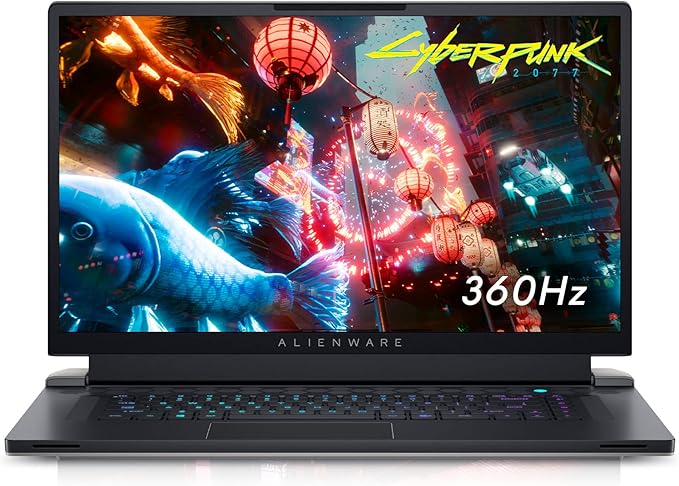
Alienware, founded in 1996 and acquired by Dell in 2006, approaches portable computing through the lens of industrial design, premium branding, and integrated ecosystem support. Alienware laptops are instantly recognizable by their futuristic "Legend" design language, premium chassis materials, and ambient AlienFX lighting systems. Backed by Dell’s massive corporate supply chain and enterprise support infrastructure, Alienware aims to deliver an elite, console-like out-of-the-box luxury experience targeting affluent gamers and enthusiasts who value structural refinement and customer service as much as frame rates.
Today, the battle between Alienware and MSI encapsulates a classic tech dilemma: modular, spec-driven engineering versus polished, industrial luxury. MSI has expanded aggressively from aggressive gaming flagships into sleek thin-and-light portables (such as the Stealth series) and color-accurate mobile workstations (Creator series). Conversely, Alienware has modernized its portfolio around two core philosophies: maximum thermal and component power (the M-Series) and high-mobility, ultra-thin engineering (the X-Series). Choosing between them requires a granular look at how each brand balances thermals, software, build quality, and after-purchase support.
Key Differences & Technological Comparison
The primary battleground between Alienware and MSI lies in chassis engineering, thermal dissipation technologies, and display integration. Alienware utilizes advanced materials such as magnesium alloy, anodized aluminum, and proprietary structural reinforcements paired with high-durability coatings designed to resist staining. Thermally, Alienware relies heavily on its proprietary "Cryo-tech" architecture, which incorporates gallium-silicone liquid metal thermal interfaces (Element 31), dedicated vapor chambers, and quad-fan configurations in models like the x16 and m18. This setup allows Alienware to drive higher sustained Total Graphics Power (TGP) ratings, though often at the cost of aggressive fan acoustics and elevated surface temperatures near the exhaust ports.
MSI takes a mechanical, function-over-form approach to thermal management. Utilizing its Cooler Boost technology, MSI equips its laptops with an intricate network of shared and dedicated heat pipes, wide-fin copper heat sinks, and high-airflow Whirlwind fans. While flagship models like the Titan 18 HX match or exceed Alienware's thermal dissipation capacities through sheer physical volume and mechanical vapor chambers, MSI’s mid-tier systems frequently rely on traditional thermal paste rather than liquid metal. This makes MSI units easier for end-users to repaste and maintain long-term, whereas working inside an Alienware often presents inverted motherboards and complex internal ribbon routing that discourages DIY maintenance.
From an interface and input perspective, Alienware holds an advantage through its collaboration with Cherry MX, offering authentic ultra-low-profile mechanical laptop switches with 1.8mm key travel and per-key RGB on select models. MSI counters with long-standing partnerships with SteelSeries, delivering highly responsive membrane keyboards with superior travel and industry-leading software integration for macro mapping. In terms of display tech, both manufacturers lead the adoption curve, offering high-refresh QHD+ panels, 4K Mini-LED displays with peak brightness exceeding 1,000 nits, and fast-response OLED panels, though MSI tends to provide broader panel coverage across a wider array of price tiers.
Pros & Cons Comparison
MSI: Strengths
- Broad Product Spectrum: Offers an extensive lineup ranging from budget-conscious models (Thin/Cyborg) to hyper-enthusiast halo devices (Titan).
- Hardware Access & Upgradability: Generally more straightforward interior layouts featuring standard dual SO-DIMM RAM slots and multiple M.2 NVMe SSD bays.
- Advanced BIOS Customization: Unlocked advanced BIOS access allows enthusiasts to fine-tune memory timings, undervolt, and configure system architecture directly.
- Thermal Efficiency on Flagships: Superior acoustic management and sustained peak performance in thicker desktop-replacement form factors.
MSI: Weaknesses
- Inconsistent Chassis Rigidity: Lower and mid-tier models (GF, Katana series) rely heavily on creaky plastics and historically vulnerable display hinges.
- Software Bloat & Polish: MSI Center software can be fragmented, occasionally unintuitive, and prone to resource-heavy background processes.
- Inconsistent Battery Life: High baseline power draw and less aggressive power-switching profiles often yield subpar unplugged endurance.
Alienware: Strengths
- Exceptional Build Quality: Premium materials featuring magnesium alloys, CNC-machined aluminum, and structural rigidity across the entire lineup.
- Enterprise-Grade Support Ecosystem: Direct backing by Dell, offering rapid on-site repair services, accidental damage protection, and global support contracts.
- Class-Leading Keyboard Experience: Optional co-engineered Cherry MX ultra-low-profile mechanical switches provide tactile superiority.
- Unified Aesthetic Language: Consistent, sophisticated "Legend" design philosophy that stands apart from standard angular gaming laptop designs.
Alienware: Weaknesses
- Thermal Throttling & Surface Heat: Slim profiles (especially the X-Series) often push components to high thermal thresholds (100°C Tjunction), warming the chassis considerably.
- Repair & Upgrade Impediments: Frequent use of inverted motherboards and soldered LPDDR5x memory on thin-and-light models severely limits end-user upgrades.
- Cost-to-Performance Premium: Significant price markup for brand equity and chassis materials compared to identically spec’d alternatives.
Performance, Durability & Value Analysis
When measuring pure computing output per dollar, MSI consistently presents a more aggressive value proposition. In the budget-to-midrange segment (ranging from $800 to $1,500), an MSI chassis typically secures a higher-tier GPU or CPU class than a comparably priced Alienware. In the halo tier (exceeding $3,000), MSI’s flagship desktop replacements, like the Titan and Raider series, routinely capture raw synthetic benchmark crowns due to unrestricted power allocations and expansive cooling profiles. However, MSI’s value calculus degrades when structural longevity is factored in at the lower tiers. While their internal components perform admirably, long-term wear on plastic chassis, structural chassis flex, and hinge fatigue require owners to handle non-flagship MSI laptops with care.
Alienware operates with a premium cost structure that often penalizes the value-focused consumer up front, but amortizes well over long-term ownership. The rigid structural integrity of Alienware chassis means they resist physical wear and tear far better over multi-year lifecycles. Furthermore, Dell’s secondary-market residual value remains higher than MSI's, aided by Alienware’s brand recognition. The critical differentiator in longevity, however, is Dell’s warranty infrastructure. Where MSI owners typically rely on regional depot repair services that can sideline a mission-critical device for weeks, Alienware customers can leverage Dell’s Premium Support with next-business-day on-site technicians, offering tangible value for professionals who cannot afford extended operational downtime.
Final Verdict: Which Brand Should You Choose?
Your choice between Alienware and MSI ultimately hinges on whether your priorities align with raw hardware flexibility or holistic, premium ownership.
Choose MSI if:
- You prioritize pure frame rates, unthrottled component wattages, and raw performance metrics above all else.
- You want internal access to perform future RAM upgrades, SSD additions, and custom thermal compound repasting.
- You are an enthusiast who wants to manually tweak low-level hardware parameters, fan curves, and memory timings through an unrestricted BIOS.
- You are shopping in the entry-level to mid-tier price brackets and need the absolute highest graphics tier your budget will allow.
Choose Alienware if:
- You value premium materials, structural rigidity, and an unmistakable industrial aesthetic that feels high-end.
- Typing feel is paramount, and you plan to configure your machine with the tactile Cherry MX mechanical switches.
- You rely on your laptop for mission-critical tasks and want access to Dell's expedited on-site repair and warranty network.
- You are looking for an ultra-thin gaming machine (such as the Alienware x14 or x16) that balances portability with high-end luxury materials.
Affordability
When evaluating affordability in the high-performance laptop market, MSI easily outmaneuvers Alienware by casting a much wider net across various price tiers. MSI’s product portfolio spans from entry-level and budget gaming machines like the Thin, Cyborg, and Katana series—frequently priced well under $1,000—up to enthusiast-tier machines like the Raider and Titan. In contrast, Alienware operates strictly as Dell's flagship luxury gaming imprint, with its entry point typically starting in the mid-range (often above $1,300 for base m-series models) and climbing rapidly for the flagship x-series. Buyers seeking strict performance-per-dollar metrics will find that MSI routinely offers modern silicon, such as mid-to-high tier NVIDIA GeForce RTX 40-series GPUs paired with capable Intel or AMD processors, at price points where Alienware simply does not compete.
The stark difference in price tags directly reflects each brand's engineering philosophy and manufacturing choices. Alienware justifies its premium through robust industrial design, utilizing advanced thermal architectures like Element 31 thermal interface material, vapor chambers, and dense magnesium alloy chassis with superior structural integrity and distinct aesthetic polish. These engineering choices provide exceptional longevity and premium fit-and-finish, but they impose a steep cost premium that rarely translates into linear frame-rate gains. Conversely, MSI achieves aggressive affordability by making targeted, practical compromises. Budget-to-mid-tier MSI machines rely heavily on plastic-dominant chassis, lower-tier thermal solutions with higher acoustic output, and entry-level display panels (often exhibiting lower color gamuts and peak brightness). However, these compromises allow MSI to channel maximum capital directly into core compute components, delivering raw graphical and processing power at prices that Alienware cannot match.
Ultimately, the practical trade-off between the two brands centers on whether a consumer prioritizes holistic device luxury or sheer computational value. For budget-conscious gamers, students, and pragmatic creators, MSI represents the superior choice for affordability, maximizing frame rates and processing throughput per dollar spent despite concessions in build rigidity and secondary features. Alienware remains a niche investment for well-funded buyers who view aesthetic elegance, premium materials, sophisticated chassis engineering, and Dell’s robust post-purchase support infrastructure as essential elements worth a substantial financial surcharge.
Battery Life
When evaluating battery life in the high-performance laptop sector, both Alienware and MSI face the inherent challenge of powering wattage-hungry CPUs and dedicated GPUs, but they approach power management through differing engineering philosophies. Alienware generally equips its machines, such as the m-series and x-series, with large battery capacities—often pushing the legal flight limit at 86Wh to 99Wh. Supported by Dell’s sophisticated power-management software, Alienware relies heavily on Advanced Optimus and dynamic display refresh rate switching to stretch runtime during non-gaming tasks. However, Alienware’s thermal design profiles prioritize peak sustained performance and distinct aesthetics (such as extensive per-key AlienFX RGB arrays and secondary chassis lighting), which can rapidly deplete reserves. In practical terms, while an Alienware laptop might survive 4 to 6 hours during light productivity workflows, any moderate load quickly drops that figure into the 1.5 to 2.5-hour territory.
MSI presents a more fragmented landscape due to its vastly broader catalog, spanning budget-oriented gaming rigs like the Katana series to premium flagship workhorses like the Raider and stealthy ultraportables like the Creator and Stealth series. At the entry and mid-tier levels, MSI often cuts costs with smaller 53Wh to 70Wh batteries, leading to notoriously mediocre battery life that rarely exceeds 3 hours of mixed usage. Conversely, MSI’s high-end, thin-and-light models utilize max-capacity 99.9Wh units paired with the MSI Center utility, which offers granular user-controlled switchable graphics (MUX switch options) and extreme power-saving profiles. When optimized, MSI’s productivity and thin gaming machines can edge out Alienware, occasionally reaching 6 to 7 hours of low-intensity use, though the brand struggles with higher idle battery drain on its desktop-replacement lines where high-draw hardware remains active.
Ultimately, the trade-offs come down to consistency versus modular efficiency. Alienware provides a more predictable, high-baseline experience where nearly all premium models feature maximum-capacity cells, though heavy background software and aggressive factory tuning keep them tethered to a power outlet for any serious computing. MSI gives consumers greater variance; buyers of budget MSI laptops will sacrifice mobility significantly, whereas discerning users who configure MSI’s top-tier, slim notebooks will find superior, customizable battery longevity compared to Alienware. For purely untethered productivity, MSI holds the higher ceiling in select models, but Alienware delivers better structural consistency across its dedicated enthusiast lineup.
Display
When evaluating display engineering, Alienware and MSI approach visual performance from distinct philosophical angles, reflecting their flagship gaming priorities versus broad market adaptation. Alienware, operating under the Dell umbrella, maintains a tightly curated display catalog that emphasizes high color fidelity, exceptional motion clarity, and premium build integration. Across its modern M-Series and X-Series chassis, Alienware standardizes on fast IPS panels with ComfortView Plus—a hardware-level low-blue-light solution that preserves color accuracy—while offering high-end configurations that scale to QHD+ and 4K UHD resolutions with refresh rates up to 480Hz on esports-focused FHD variants. Furthermore, Alienware's partnership with panel suppliers guarantees full coverage of the DCI-P3 color gamut on mid-to-high tiers, paired with seamless NVIDIA G-Sync and Advanced Optimus support. This creates a remarkably consistent out-of-the-box calibration, minimal backlight bleed, and zero screen tearing, though Alienware's catalog lacks the sheer variety of panel technologies found in MSI’s sprawling portfolio.
MSI takes a more aggressive, experimental approach to display technology, frequently being among the first to bring cutting-edge panel innovations to retail shelves. In its enthusiast-tier Titan, Raider, and Creator series, MSI has heavily invested in Mini-LED panels featuring thousands of local dimming zones, delivering blistering peak brightness exceeding 1,000 nits and VESA DisplayHDR 1000 certification that fundamentally outperforms Alienware's traditional IPS solutions in contrast and HDR content. Additionally, MSI caters to creative professionals through its True Color software, offering factory-calibrated color profiles across sRGB, Adobe RGB, and DCI-P3. However, this technical strength at the high end highlights MSI's primary weakness: inconsistency across its wider product stack. MSI’s budget and mid-tier lines—such as the Katana, Sword, and Thin series—often incorporate subpar IPS-level panels characterized by dim 250-nit backlights, poor contrast, and restricted 45% NTSC color spaces that compare unfavorably to Alienware's baseline offerings.
Ultimately, the practical trade-off between the two brands centers on consistency versus peak dynamic performance. Alienware offers a reliable, set-it-and-forget-it ecosystem where even baseline configurations feature competitive color depth, rapid response times, and robust adaptive sync technologies, making them a safer choice for buyers who prioritize uniform quality without panel-lottery concerns. Conversely, MSI represents the higher technical ceiling for users willing to pay for top-tier configurations, where its 4K 144Hz Mini-LED displays deliver visual depth, black levels, and HDR vibrancy that Alienware’s current laptop lineup cannot match. Consumers must therefore weigh Alienware's dependable standard across all models against MSI's state-of-the-art, HDR-capable flagships that exist alongside lower-tier, compromised displays.
Performance
When evaluating sustained performance, both Alienware and MSI represent the upper echelon of high-performance mobile computing, yet they employ distinct engineering philosophies to extract maximum wattage from CPUs and GPUs. Alienware (Dell's enthusiast sub-brand) generally emphasizes extreme, single-component power delivery through proprietary hardware solutions like the Cryo-Tech cooling architecture. High-end models, such as the Alienware m16 and x16, leverage tailored vapor chambers, quad-fan arrays, and a patented Element 31 gallium-silicone liquid metal thermal interface. This allows Alienware laptops to sustain exceptionally high Total Graphics Power (TGP) and dynamic boost targets without instantaneous thermal throttling. However, the trade-off often manifests in aggressive, high-pitched fan curves and restrictive proprietary software (Alienware Command Center), which provides less granular, user-level clock control compared to enthusiast demands.
MSI, by contrast, approaches performance with an engineering focus steeped in raw component headroom and component tuning flexibility. Through its flagship Titan and Raider series, MSI often leads peak synthetic and real-world benchmark metrics by utilizing its Cooler Boost Titan architecture, which incorporates high-density heat-pipe networks and dual or triple high-efficiency fans. Crucially, MSI offers greater technical transparency and out-of-the-box performance tuning: the brand frequently permits higher combined CPU-GPU wattage profiles (sometimes exceeding 250W via MSI OverBoost Ultra technology) and unlocks advanced BIOS controls alongside comprehensive MSI Center software. This makes MSI machines deeply attractive to overclockers and hardware purists who prioritize unthrottled sustained throughput in multi-threaded creative rendering or unconstrained frame rates over acoustic comfort or chassis aesthetics.
Ultimately, the practical trade-off between the two brands rests on thermal stability versus raw ceiling. Alienware provides a more refined, consolidated performance envelope where advanced thermal materials prevent premature component degradation and maintain predictable performance even in thinner chassis profiles. MSI consistently edges out on raw, unadulterated horsepower and thermal overhead in desktop-replacement classes, though often at the expense of bulkier chassis dimensions and chassis surface temperatures. For consumers seeking maximum raw power and deep hardware-level overclocking capability, MSI maintains a slight technical advantage; for those seeking high-tier, out-of-the-box gaming stability with bleeding-edge integrated thermal engineering, Alienware remains exceptionally competitive.
Compare current retail pricing, active promotions, and verified stock availability directly from authorized stores:
Compare current retail pricing, active promotions, and verified stock availability directly from authorized stores: