







Acer vs Alienware: Overview & Brand Philosophy
In the expansive landscape of modern computing, few brand comparisons reveal a sharper contrast in product philosophy than Acer and Alienware. Acer, established in 1976 and headquartered in Taiwan, operates as a massive, diversified manufacturer committed to democratizing technology. Its catalog ranges from ultra-affordable Chromebooks and utilitarian work laptops (the Aspire and Swift lines) to ambitious gaming rigs under the Predator and Nitro monikers. Acer’s guiding principle revolves around market saturation, accessibility, and high performance-per-dollar ratios, ensuring that consumers across every economic tier can access functional, modern computing hardware.
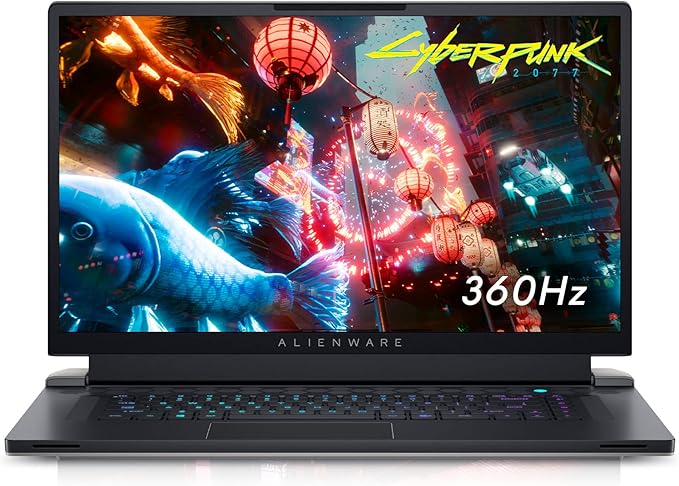
Alienware, by contrast, occupies an entirely different strategic tier. Founded in 1996 and acquired by Dell in 2006, Alienware is a boutique gaming and enthusiast brand engineered to deliver unapologetic performance wrapped in iconic, sci-fi-inspired aesthetics. Rather than attempting to serve enterprise desks or budget-conscious classrooms, Alienware commits exclusively to the high-end gaming and desktop-replacement segments with products like the m-Series and x-Series. Its brand identity hinges on bespoke engineering, high thermal dissipation capabilities, and premium luxury pricing aimed at gamers and creative professionals who refuse hardware compromises.
When pitting Acer against Alienware, consumers are not merely comparing two hardware vendors; they are evaluating two fundamentally different approaches to product development. Acer seeks to maximize technical specifications at competitive price floors, often relying on utilitarian materials to keep margins low. Alienware, conversely, treats the laptop as an artisanal piece of gaming hardware, prioritizing aluminum and magnesium alloys, advanced vaporization chambers, and proprietary aesthetic flourishes, positioning itself as an aspirational status symbol.
Key Differences & Technological Comparison
The technological divergence between Acer and Alienware is most visible in their thermal engineering, chassis construction, and display technology. Alienware differentiates itself through its proprietary "Cryo-tech" thermal architecture, which frequently incorporates Element 31 (a tailored gallium-silicone liquid metal matrix) on higher-tier configurations, quad-exhaust fan profiles, and large vapor chambers. This allows Alienware machines to drive higher Total Graphics Power (TGP) ratings through their NVIDIA GeForce RTX or AMD Radeon GPUs without hitting crippling thermal throttling limits as quickly. Acer counters this in its high-end Predator Helios lines with custom-engineered 5th Gen AeroBlade 3D metal fan technology and liquid metal thermal grease, although its budget Nitro chassis rely on more conventional heat-pipe layouts that tend to run louder and hotter under sustained computational loads.
Chassis build quality and material selection also starkly distinguish the two brands. Alienware utilizes the "Legend" industrial design language, featuring structural magnesium alloys, anodized aluminum shells, and soft-touch high-end finishes that mitigate fingerprints. Acer balances a broader portfolio: while its Swift and Predator Triton lines incorporate magnesium-aluminum builds, the company frequently relies on polycarbonate blends for its entry-level and mid-range devices (such as the Aspire and Nitro 5). Consequently, Alienware units feel substantially more rigid, heavier, and resilient, while Acer offers better portability and lighter frames, often at the expense of deck flex.
In terms of user input and visual hardware, Alienware holds an advantage through co-engineered partnerships, such as optional ultra-low-profile CherryMX mechanical laptop keyboards with per-key AlienFX RGB backlighting. Alienware panels also prioritize cutting-edge specs, offering QHD and 4K displays with up to 480Hz refresh rates, advanced G-Sync integration, and high DCI-P3 color coverage. Acer’s display offerings are expansive: while their budget lines often cut costs using mediocre 250-nit, 45% NTSC panels, their elite Predator and ConceptD creator laptops feature stunning Mini-LED panels with thousands of dimming zones and factory-calibrated color accuracy that rival Alienware's best efforts.
Pros & Cons Comparison
Acer
- Pro: Exceptional Price-to-Performance Ratio: Delivers higher-tier processors and graphics cards at substantially lower price points than the competition.
- Pro: Broad Portfolio Diversity: Offers solutions ranging from sub-$300 budget notebooks to elite $3,000+ gaming and content-creation powerhouses.
- Pro: Everyday Portability: Even its gaming devices (notably the Triton series) lean toward lighter, more travel-friendly footprints than typical Alienware hardware.
- Con: Inconsistent Material Quality: Budget and mid-tier chassis often rely heavily on structural plastics prone to flex, squeaks, and cosmetic wear.
- Con: Bloatware and Driver Overhead: Laptops frequently ship with considerable pre-installed trial software, requiring initial user cleanup.
Alienware
- Pro: Premium Industrial Design & Durability: Robust construction leveraging aerospace-grade materials, rigid hinges, and distinctive styling.
- Pro: Elite Cooling Architectures: High-end thermal management, including vapor chambers and liquid metal interface materials, allowing high sustained clock speeds.
- Pro: Superior Keyboards & Displays: Class-leading tactile feedback via optional mechanical switches and standard high-brightness, color-accurate displays.
- Con: Prohibitive Cost Premium: Consumers pay a substantial brand tax, often costing hundreds of dollars more than an equivalently specced Acer device.
- Con: Heavy, Bulky Footprints: Most configurations are heavy and require large external power bricks, severely limiting true untethered mobility.
Performance, Durability & Value Analysis
From a raw performance-per-dollar standpoint, Acer almost always outmaneuvers Alienware. An Acer Nitro or Predator Helios laptop will routinely supply the same core silicon—such as an Intel Core i7 processor and an RTX 4070 GPU—for 20% to 35% less money than an equivalent Alienware m16 or x16. For budget-conscious consumers or students seeking pure computational muscle for high-fidelity gaming or video rendering, Acer delivers unmatched economic utility. However, peak benchmarks tell only half the story; Alienware typically permits its silicon to sustain elevated power targets over marathon compute sessions due to its superior cooling capacity, giving it a slight edge in raw, unthrottled endurance.
When assessing long-term durability and structural reliability, the tables turn in Alienware's favor. Alienware’s structural integrity is backed by parent company Dell’s enterprise-grade supply chain, resulting in superior drop resistance, hinge endurance, and component longevity. Acer’s high-end machines are well-built, but its volume-driven budget units are more susceptible to physical fatigue over a three-to-five-year deployment window. From a total value perspective, Acer represents short-to-mid-term savings and maximum hardware utility, while Alienware functions as an investment in premium usability, physical resilience, and acoustic refinement.
Final Verdict: Which Brand Should You Choose?
Your choice between Acer and Alienware ultimately hinges on your financial flexibility and your threshold for luxury versus raw utility. If you are shopping on a strict budget, require an everyday productivity machine that can also game, or want the absolute best hardware specifications your dollar can buy, Acer is the definitive choice. Laptops like the Acer Swift Go provide incredible utility for professionals, while the Acer Nitro and Predator series deliver thrilling gaming performance without enforcing an unnecessary luxury surcharge.
If, on the other hand, you view your laptop as an uncompromising, high-performance centerpiece and have the capital to invest, Alienware is the superior platform. Choose Alienware if you demand desktop-grade thermal stability, best-in-class chassis rigidity, mechanical typing dynamics, and a show-stopping visual presence. While you will pay a distinct premium, Alienware repays that cost with a sensory and operational refinement that standard consumer-grade laptops simply cannot match.
Affordability
When evaluating affordability in the laptop space, Acer and Alienware represent fundamentally opposed manufacturing philosophies and target demographics. Acer is historically recognized as an industry leader in accessible computing, built on high-volume production and aggressive cost-to-performance optimization. Across its Aspire productivity machines, Swift ultrabooks, and Nitro gaming lines, Acer engineers hardware that prioritizes component density—such as modern CPUs and GPUs—while keeping entry barriers exceptionally low. To achieve these ultra-competitive price points, Acer makes calculated engineering concessions, typically utilizing ABS plastic chassis, modest membrane keyboards, and displays with baseline sRGB color gamuts and average peak brightness. Conversely, Alienware operates strictly as Dell's ultra-premium gaming and enthusiast subsidiary. Alienware completely bypasses the sub-$1,000 budget segment, with its base configurations often exceeding the price of high-tier Acer alternatives. Alienware prices incorporate elite R&D investments, featuring rigid magnesium alloy or aluminum unibodies, bespoke thermal solutions like encapsulated liquid metal (Element 31), advanced vapor chambers, and per-key mechanical switches engineered in partnership with CherryMX.
The practical trade-offs regarding affordability hinge directly on how much value a consumer places on structural longevity versus raw silicon performance per dollar. Acer provides unmatched value for budget-conscious buyers, casual gamers, and students; a mid-tier Acer Nitro or Predator model can deliver 85% to 90% of the in-game frame rates of an Alienware unit for a fraction of the investment. However, Acer's lower-priced designs often grapple with higher fan acoustics under thermal load, structural chassis flex, and shorter battery lifespans. On the other hand, Alienware does not compete on price; its value proposition is anchored in luxury engineering, thermal headroom that allows components to run at their maximum rated Wattage (TGP), superior high-refresh OLED or QHD display panels, and extensive post-purchase Dell technical support. Ultimately, while Acer democratizes computing by making capable gaming and productivity silicon available at highly accessible price tiers, Alienware caters to the premium market where affordability takes a back seat to bespoke industrial design, prestige materials, and uncompromised build quality.
Battery Life
When evaluating battery life, Acer and Alienware diverge drastically due to fundamentally different target demographics, thermal architectures, and engineering philosophies. Acer offers a remarkably broad product catalog that spans high-efficiency ultraportables, mainstream productivity notebooks, and budget-to-midrange gaming rigs. Within its productivity-focused Swift and Aspire lineups, Acer leverages low-TDP Intel Core Ultra and AMD Ryzen processors paired with aggressive firmware-level power management and dynamic display refresh rates. This allows machines like the Acer Swift Go to consistently achieve between 10 to 14 hours of real-world endurance on standard office workflows. Even within Acer's dedicated gaming tiers (Nitro and Predator), the company provides accessible software toggles to restrict wattages and disable discrete GPUs, enabling modest off-charger longevity of 4 to 6 hours when handling non-gaming tasks—a pragmatic balance of portability and power conservation.
Conversely, Alienware operates almost exclusively as an enthusiast gaming brand engineered for maximum, unthrottled performance, which inherently compromises battery life. Dell's Alienware systems—such as the m-series and x-series—are engineered with high-wattage desktop-replacement components, vapor-chamber thermal modules, expansive RGB micro-controllers, and high-refresh-rate, high-nits QHD/4K panels that continuously place extreme parasitic loads on the battery cell. Even when outfitted with maximum FAA-allowable capacities (such as 99Wh batteries), Alienware machines routinely struggle to exceed 2 to 4 hours of lightweight productivity and often deplete in well under 90 minutes under sustained 3D loads. While Dell implements NVIDIA Advanced Optimus and custom battery profiles within the Alienware Command Center, the hardware platform is systematically optimized for peak thermal throughput and frame rates rather than idle efficiency.
Ultimately, the consumer trade-off comes down to utilitarian versatility versus unapologetic performance. Acer emerges as the decisively superior choice for mobile professionals, students, and hybrid users who demand all-day battery life without carrying a bulky proprietary power brick, largely supported by Acer's widespread adoption of standard USB-C Power Delivery across its segments. Alienware, by contrast, treats battery life as a secondary fail-safe intended merely for moving between power outlets. Buyers selecting Alienware must accept significant tethering to heavy AC adapters to extract intended performance, whereas Acer successfully engineers across the spectrum to deliver laptops capable of genuinely sustained, unplugged productivity.
Display
When evaluating display technology, Acer and Alienware approach visual engineering from fundamentally different market philosophies. Acer adopts a broad, volume-driven strategy that spans across low-cost productivity screens to cutting-edge gaming panels in its Predator and Nitro lineups. While entry-level Acer machines often settle for pedestrian FHD panels with mediocre color accuracy and modest brightness, its top-tier offerings—such as the Predator Helios and Triton series—showcase remarkable engineering. Acer has been an aggressive early adopter of Mini-LED backlighting, offering panels with over a thousand local dimming zones, peak brightness levels exceeding 1000 nits, and vibrant DCI-P3 coverage. Furthermore, their ConceptD creator-focused laptop displays carry Pantone validation and factory calibration, offering exceptional Delta E < 2 color fidelity. However, the trade-off with Acer lies in panel lottery and vertical inconsistency; the visual experience on budget and mid-tier models frequently cuts corners on response times and sRGB volume compared to the premium Predator tier.
Alienware, serving as Dell's flagship boutique gaming line, targets an exclusively high-performance demographic and consistently engineers some of the most technologically advanced displays in the industry. Rather than relying on budget-friendly baseline displays, Alienware models (such as the m-series and x-series) prioritize extreme refresh rates and pristine motion handling. Alienware was among the trailblazers integrating 480Hz and 360Hz refresh rate panels, paired with Advanced Optimus, NVIDIA G-Sync, and hardware-level ComfortView Plus low-blue-light filtering as standard expectations rather than optional luxuries. While Acer pushes peak luminance via Mini-LED, Alienware has doubled down on ultra-responsive IPS and breathtaking OLED options with instantaneous response times (as low as 0.2ms) and infinite contrast ratios. Alienware displays also boast superior factory calibration and uniform color reproduction across their entire product stack, though this comes at the expense of severe battery drain and higher retail entry costs.
In a direct head-to-head comparison, the decision hinges on specialized use cases versus pure competitive fluidity. Acer offers incredible technological extremes: you can secure an unbeatable HDR and high-nit performance for content creation and cinematic gaming through their Mini-LED Predator models, but you must navigate lower-tier screens with high latency and washed-out hues in their everyday lineups. Alienware, conversely, provides higher baseline engineering consistency, market-leading refresh cycles, and lower input latency ideal for competitive esports, rounded out by deep blacks on its OLED configurations. For consumers seeking sheer HDR peak brightness and high-end creative color precision, Acer's premium flagship panels deliver compelling value; for gamers demanding uncompromising motion clarity, uniform premium quality, and near-zero response times, Alienware holds the definitive technical edge.
Performance
When evaluating performance between Acer and Alienware, the fundamental distinction lies in their hardware philosophies and architectural targets. Alienware, Dell's dedicated high-performance gaming arm, treats performance as an uncompromised priority. Their laptops, such as the m-Series and x-Series, are engineered to sustain maximum Total Graphics Power (TGP) and peak CPU clock speeds with minimal thermal throttling. This is made possible through elite thermal solutions, including proprietary Element 31 gallium-silicone liquid metal interfaces, quad-exhaust architectures, and vapor-chamber designs. In contrast, Acer covers an expansive performance spectrum, from ultra-efficient productivity thin-and-lights like the Swift series to mid-range powerhouses like the Nitro 5, topping out at their enthusiast-grade Predator Triton and Helios lines. While Acer's top-tier Predator models often match Alienware in raw specification sheets—deploying unlocked Intel Core i9 or AMD Ryzen 9 processors alongside high-wattage NVIDIA GeForce RTX GPUs—Acer's chassis engineering often prioritizes cost-efficiency and mainstream chassis design over Alienware's ultra-dense, bespoke cooling envelopes.
In real-world throughput and synthetic benchmarks, Alienware generally leads in sustained performance workloads such as prolonged 4K gaming, heavy 3D rendering, and local machine learning training. The integration of the Alienware Command Center offers granular control over overclocking profiles and fan curves, enabling power users to extract every ounce of silicon capability, though often at the cost of intense fan noise. Acer counters with exceptional performance-per-dollar metrics, particularly in the budget-to-midrange segment where Nitro and Predator Helios laptops reliably push full-power GPUs into the hands of budget-conscious consumers. The Predator series utilizes innovative AeroBlade 3D fan technology and liquid metal thermal grease on its higher-end units, closing the gap in thermal dissipation; however, lower-tier Acer machines often rely on more aggressive thermal throttling or capped component wattages to manage heat in thinner or plastic-heavy chassis.
Ultimately, the practical trade-off between the two brands centers on consistency versus value. Alienware delivers an elite, desktop-replacement caliber of sustained performance aimed squarely at competitive gamers and content creators who demand near-zero performance degradation during multithreaded stress tests. However, this engineering carries a premium price and compromises portability and battery efficiency. Acer provides a far more democratic performance profile: while its top Predator flagships can trade blows with Alienware in pure frame rates, the brand’s broader portfolio makes targeted performance compromises—such as utilizing lower-TGP GPU variants in select lines—to offer lighter form factors and vastly superior price-to-performance ratios for everyday consumers.